
Create time dimension
Overview
The Create time dimension wizard creates a time transformation using a configured time interval and star selection.
Function
Choose schema, name, period length, time-to-ID function, and stars, then finish the wizard to create the time dimension transformation.
Access
Open the wizard from the listed navigation, toolbar, or diagram context.
How to access
Navigation tree
Not direct from the navigation tree.
Toolbar
ETL -> Time dimension.
Diagram
Diagram -> Add -> Time dimension.
Visual element
Create time dimension wizard
Screen overview
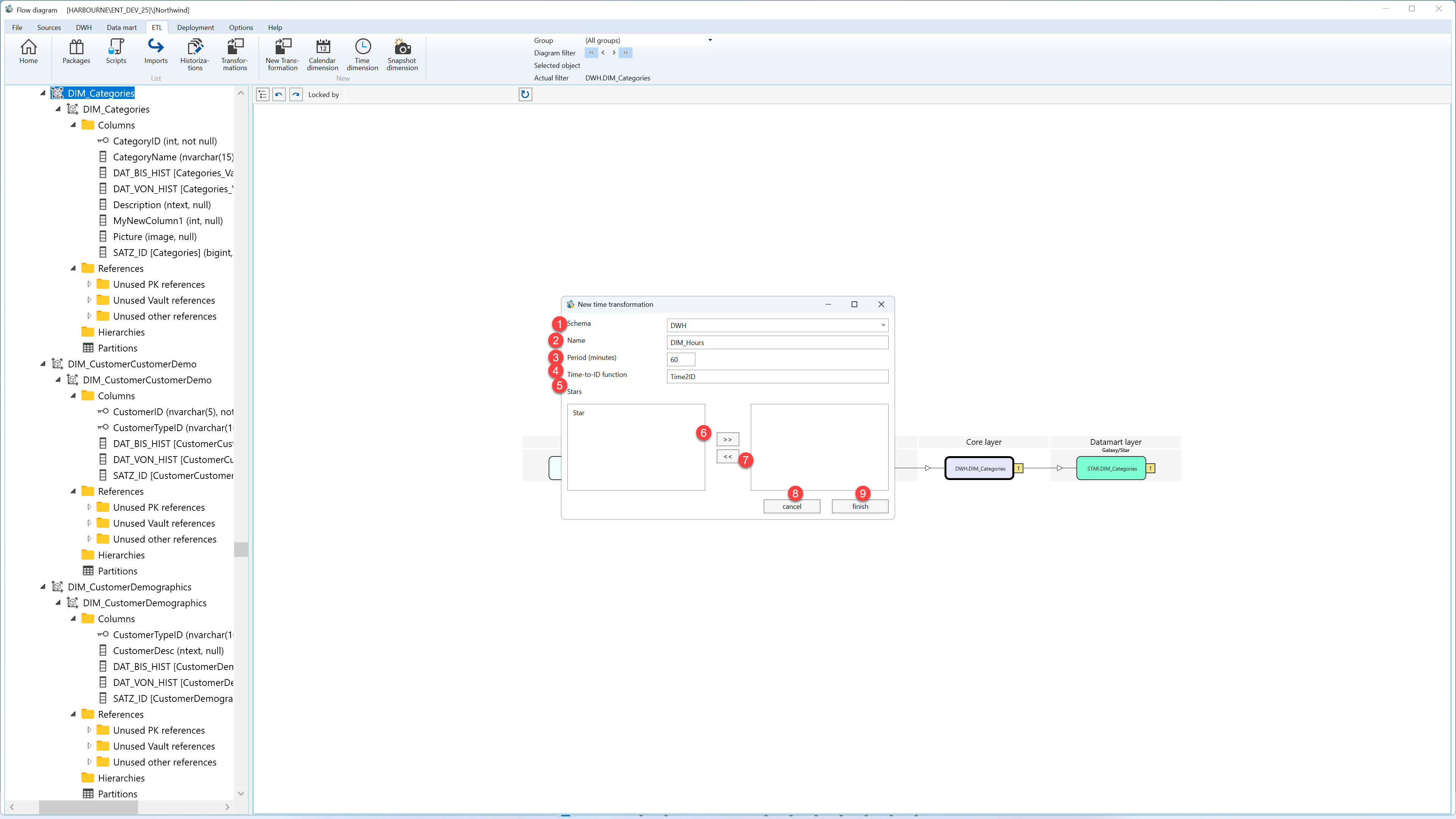
| ID | Property | Description |
|---|---|---|
| 1 | Schema | Schema for the time transformation. |
| 2 | Name | Name of the time transformation. |
| 3 | Period (minutes) | Minute interval used to generate time rows. |
| 4 | Time-to-ID function | Function used to convert time values into identifiers. |
| 5 | Stars | Stars that should use the time transformation. |
| 6 | >> | Adds the selected item to the active selection. |
| 7 | << | Removes the selected item from the active selection. |
| 8 | Finish | Completes the wizard and creates or updates the selected object. |
| 9 | Cancel | Leaves the page without continuing the current edit. |
