
Object groups
Overview
Object groups is the dialog used to create, edit, lock, and save groups that organise AnalyticsCreator repository objects. Groups can be used for filtering, workflow organisation, and controlled processing of related objects.
Function
Use this dialog to maintain object group definitions. Each group has a Name and optional Description. A group can also be configured as a workflow group with SSIS configuration script names.
Create workflow marks the group as a workflow group. The SSIS configuration columns define script names used for complete, enable, and disable workflow configuration operations.
Locked by shows whether a group is locked by a repository user. Use Lock to lock a selected group and Unlock to remove a lock when the current user is allowed to do so.
Save stores group definition changes and refreshes the calculated group relationships. Cancel closes the dialog without saving pending changes.
Access
Open Object groups from the Groups branch in the navigation tree. The dialog can also be opened from group-related object commands when group membership or group maintenance is required.
How to access
Navigation tree
Data warehouse -> Groups -> List groups, Add group, or Edit group.
Object or diagram context
Use the available object group command for the selected object when group membership or group maintenance is required.
Screen overview
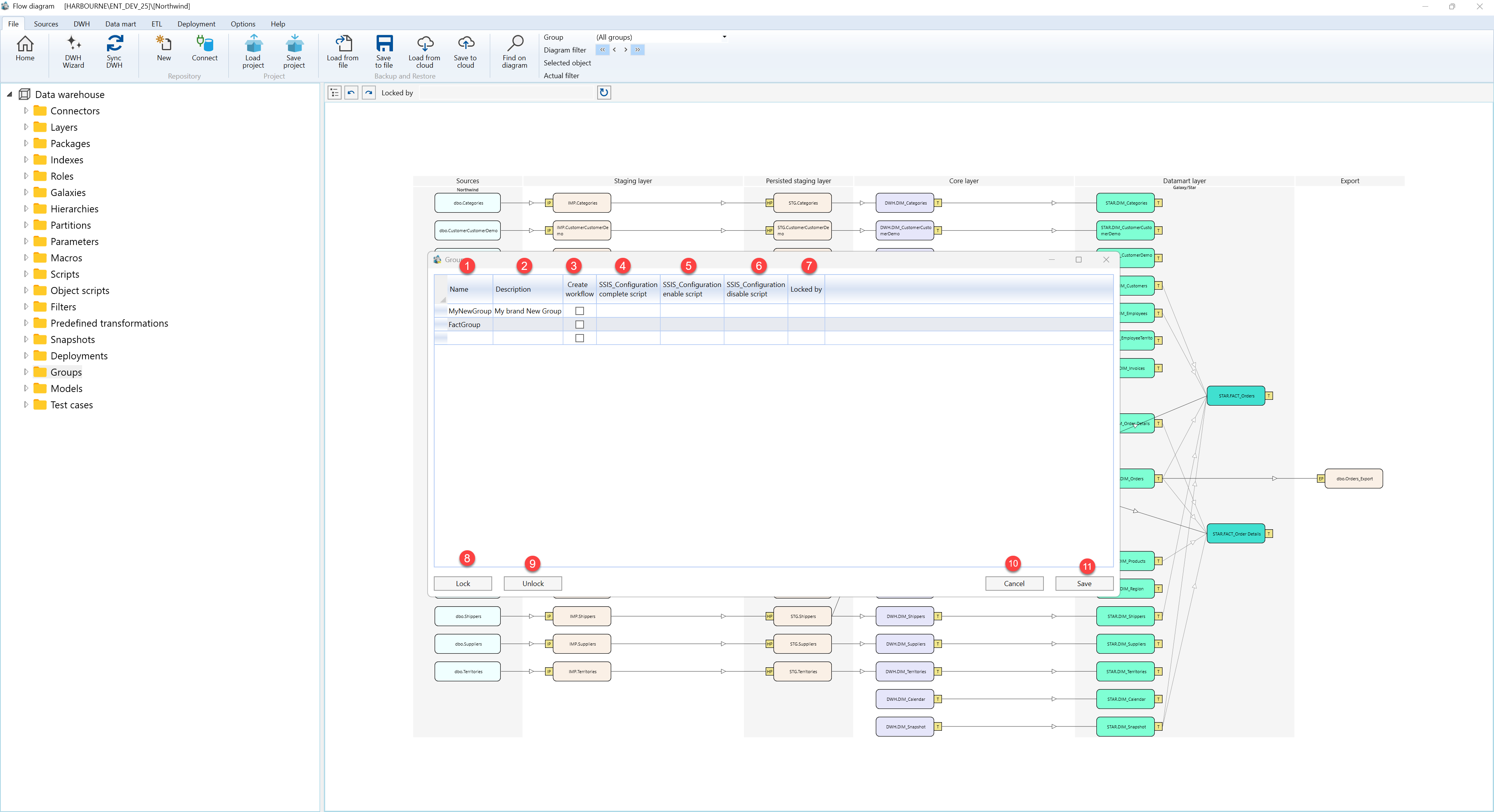
The Object groups dialog contains the editable group grid and the dialog action buttons. The table below follows the numbered markers in the screenshot.
| ID | Property | Description |
|---|---|---|
| 1 | Name | Name of the object group shown in the repository navigation tree and group selectors. |
| 2 | Description | Business description of the group and its purpose. |
| 3 | Create workflow | Marks the group as a workflow group. |
| 4 | SSIS Configuration complete script | Script file used for the complete workflow configuration step. |
| 5 | SSIS Configuration enable script | Script file used when enabling the workflow configuration. |
| 6 | SSIS Configuration disable script | Script file used when disabling the workflow configuration. |
| 7 | Locked by | Shows the repository user who currently locked the group, if the group is locked. |
| 8 | Lock | Locks the selected group for the current repository user when it is not already locked. |
| 9 | Unlock | Removes the selected group lock when the current user is allowed to unlock it. |
| 10 | Cancel | Closes the dialog without saving pending group changes. |
| 11 | Save | Saves group definition changes and refreshes the calculated object-group relationships. |
