
Macros
Overview
The Macros navigation tree branch opens reusable macro definitions.
Function
Use the branch or DWH toolbar command to open the macro list.
The list shows macro name and language, with actions to create or delete macro definitions.
Access
Open the Macros branch from the navigation tree or use the DWH toolbar tab.
How to access
Navigation tree
Macros -> List macros.
Toolbar
DWH -> Macros.
Diagram
Not opened directly from the diagram.
Visual element
Macros navigation branch and list
Screen overview
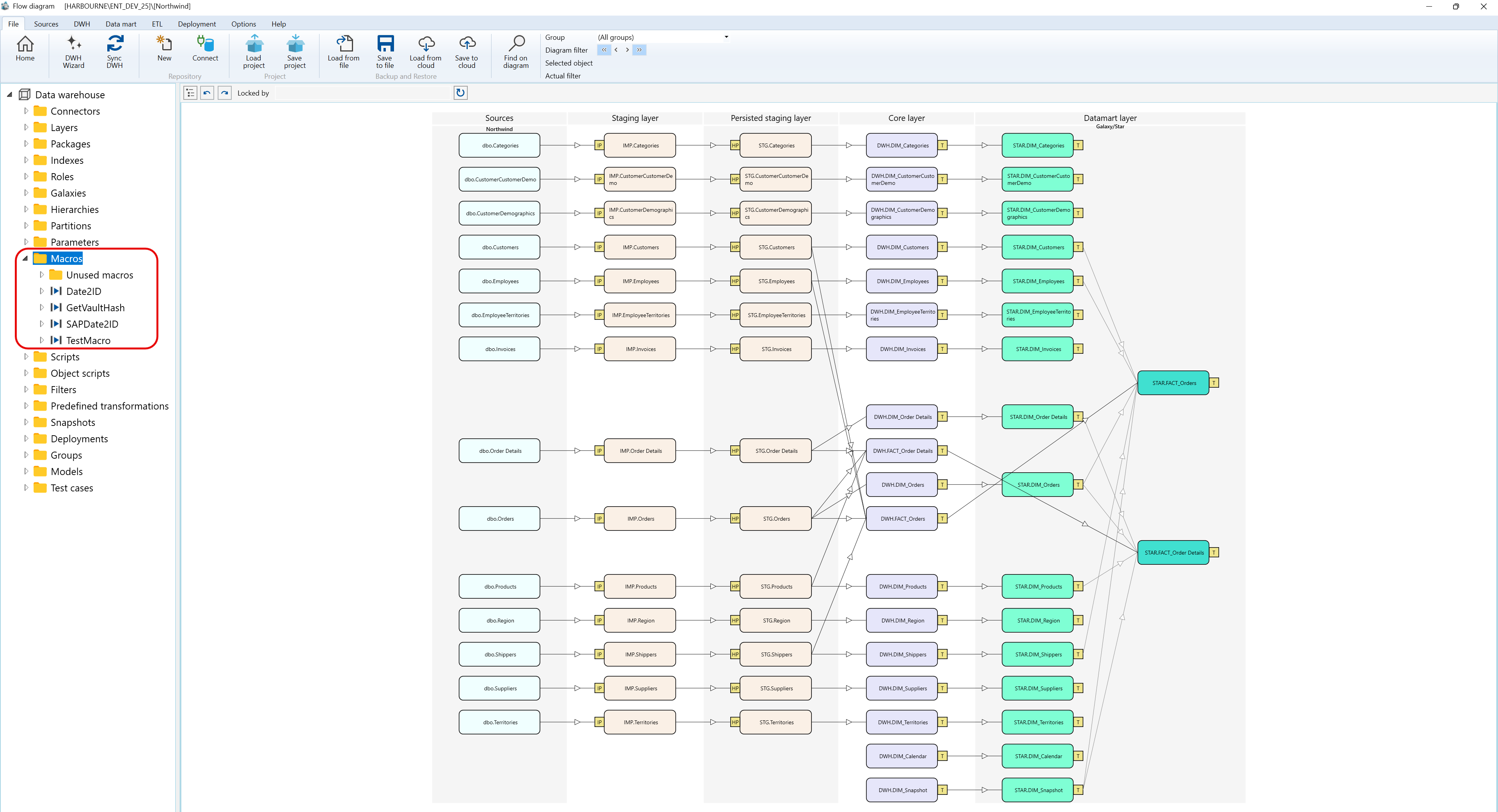
Context menus access - Macros - Where I can find it
The context menu examples below use the captured Data warehouse > Macros navigation tree branch and show the Macros branch, a macro node, and nested Macros nodes.
A.1) Macros
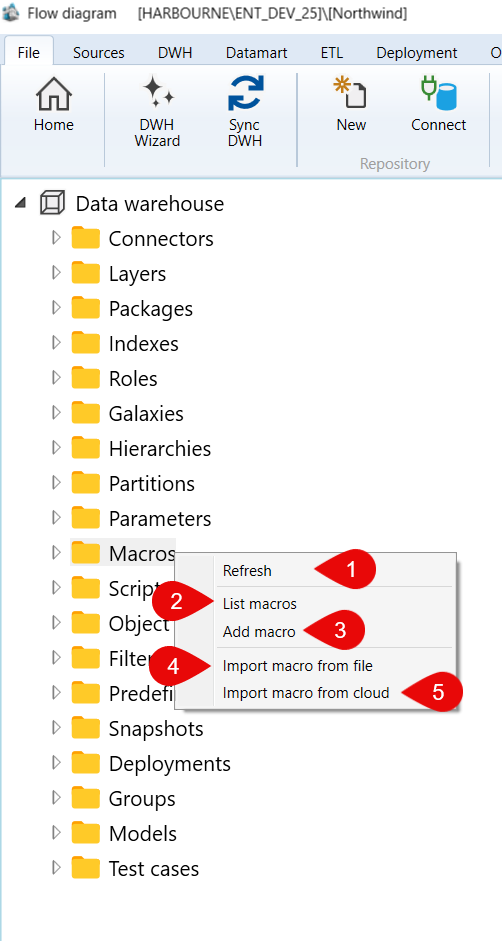
| ID | Command | Description |
|---|---|---|
| 1 | Refresh | Reloads the Macros branch. |
| 2 | List macros | Opens the macro list. |
| 3 | Add macro | Creates a macro from the selected context. |
| 4 | Import macro from file | Imports a macro from a file. |
| 5 | Import macro from cloud | Imports a macro from cloud storage. |
A.2) Macros > Date2ID
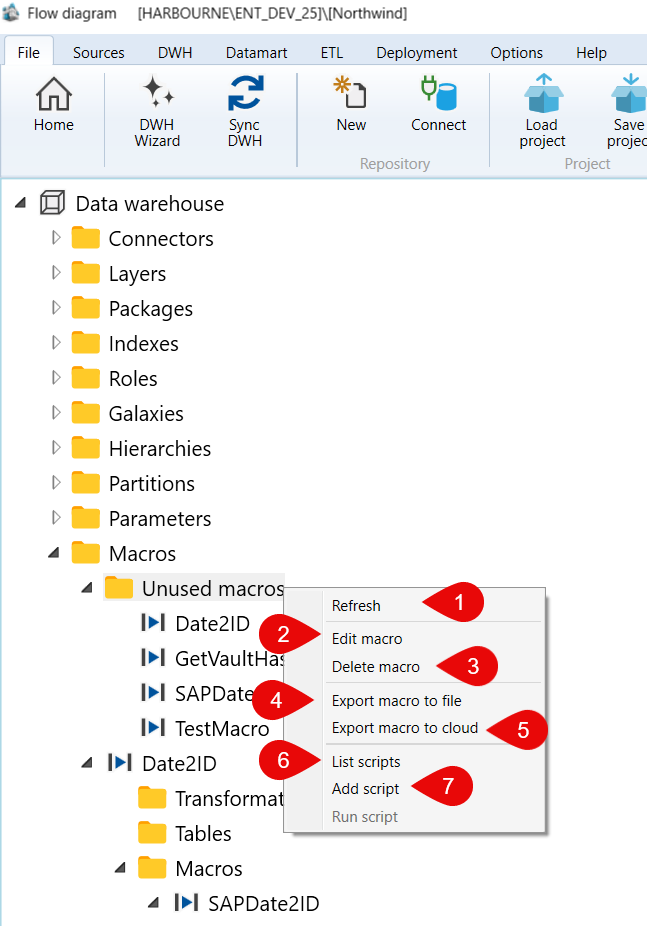
| ID | Command | Description |
|---|---|---|
| 1 | Refresh | Reloads the selected macro node. |
| 2 | Edit macro | Opens the selected macro for editing. |
| 3 | Delete macro | Deletes the selected macro. |
| 4 | Export macro to file | Exports the selected macro to a file. |
| 5 | Export macro to cloud | Exports the selected macro to cloud storage. |
| 6 | List scripts | Lists scripts available for the selected macro. |
| 7 | Add script | Adds a script to the selected macro. |
| 8 | Run script | Runs a script for the selected macro. |
A.3) Macros > Date2ID > Macros
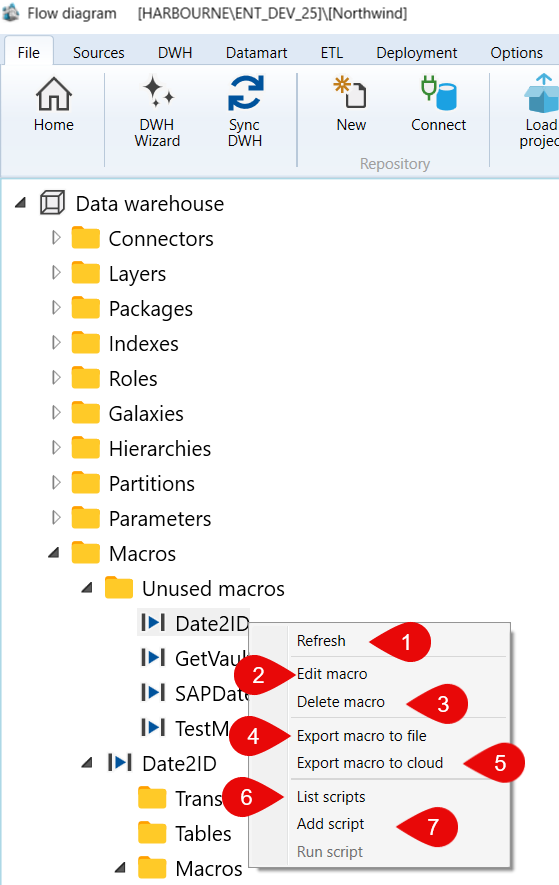
| ID | Command | Description |
|---|---|---|
| 1 | Refresh | Reloads the selected macro node. |
| 2 | Edit macro | Opens the selected macro for editing. |
| 3 | Delete macro | Deletes the selected macro. |
| 4 | Export macro to file | Exports the selected macro to a file. |
| 5 | Export macro to cloud | Exports the selected macro to cloud storage. |
| 6 | List scripts | Lists scripts available for the selected macro. |
| 7 | Add script | Adds a script to the selected macro. |
| 8 | Run script | Runs a script for the selected macro. |
A.4) Macros > Date2ID > Macros > SAPDate2ID
Paste image here: Data warehouse > Macros > Date2ID > Macros > SAPDate2ID
| ID | Command | Description |
|---|---|---|
| 1 | Refresh | Reloads the selected macro node. |
| 2 | Edit macro | Opens the selected macro for editing. |
| 3 | Delete macro | Deletes the selected macro. |
| 4 | Export macro to file | Exports the selected macro to a file. |
| 5 | Export macro to cloud | Exports the selected macro to cloud storage. |
| 6 | List scripts | Lists scripts available for the selected macro. |
| 7 | Add script | Adds a script to the selected macro. |
| 8 | Run script | Runs a script for the selected macro. |
A.5) Macros > Date2ID > Macros > SAPDate2ID > Macros
Paste image here: Data warehouse > Macros > Date2ID > Macros > SAPDate2ID > Macros
| ID | Command | Description |
|---|---|---|
| 1 | Refresh | Reloads the selected macro node. |
| 2 | Edit macro | Opens the selected macro for editing. |
| 3 | Delete macro | Deletes the selected macro. |
| 4 | Export macro to file | Exports the selected macro to a file. |
| 5 | Export macro to cloud | Exports the selected macro to cloud storage. |
| 6 | List scripts | Lists scripts available for the selected macro. |
| 7 | Add script | Adds a script to the selected macro. |
| 8 | Run script | Runs a script for the selected macro. |
