
Connector
Overview
The Edit Connector page is used to add or maintain a source connector in AnalyticsCreator. Use it to define the connector name, choose the connector type, enter connection details, configure connector-specific options, test the connection, and save the connector for reuse by sources and packages.
Function
A connector stores the connection information required to access a source system. The page adapts to the selected connector type and displays the fields needed for that technology, such as connection strings, file settings, server and database settings, Azure Blob settings, OData settings, authentication options, or other connector-specific properties.
Use Test connection to validate the current connector settings before saving. Use Save to store the connector and make it available for source-related workflows.
Edit Connector
The Edit Connector page is opened when users add a new connector, edit an existing connector from the navigation tree, or double-click a connector in the Connectors list. It is the main page for maintaining the connection details used by source definitions.
Access
Open the Edit Connector page from the Connectors branch in the navigation tree, from the Sources toolbar, or from the Connectors list. Use Add connector when creating a new connector and Edit connector or double-click when maintaining an existing connector.
How to access
Navigation tree
Connectors -> Add connector, or Connectors -> CONNECTOR -> Edit connector
Toolbar
Sources -> Connectors
Diagram
Not opened directly from the dataflow diagram.
Connectors list
Double-click a connector row in the Connectors list to open the Edit Connector page.
Screen overview
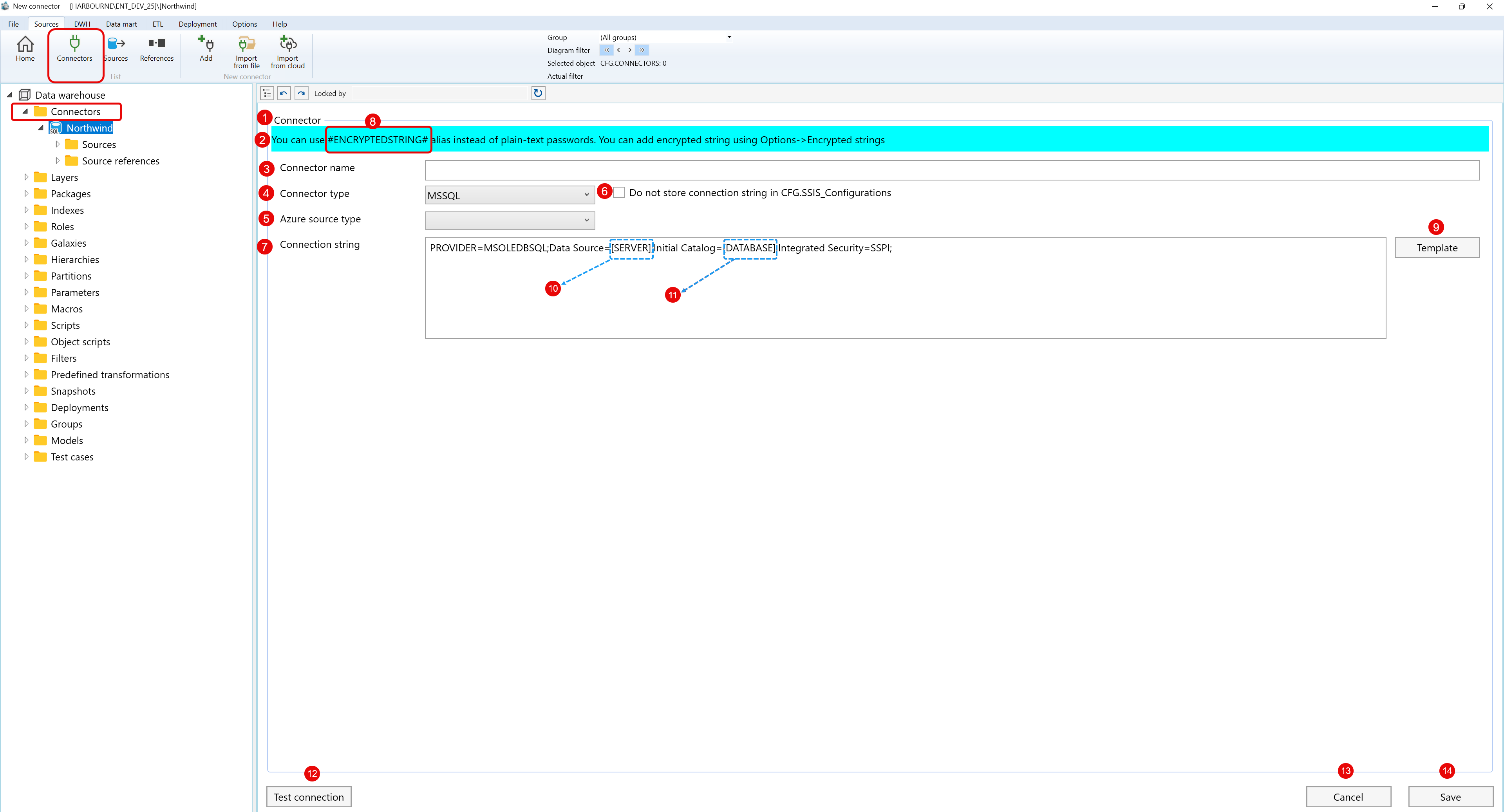
Screen overview: The Edit Connector page is used to configure connection details, test the connection, and save the connector.
| ID | Property | Description |
|---|---|---|
| 1 | Edit Connector page | Editor area for adding or maintaining one source connector. |
| 2 | Connector name | Required name shown in connector lists, source workflows, and the navigation tree. |
| 3 | Connector type | Selects the connector technology and controls which connection fields are displayed. |
| 4 | Connection settings | Contains the connection string, server details, database details, URL, authentication, file, or connector-specific settings needed by the selected connector type. |
| 5 | Encrypted string support | Allows encrypted-string aliases to be used instead of plain-text sensitive values when supported by the connector type. |
| 6 | Template | Fills the connection editor with an example template for the selected connector type when available. |
| 7 | Test connection | Checks the current connection settings and reports whether the connection can be established. |
| 8 | Save | Saves the connector, validates required fields, and makes the connector available for source-related workflows. |
