
User groups
Overview
The User groups list maintains user group names and rights.
Function
Use the list to search groups, review or change rights, add new groups, leave a group, or delete a selected group.
Rights values control the level of access assigned to each group.
Access
Open user groups from the Options toolbar tab.
How to access
Navigation tree
Not opened from the navigation tree.
Toolbar
Options -> User groups.
Diagram
Not opened directly from the diagram.
Visual element
User groups list
Screen overview
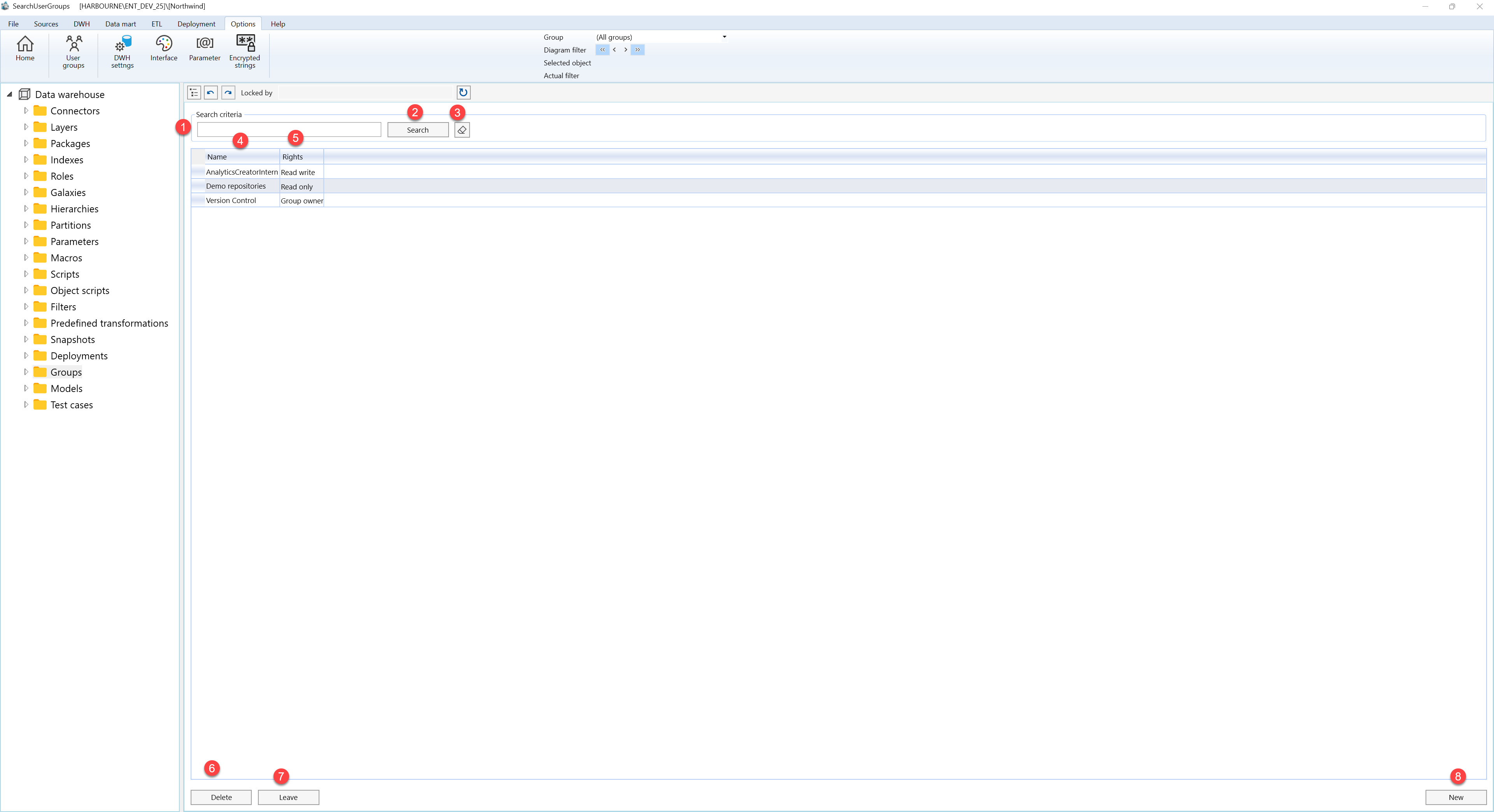
| ID | Property | Description |
|---|---|---|
| 1 | Search criteria | Area used to filter user group rows. |
| 2 | Search | Applies the current search criteria. |
| 3 | Name | Business name shown in lists and navigation. |
| 4 | Rights | Rights assigned to the group. |
| 5 | Delete | Deletes the selected group. |
| 6 | Leave | Leaves the selected group. |
| 7 | New | Creates a new group row. |
