
Source references
Overview
Source references is the searchable list page for relationships between source objects. Use it to review how two source-side objects are connected, open an existing reference for editing, create a new reference, or remove a reference that is no longer needed.
Function
The page combines a search filter with a read-only result grid. The search field can narrow the list by description, source names, schemas, aliases, join type, cardinality, or reference statement, and the clear-filter button reloads the matching references.
Each result shows the two sides of the relationship, the cardinality, the description, and the reference expression used to connect the sources. Double-clicking a row opens that reference for editing. Use New to start a new source reference, or Delete to remove the selected reference after confirmation.
Access
Open the list from the Sources toolbar or from a connector or source branch in the navigation tree. When it is opened from a connector or a source, the list is scoped to that context so the user starts with the most relevant references.
How to access
Navigation tree
Connectors -> [connector] -> Source references -> List source references; or Connectors -> [connector] -> Sources -> [source] -> References -> List source references.
Toolbar
Sources -> References
Diagram
Not opened directly from the diagram. Use the navigation tree or Sources toolbar to open the list.
Visual element
Source references list page
Screen overview
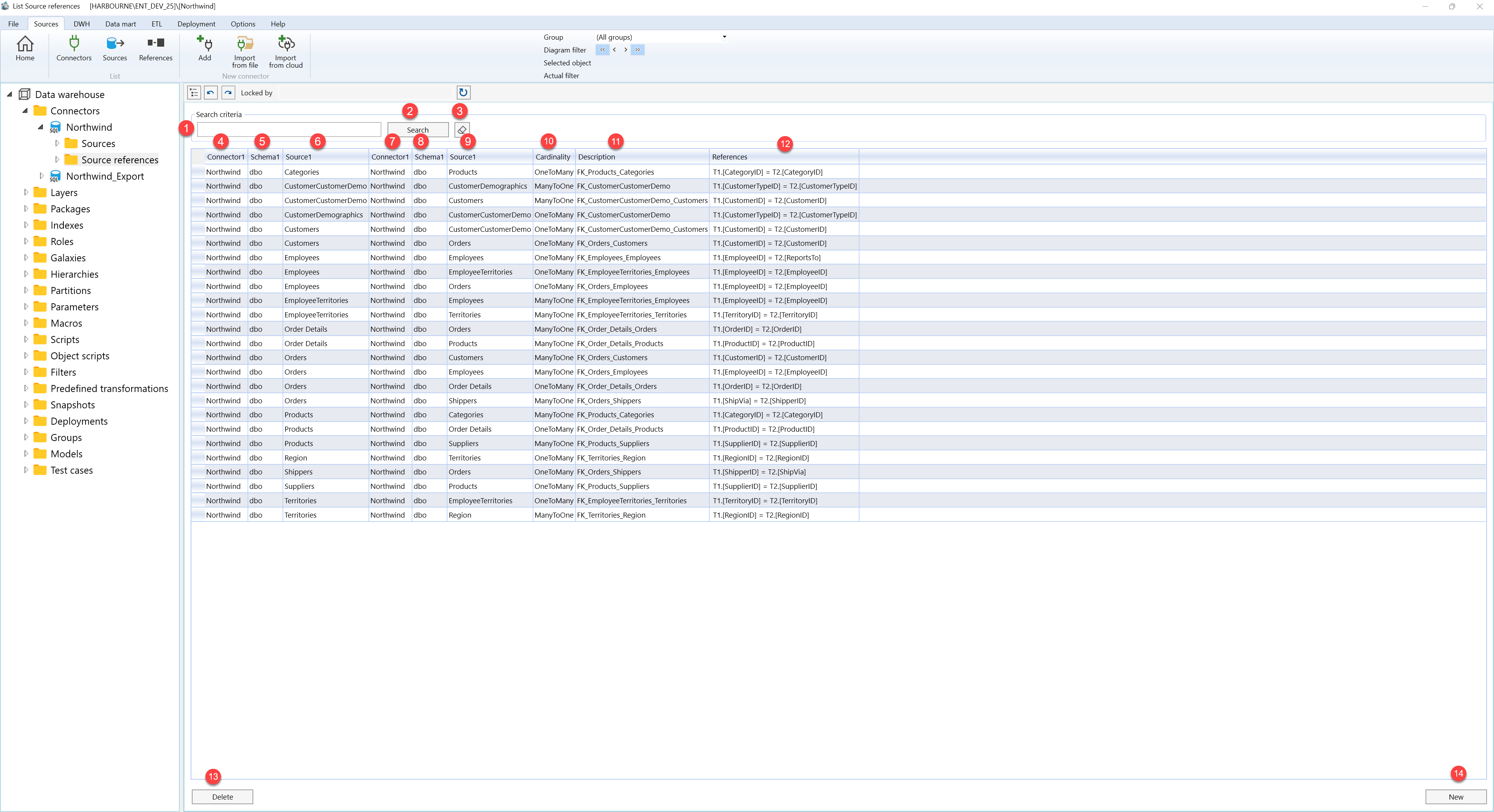
| ID | Property | Description |
|---|---|---|
| 1 | Search criteria | Area that contains the text filter and search actions for narrowing the reference list. |
| 2 | Search field | Text field for searching by description, source names, schemas, aliases, join type, cardinality, or reference statement. |
| 3 | Search | Applies the current search text to the source-reference list. |
| 4 | Clear filter | Clears the search text and reloads the matching references for the current connector or source context. |
| 5 | Connector1 | Grid column for the connector on the first source side of the reference. |
| 6 | Schema1 | Grid column for the schema on the first source side. |
| 7 | Source1 | Grid column for the first source in the relationship. |
| 8 | Connector1 | Grid column for the connector on the second source side of the reference. |
| 9 | Schema1 | Grid column for the schema on the second source side. |
| 10 | Source1 | Grid column for the second source in the relationship. |
| 11 | Cardinality | Shows how records on the first side relate to records on the second side. |
| 12 | Description | Business description used to identify the reference. |
| 13 | References | Shows the reference expression that connects the two source sides. |
| 14 | Source references grid | Read-only list of matching source references. Double-click a row to open it for editing. |
| 15 | New | Starts a new source reference. |
| 16 | Delete | Deletes the selected source reference after confirmation. |
