
Create source
Overview
The Create source wizard reads metadata from a connector and creates source definitions in AnalyticsCreator. Use it to select a connector, choose whether to read tables or define a query, filter the available source objects, retrieve relations, and create source entries from the selected metadata.
Function
Use this wizard when source objects need to be created from an existing connector. The wizard can read table metadata from the connector and list the available source objects for selection.
Connector defines the connector used to read source metadata. The Table and Query options define whether the wizard reads table metadata or prepares a query-based source.
Filter schema and Filter table limit the source objects returned by the connector. Apply applies the current filter settings to the object list.
Retrieve relations reads source relationships where the connector supports relation discovery. SAP description language defines the language used for SAP source descriptions when SAP metadata is read.
The source-object grid shows whether each source already exists, its source type, schema, table name, and description. Next continues the wizard, Back returns to the previous step when available, Finish creates the selected source definitions, and Cancel closes the wizard without continuing.
Access
Open the wizard from a connector context when source metadata should be read from that connector.
How to access
Navigation tree
Connectors -> [connector] -> Sources -> Read source from connector.
Diagram
The Create source wizard is not opened directly from the diagram.
Screen overview
The Create source wizard contains the connector selection, table or query mode, source filters, relation and SAP metadata options, the source-object grid, and the wizard action buttons. The table below follows the numbered markers in the screenshot.
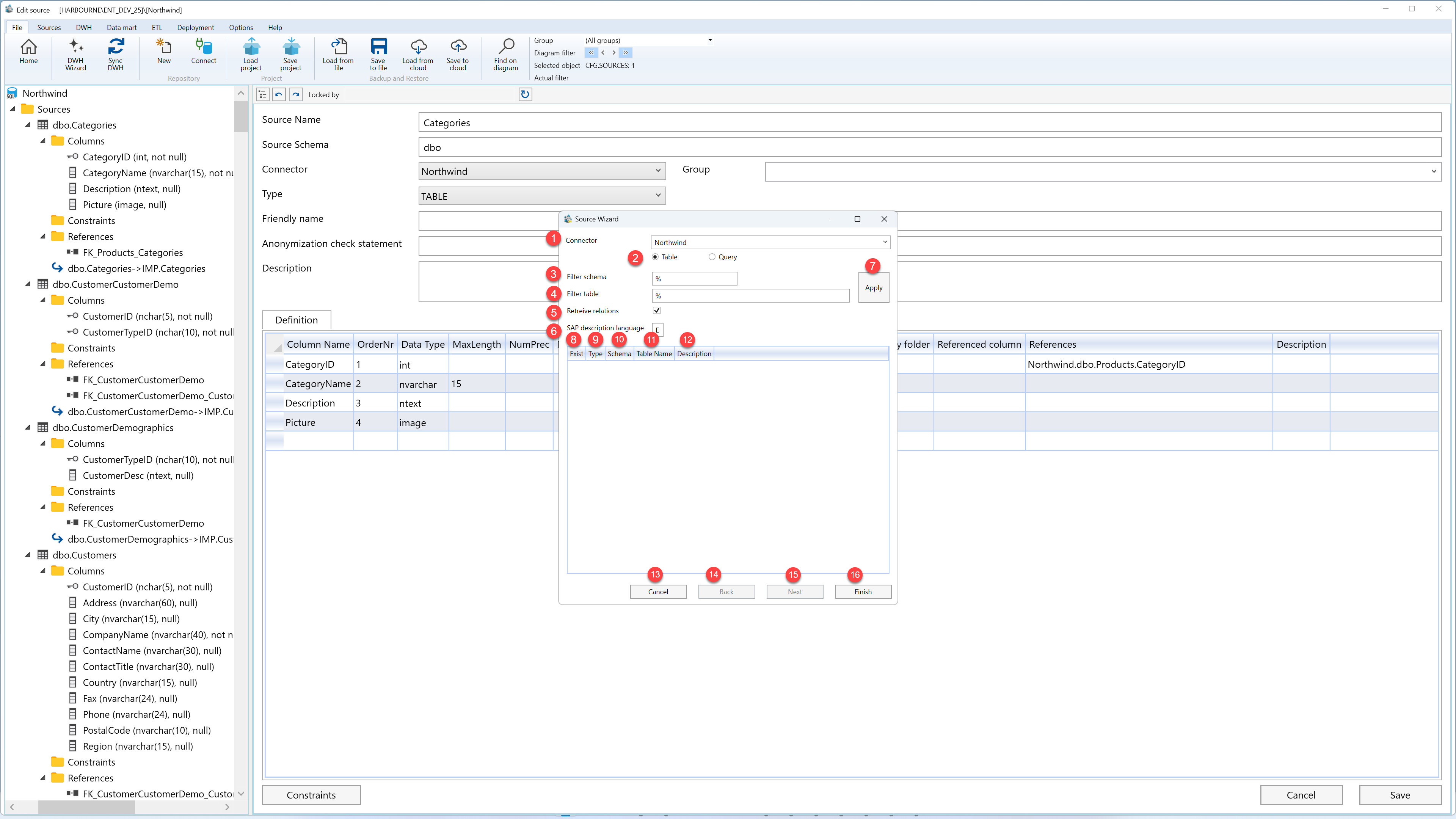
| ID | Property | Description |
|---|---|---|
| 1 | Connector | Connector used to read source metadata and create source definitions. |
| 2 | Table / Query | Selects whether the wizard reads table metadata or prepares a query-based source. |
| 3 | Filter schema | Schema filter used to limit the source objects returned by the connector. |
| 4 | Filter table | Table-name filter used to limit the source objects returned by the connector. |
| 5 | Retrieve relations | Reads source relationships from the connector where relation discovery is supported. |
| 6 | SAP description language | Language used for SAP source descriptions when SAP metadata is read. |
| 7 | Apply | Applies the selected connector, mode, and filter settings to refresh the source-object list. |
| 8 | Exist | Shows whether the listed source object already exists in AnalyticsCreator. |
| 9 | Type | Source type returned by the connector, such as table, view, or query where applicable. |
| 10 | Schema | Source schema returned by the connector. |
| 11 | Table Name | Name of the source table or source object returned by the connector. |
| 12 | Description | Description returned for the listed source object, where available. |
| 13 | Cancel | Closes the wizard without continuing the current source-creation workflow. |
| 14 | Back | Returns to the previous wizard step when a previous step is available. |
| 15 | Next | Moves to the next wizard step after the current selections are valid. |
| 16 | Finish | Completes the wizard and creates the selected source definitions. |
