
Predefined transformation
Overview
The Predefined transformation page is used to add or edit reusable transformation templates. Use it to define the template name, description, validation statement, transformation statement, evaluated output, and allowed keywords.
Function
Use this page to maintain a reusable transformation pattern that can be applied in transformation logic.
The Check statement defines when the predefined transformation can be applied. The Transformation statement contains the reusable expression or statement template. The Evaluated statement shows the result after evaluation.
Evaluate refreshes the evaluated statement. Save stores the predefined transformation definition. Cancel closes the page without continuing the current edit.
Predefined transformation context
Predefined transformations are reusable templates. The allowed keywords area lists the fields that can be referenced inside the check statement or transformation statement.
Access
Open this page from the Predefined transformations branch in the navigation tree or from the Predefined transformations list.
How to access
Navigation tree
Data warehouse -> Predefined transformations -> [predefined transformation] -> Edit predefined transformation.
Toolbar
ETL -> Predefined transformations, then double-click a predefined transformation row.
Diagram
Not opened directly from the diagram.
Screen overview
The Predefined transformation page contains the template identification fields, validation statement, transformation statement, evaluated output, allowed keywords, and page action buttons.
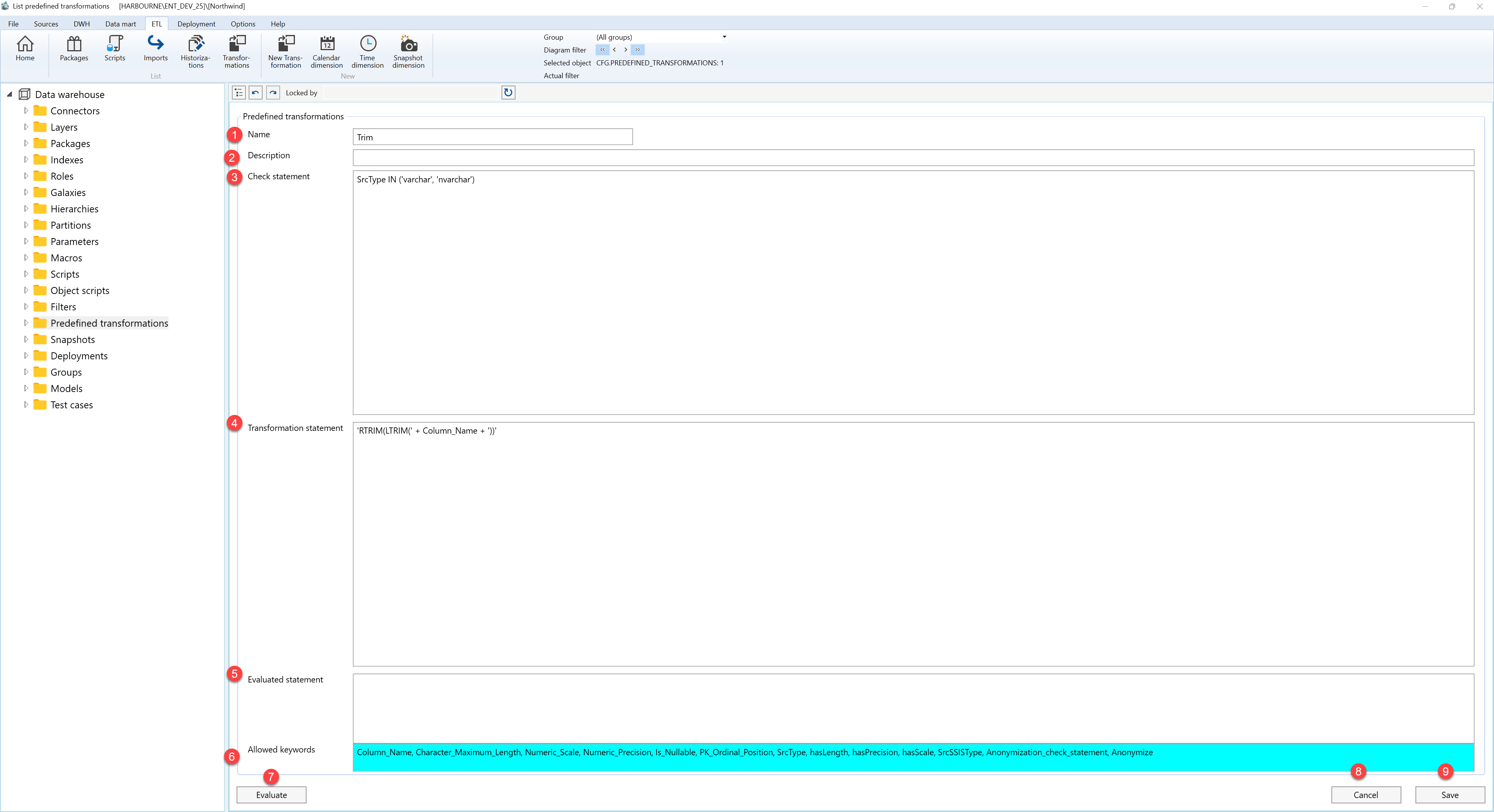
| ID | Property | Description |
|---|---|---|
| 1 | Name | Name of the reusable predefined transformation template. |
| 2 | Description | Optional description or notes for the predefined transformation. |
| 3 | Check statement | Validation statement used to determine whether the predefined transformation can be applied. |
| 4 | Transformation statement | Reusable transformation expression or statement stored by the template. |
| 5 | Evaluated statement | Preview of the transformation statement after evaluation. |
| 6 | Allowed keywords | List of keywords that can be used inside the check statement and transformation statement. |
| 7 | Evaluate | Evaluates the current transformation statement and refreshes the evaluated statement preview. |
| 8 | Cancel | Closes the page without continuing the current edit. |
| 9 | Save | Stores the current predefined transformation definition. |
