
Persisting
Overview
The Persisting page is used to add or edit how a transformation result is persisted as a physical table and package step. Use it to assign the persisting item to a package, review the persisting type, configure incremental loading, maintain execution options, and review the generated procedure and scripts.
Function
Use this page to maintain the transformation persisting definition, including the package assignment, persisting type, incremental column, statistics update option, partition switching, table renaming, transaction handling, logging, and duplicate removal.
The Procedure area shows the generated persisting logic. The Scripts area contains pre-script and post-script statements and lets you review the original and parsed versions of the script text.
Save validates and stores the persisting definition. Cancel closes the page without continuing the current edit.
Transformation persisting context
A persisting package can contain one or more persisting items. This page edits the persisting item itself, not the package container. Use the Package page only when you need to edit the persisting package name, package type, package content, or manual dependencies.
Access
Open this page when you need to add or edit a persisting item for a transformation result. Existing persisting items can be opened from the Persisting package branch, from a persisting row in the package content, or by double-clicking a persisting object in the diagram.
How to access
Navigation tree
Data warehouse -> Packages -> Persisting -> [persisting item] -> Edit package.
Toolbar
ETL -> Packages, open a persisting package, then double-click the persisting content row.
Diagram
Double-click the persisting object in the diagram.
Screen overview
The Persisting page contains the package and persisting settings, execution options, generated procedure, scripts, and page action buttons.
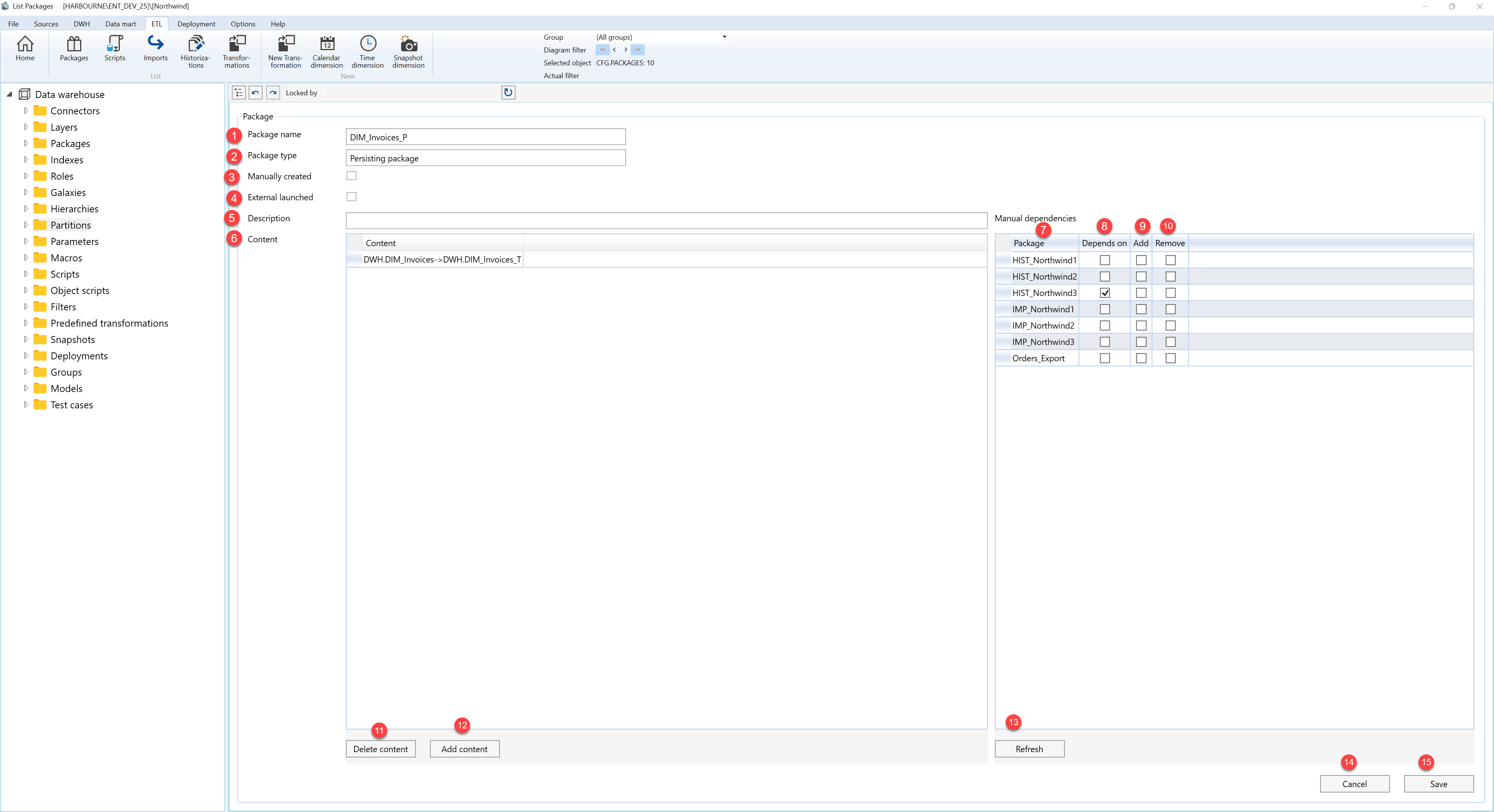
| ID | Property | Description |
|---|---|---|
| 1 | Package name | Name of the persisting package shown in the Packages list and navigation tree. |
| 2 | Package type | Package category. In this screen, the package type is Persisting package. |
| 3 | Manually created | Indicates whether the package is maintained manually. |
| 4 | External launched | Marks the package as launched outside the normal package execution sequence. |
| 5 | Description | Optional description of the package purpose. |
| 6 | Content | Grid containing the persisting content assigned to the package. |
| 7 | Package | Package listed in the Manual dependencies grid. |
| 8 | Depends on | Indicates whether the current package depends on the listed package. |
| 9 | Add | Marks the listed package to be added as a manual dependency. |
| 10 | Remove | Marks the listed package to be removed from the manual dependency selection. |
| 11 | Delete content | Removes the selected persisting content row from the package. |
| 12 | Add content | Adds a new persisting content row to the package. |
| 13 | Refresh | Refreshes the manual dependencies grid. |
| 14 | Cancel | Closes the page without continuing the current edit. |
| 15 | Save | Stores the current package definition. |
