
Model Fact
Overview
The Model Fact page maintains fact definitions inside a data mart model. Use it to assign the fact to a model, describe its business purpose, maintain its measures, and connect it to model dimensions.
Function
Model selects the data mart model that owns the fact. When the page is opened from a model's Facts branch, the model is preselected for new facts.
Name is the required fact name. Friendly name and Description document the business-facing purpose of the fact.
The first editable grid defines the fact measures with a name, friendly name, and description. The second editable grid links the fact to model dimensions. When a dimension row is added and a dimension is selected, AnalyticsCreator can fill the row name from the selected dimension when the row name is still blank.
Save requires a model and name, stores the fact, refreshes the navigation tree, and reloads the page. Cancel closes the page without continuing the current edit.
Access
Open an existing fact from the Facts branch under a model in the navigation tree. Use Add fact from the same Facts branch to create a new fact for that model.
How to access
Navigation tree
Models -> [model] -> Facts -> [fact] -> Edit fact, or Models -> [model] -> Facts -> Add fact.
Toolbar
Data mart -> Models, then use the model's Facts branch in the navigation tree.
Diagram
Not opened directly from the diagram. Use the Models navigation tree.
Visual element
Model Fact page
Screen overview
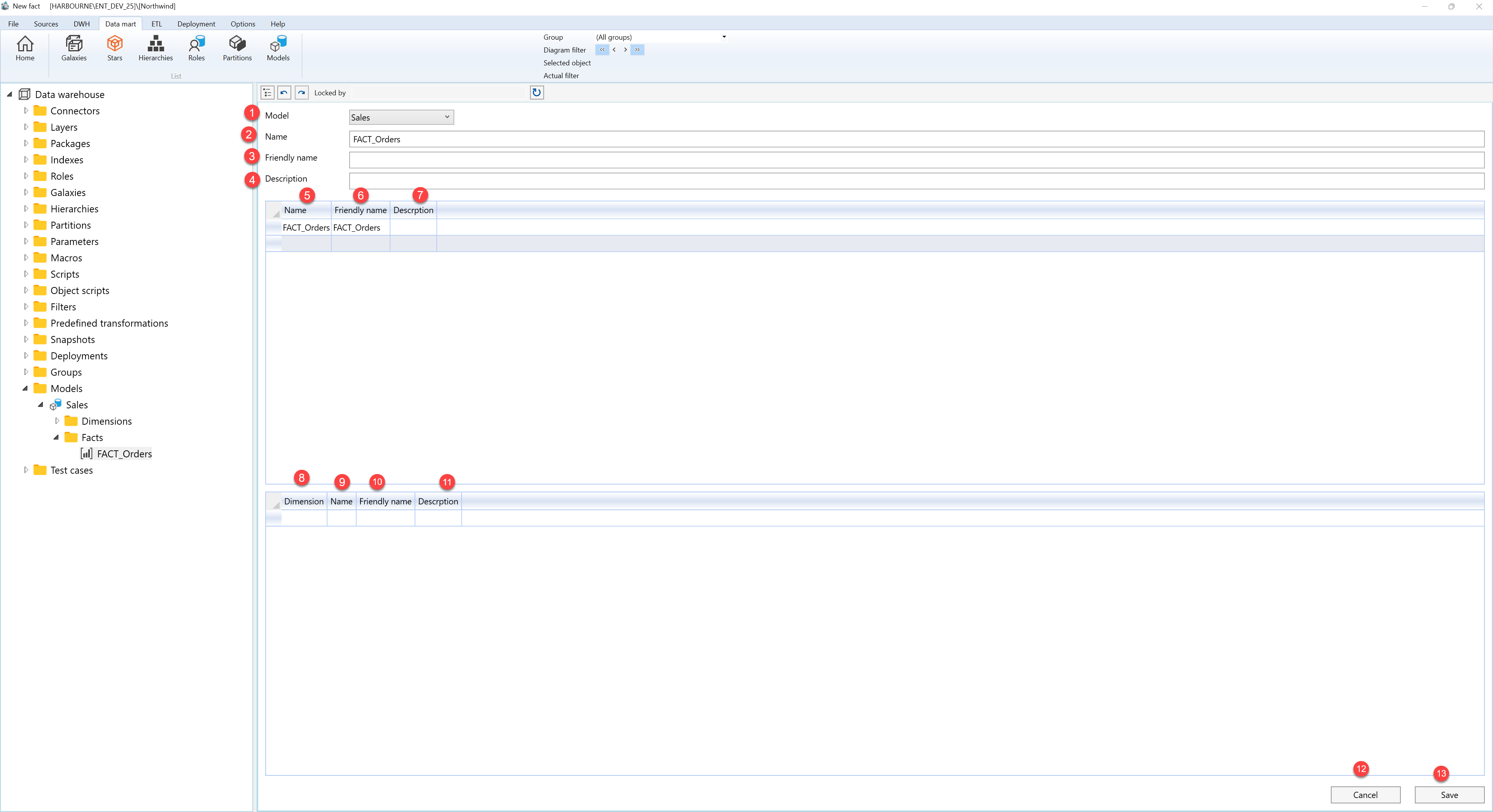
| ID | Property | Description |
|---|---|---|
| 1 | Model | Required model that owns the fact. It is preselected when the page is opened from a model's Facts branch. |
| 2 | Name | Required fact name. |
| 3 | Friendly name | Business-facing name for the fact. |
| 4 | Description | Optional description for the fact. |
| 5 | Measures grid | Editable grid for the fact's measures. |
| 6 | Name | Measure name in the Measures grid. |
| 7 | Friendly name | Business-facing measure name in the Measures grid. |
| 8 | Description | Measure description column in the Measures grid. |
| 9 | Dimensions grid | Editable grid for dimensions connected to the fact. |
| 10 | Dimension | Model dimension selected for the fact relationship. |
| 11 | Name | Dimension relationship name. A blank row name can be filled from the selected dimension. |
| 12 | Friendly name | Business-facing relationship name in the Dimensions grid. |
| 13 | Description | Dimension relationship description column in the Dimensions grid. |
| 14 | Save | Validates the required model and name, stores the fact, refreshes the navigation tree, and reloads the page. |
| 15 | Cancel | Closes the page without continuing the current edit. |
