
Transformation
Overview
The Transformation page is used to add or edit a transformation definition. Use it to define the transformation metadata, configure the output columns, select source tables and joins, apply filters, assign stars, and apply predefined transformations.
Function
Use this page to maintain the transformation name, schema, transformation type, historization type, persisting links, source behaviour, friendly name, description, inheritance settings, snapshot settings, output columns, source tables, references, filters, stars, and predefined transformations.
The Definition tab contains the editable transformation structure. It combines the column list, table and join definition, reference mapping, filter and having statements, star assignments, and predefined transformation assignments. The VIEW tab is used to review the generated view statement.
Create in DWH creates the transformation view in the data warehouse. Save stores the transformation definition. Cancel closes the page without continuing the current edit.
Transformation context
The visible screen shows a regular transformation on the Definition tab. The transformation reads from the selected source table, defines output columns, and can be linked to stars, predefined transformations, references, filters, and generated data warehouse output.
Access
Open an existing transformation from the navigation tree, from the Transformations list, or by double-clicking a transformation object in the diagram.
How to access
Navigation tree
Data warehouse -> Layers -> [layer] -> [schema] -> Transformations -> [transformation] -> Edit transformation.
Toolbar
ETL -> Transformations, then double-click a transformation row.
Diagram
Double-click a transformation object in the diagram.
Screen overview
The Transformation page is split into five main areas: general transformation settings, column definition, source-table and reference logic, star assignments, and predefined transformations.
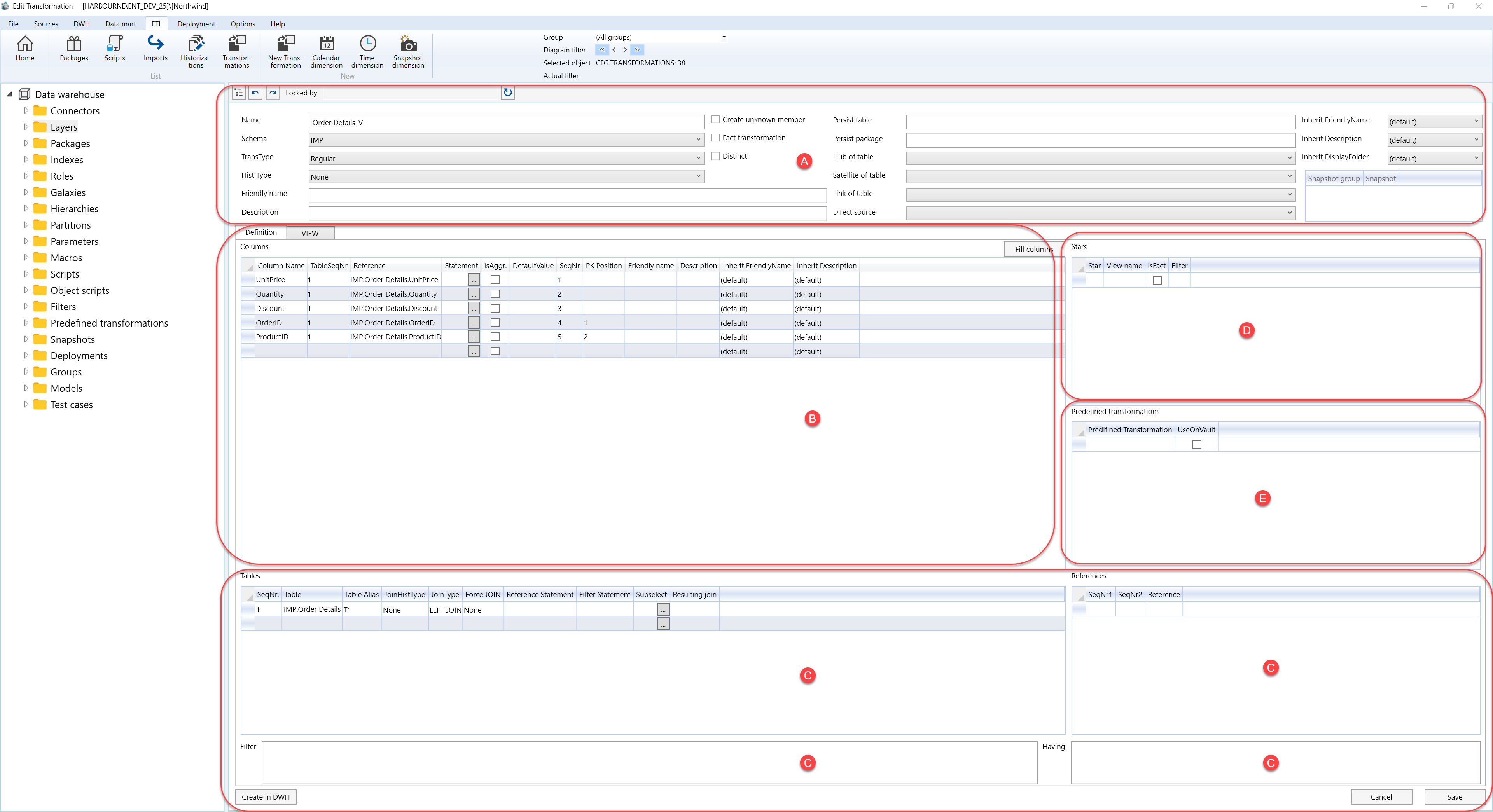
A. Transformation settings
Area A contains the general transformation metadata, source behaviour, persistence links, inheritance options, and snapshot assignment.

| ID | Property | Description |
|---|---|---|
| A.1 | Name | Transformation name shown in the Transformations list and navigation tree. |
| A.2 | Schema | Schema that contains the transformation. |
| A.3 | TransType | Transformation type selected for the definition. |
| A.4 | Hist Type | Historization behaviour used by the transformation. |
| A.5 | Friendly name | Business-facing name for the transformation. |
| A.6 | Description | Business description or notes for the transformation. |
| A.7 | Create unknown member | Creates an unknown member when supported by the transformation scenario. |
| A.8 | Fact transformation | Marks the transformation as fact-oriented. |
| A.9 | Distinct | Uses distinct rows in the transformation output. |
| A.10 | Persist table | Persisted table linked to the transformation. |
| A.11 | Persist package | Persisting package linked to the transformation. |
| A.12 | Hub of table | Hub table relationship used where applicable. |
| A.13 | Satellite of table | Satellite table relationship used where applicable. |
| A.14 | Link of table | Link table relationship used where applicable. |
| A.15 | Direct source | Direct source assigned to the transformation when applicable. |
| A.16 | Inherit FriendlyName | Controls friendly-name inheritance. |
| A.17 | Inherit Description | Controls description inheritance. |
| A.18 | Inherit DisplayFolder | Controls display-folder inheritance. |
| A.19 | Snapshot group | Snapshot group assigned to the transformation. |
| A.20 | Snapshot | Snapshot assigned to the transformation. |
B. Definition and columns
Area B contains the Definition tab and the transformation output column grid.
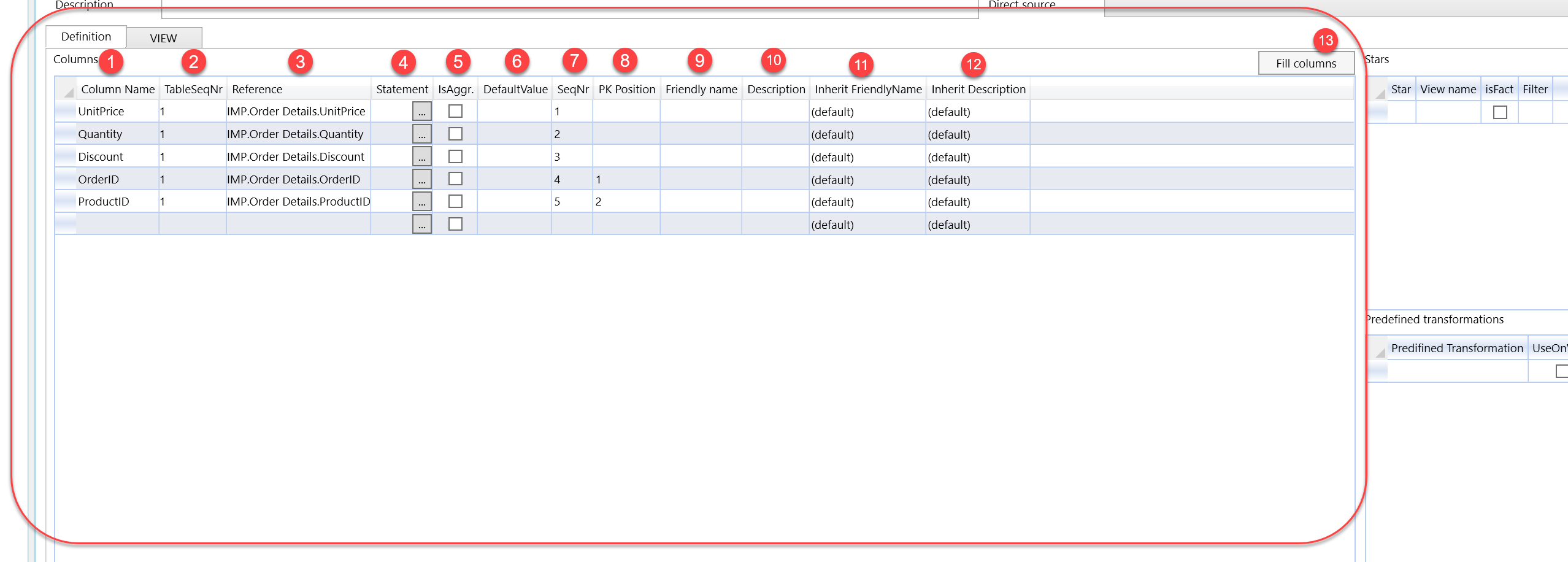
| ID | Property | Description |
|---|---|---|
| B.1 | Definition | Main editable definition tab for the transformation. |
| B.2 | VIEW | Tab used to review the generated view statement. |
| B.3 | Columns | Grid containing the transformation output columns. |
| B.3.1 | Column Name | Transformation output column name. |
| B.3.2 | TableSeqNr | Sequence number of the table used by the column reference. |
| B.3.3 | Reference | Source reference used by the output column. |
| B.3.4 | Statement | Expression used to calculate or populate the output column. |
| B.3.5 | IsAggr. | Marks the column as aggregated. |
| B.3.6 | DefaultValue | Default value assigned to the output column. |
| B.3.7 | SeqNr | Output sequence number of the column. |
| B.3.8 | PK Position | Primary-key position assigned to the output column. |
| B.3.9 | Friendly name | Business-facing name of the output column. |
| B.3.10 | Description | Description of the output column. |
| B.3.11 | Inherit FriendlyName | Controls friendly-name inheritance for the output column. |
| B.3.12 | Inherit Description | Controls description inheritance for the output column. |
| B.4 | Fill columns | Fills the column grid from the current transformation definition. |
C. Source tables, references, filters, and actions
Area C contains the source table definition, join logic, reference mapping, filter and having statements, and page action buttons.

| ID | Property / Action | Description |
|---|---|---|
| C.1 | Tables | Grid containing the source tables and join configuration used by the transformation. |
| C.1.1 | SeqNr. | Sequence number of the table row in the transformation definition. |
| C.1.2 | Table | Source table used by the transformation. |
| C.1.3 | Table Alias | Alias assigned to the source table. |
| C.1.4 | JoinHistType | Historization join behaviour for the table row. |
| C.1.5 | JoinType | Join type used for the table row. |
| C.1.6 | Force JOIN | Forces join generation for the table row. |
| C.1.7 | Reference Statement | Statement used for the reference join. |
| C.1.8 | Filter Statement | Filter statement assigned to the table row. |
| C.1.9 | Subselect | Subselect statement for the table row when required. |
| C.1.10 | Resulting join | Preview or result of the generated join logic. |
| C.2 | References | Grid containing reference mappings between table sequence numbers. |
| C.2.1 | SeqNr1 | First table sequence number used by the reference. |
| C.2.2 | SeqNr2 | Second table sequence number used by the reference. |
| C.2.3 | Reference | Reference expression or relationship between the selected table rows. |
| C.3 | Filter | Filter statement applied to the transformation. |
| C.4 | Having | Having statement used for aggregate logic. |
| C.5 | Create in DWH | Creates the transformation view in the data warehouse. |
| C.6 | Cancel | Closes the page without continuing the current edit. |
| C.7 | Save | Stores the current transformation definition. |
D. Stars
Area D assigns the transformation to one or more stars and controls fact-related star behaviour.
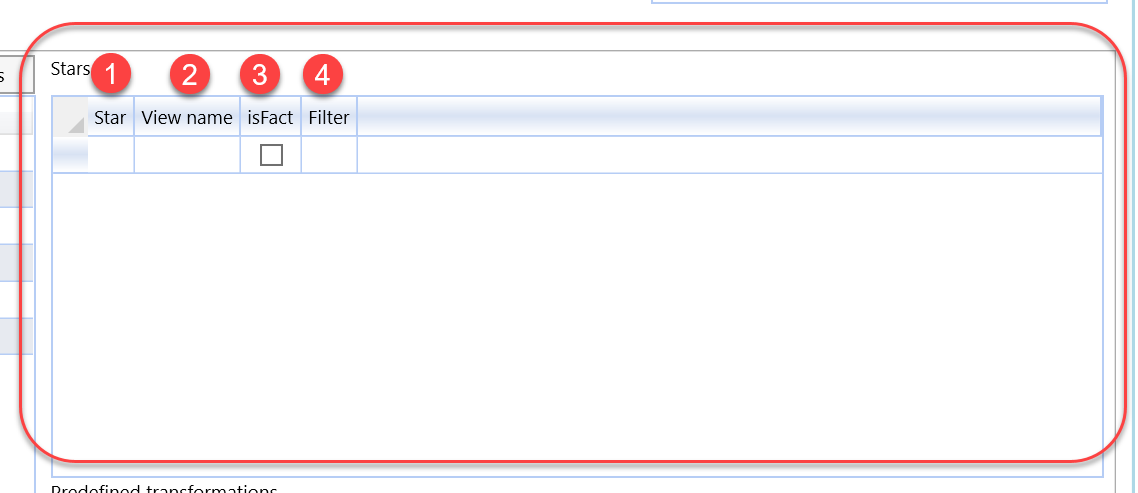
| ID | Property | Description |
|---|---|---|
| D.1 | Stars | Grid containing the stars assigned to the transformation. |
| D.1.1 | Star | Star assigned to the transformation. |
| D.1.2 | View name | View name used for the star assignment. |
| D.1.3 | isFact | Marks the star assignment as fact-related. |
| D.1.4 | Filter | Filter used for the star assignment. |
E. Predefined transformations
Area E assigns reusable predefined transformations to the current transformation definition.
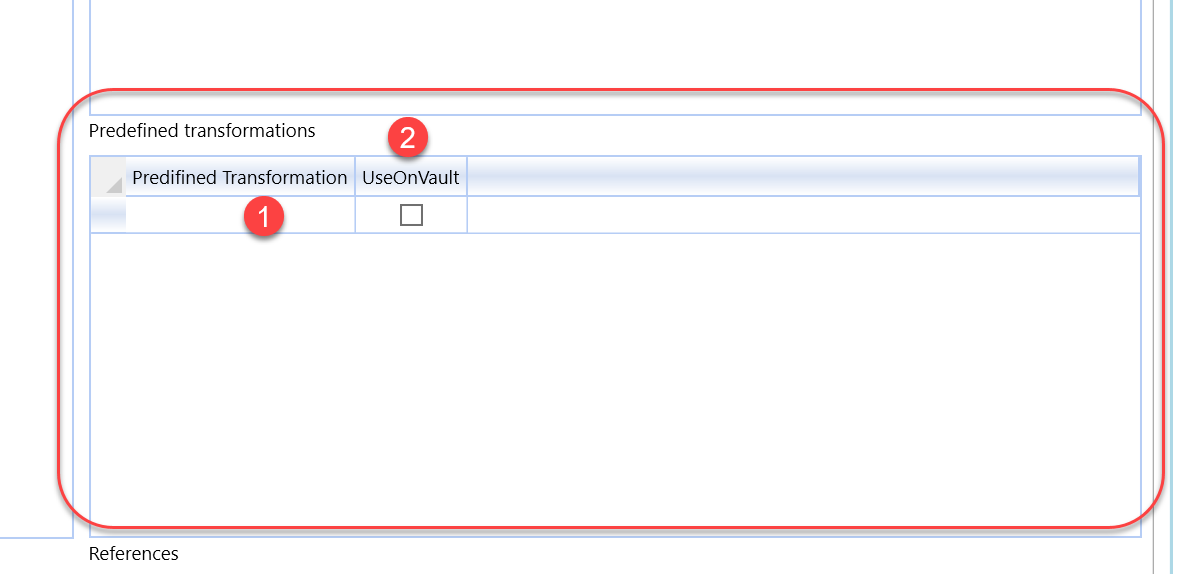
| ID | Property | Description |
|---|---|---|
| E.1 | Predefined transformations | Grid containing predefined transformations assigned to the current transformation. |
| E.1.1 | Predefined Transformation | Reusable transformation template assigned to the current transformation. |
| E.1.2 | UseOnVault | Controls whether the predefined transformation is used in the vault-related scenario. |
