
OLAP Partition
Overview
The OLAP Partition page is used to add or edit a partition definition for an analytical table. Use it to name the partition, select the table, define the slice, and maintain the SQL query statement used by the partition.
Function
Use this page to maintain the OLAP partition name, analytical table assignment, slice value, and partition SQL statement.
The partition definition identifies the portion of an analytical table that is handled by the partition. The SQL editor contains the query statement used to populate or process that partition.
Save validates and stores the partition definition. Cancel closes the page without continuing the current edit.
OLAP partition context
The same page layout is used when adding a new OLAP partition or editing an existing partition. When a table is selected or already assigned, the SQL statement can be reviewed and adjusted for the required slice.
Access
Open this page from the Partitions branch in the navigation tree or from the Partitions list in the Data mart toolbar area.
How to access
Navigation tree
Data warehouse -> Partitions -> Add partition, or Data warehouse -> Partitions -> [partition] -> Edit partition.
Toolbar
Data mart -> Partitions, then use New to add a partition or double-click an existing partition to edit it.
Diagram
Not opened directly from the diagram. Use the Data mart toolbar or the Partitions navigation-tree branch.
Screen overview
The OLAP Partition page contains the partition fields, SQL editor, and page action buttons.
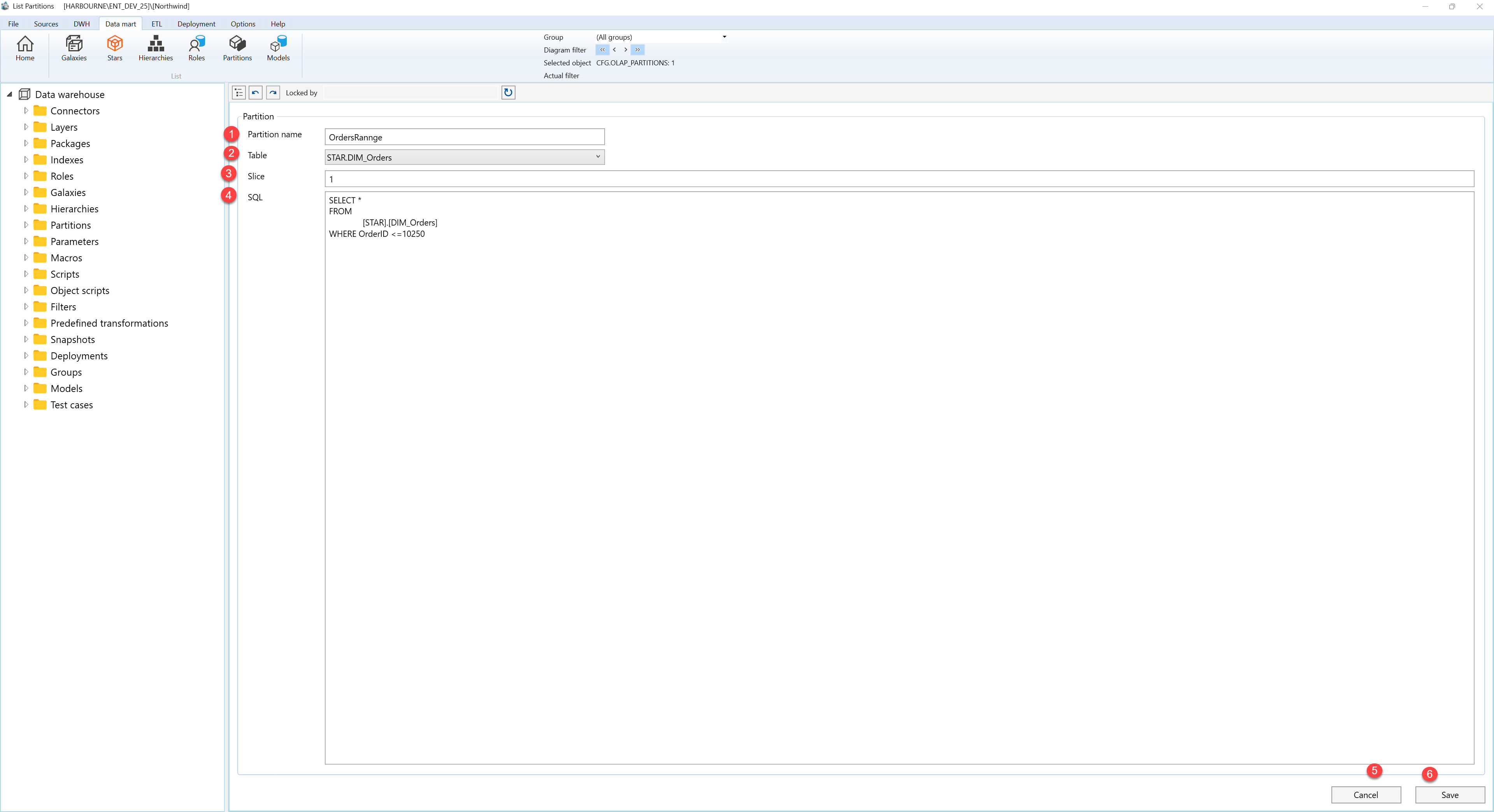
| ID | Property | Description |
|---|---|---|
| 1 | Partition name | Required name of the OLAP partition. The name is shown in the navigation tree and in the Partitions list. |
| 2 | Table | Analytical table that the partition belongs to. The selected table provides the context for the partition SQL statement. |
| 3 | Slice | Slice value or expression that identifies the portion of the selected table covered by the partition. |
| 4 | SQL | Multi-line SQL editor containing the query statement for the partition. The query defines which rows from the selected table are included in the partition. |
| 5 | Cancel | Closes the OLAP Partition page without continuing the current edit. |
| 6 | Save | Validates and stores the OLAP partition definition. |
