
Source reference
Overview
The Source reference page maintains relationships between two source objects before they are imported or transformed.
Function
Use Source 1, Source 2, Cardinality, Join, and Description to define the relationship between source objects.
The Reference Statement and Alias fields describe how the relationship is expressed.
The column mapping grid connects source columns or statements on each side of the relationship, and the inheritance options control whether metadata is inherited by default, blocked, or forced.
Access
Open an existing source reference from a source's References branch or from the Source references list.
How to access
Navigation tree
Connectors -> [connector] -> Sources -> [source] -> References -> [reference] -> Edit source reference.
Toolbar
DWH -> References, then open a source reference row from the source references list.
Diagram
Not opened directly from the diagram.
Visual element
Source reference page
Screen overview
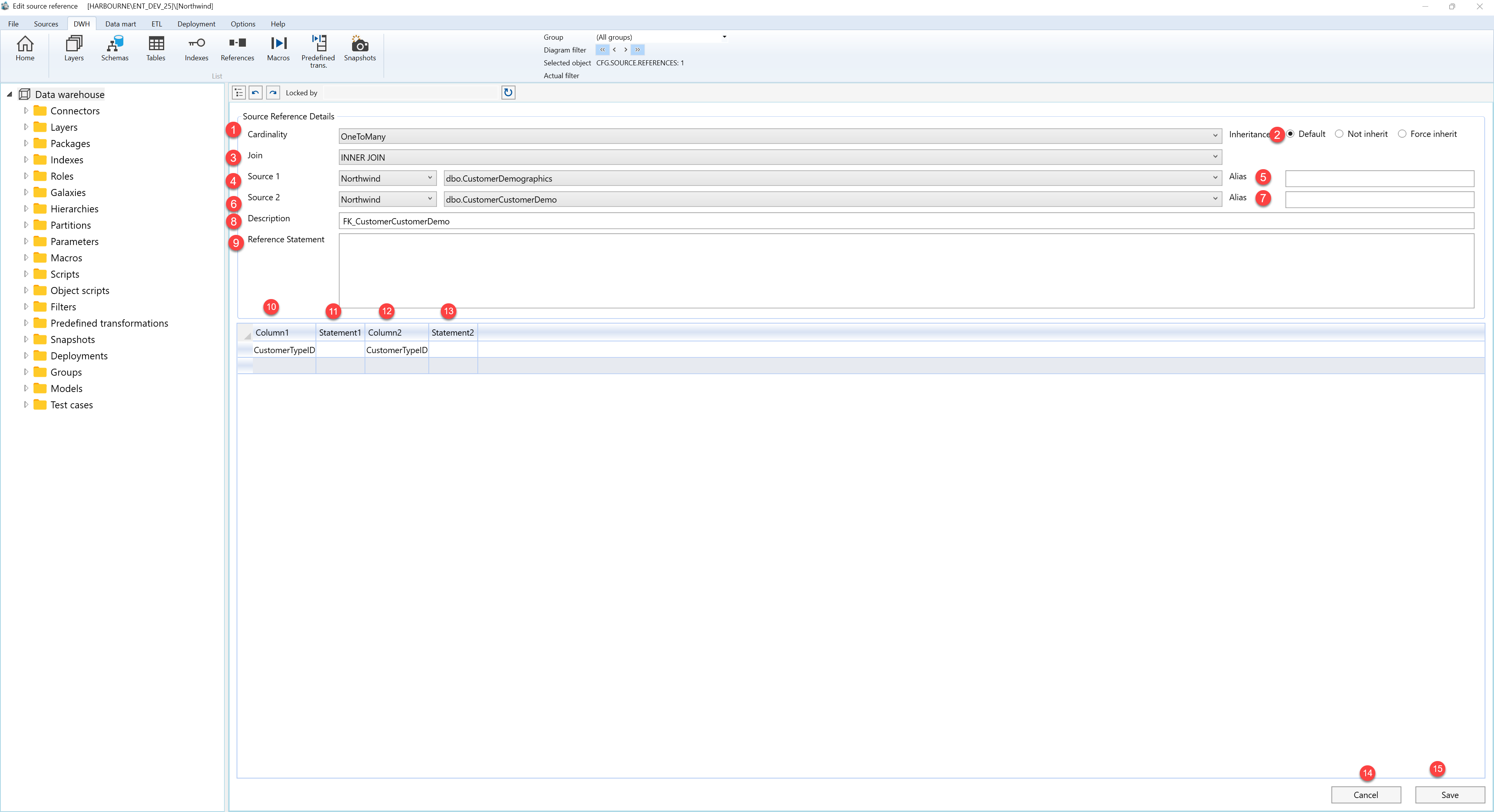
| ID | Property | Description |
|---|---|---|
| 1 | Cardinality | Relationship cardinality between the two sources. |
| 2 | Join | Join type used by the relationship. |
| 3 | Source 1 | First source in the relationship. |
| 4 | Source 2 | Second source in the relationship. |
| 5 | Description | Business description or notes for the object. |
| 6 | Reference Statement | Statement used to express the relationship. |
| 7 | Alias | Alias used for a source side in the relationship. |
| 8 | Inheritance | Controls metadata inheritance for the reference. |
| 9 | Default | Uses the default inheritance behavior. |
| 10 | Column1 | Column or expression from the first source. |
| 11 | Statement1 | Statement side for the first source. |
| 12 | Column2 | Column or expression from the second source. |
| 13 | Statement2 | Statement side for the second source. |
| 14 | Save | Saves the current definition, refreshes the relevant navigation or list, and keeps the page consistent with the saved state. |
| 15 | Cancel | Leaves the page without continuing the current edit. |
