
Imports
Overview
The Imports list shows import package items that load source data into target tables.
Function
Use the list to review the target table, source, package, description, statistics update setting, and logging setting.
New starts an import creation flow and Delete removes the selected import item.
Access
Open imports from the ETL toolbar tab.
How to access
Navigation tree
Not opened directly from the navigation tree.
Toolbar
ETL -> Imports.
Diagram
Not opened directly from the diagram.
Visual element
Imports list
Screen overview
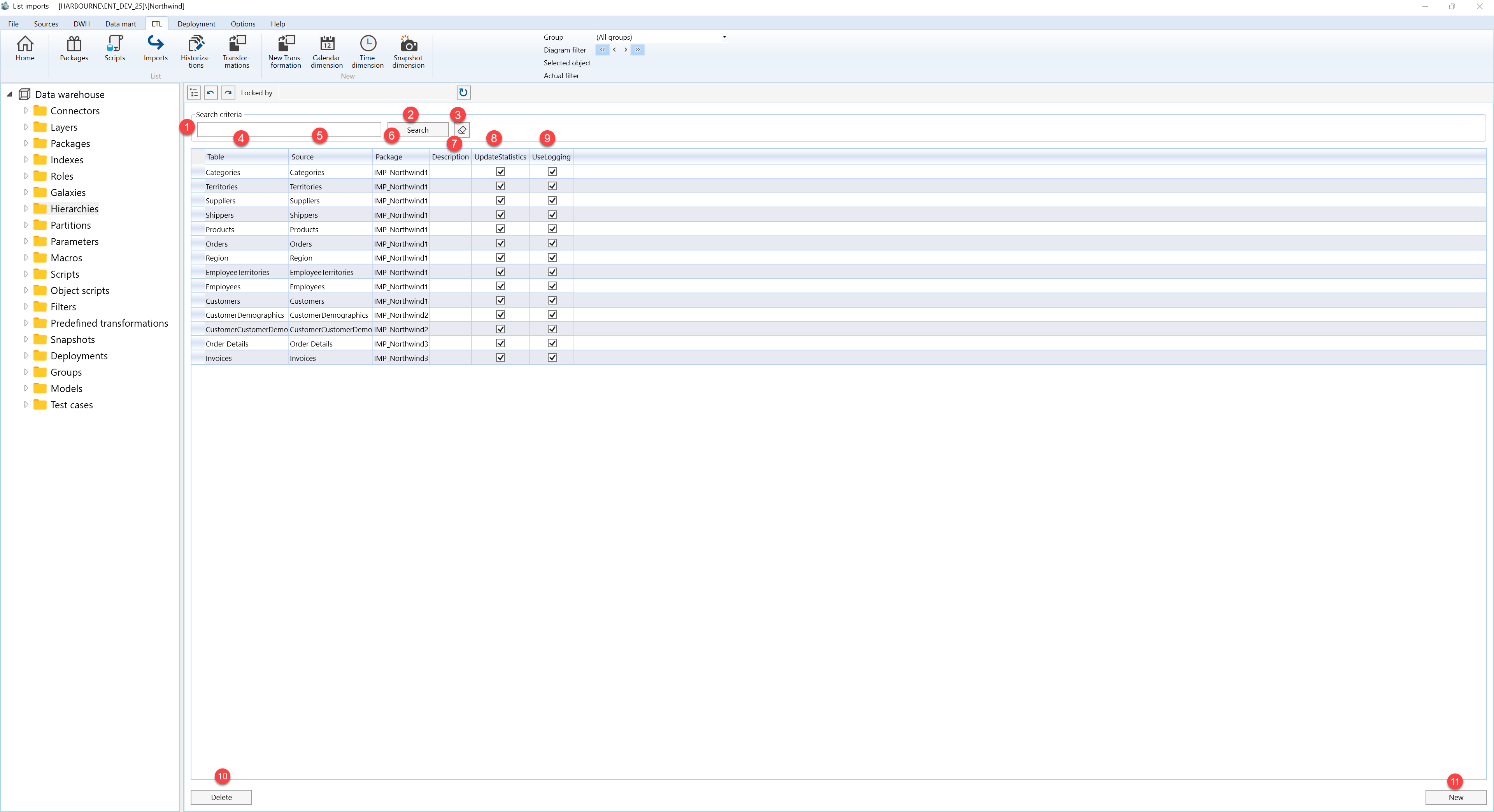
| ID | Property | Description |
|---|---|---|
| 1 | Search criteria | Area used to filter import rows. |
| 2 | Search | Applies the current search criteria. |
| 3 | Table | Table selected or produced by the current operation. |
| 4 | Source | Source object used by the current page or wizard. |
| 5 | Package | Package selected for the current operation. |
| 6 | Description | Business description or notes for the object. |
| 7 | UpdateStatistics | Shows whether statistics are updated after import. |
| 8 | UseLogging | Shows whether logging is enabled. |
| 9 | New | Starts creation of an import item. |
| 10 | Delete | Deletes the selected import item. |
