
Tables
Overview
The Tables list shows table definitions with schema, historization, persisting, type, friendly name, and description information.
Function
Use the list to review table metadata and identify how tables relate to historization or persisting output.
Delete removes the selected table when the current context and permissions allow it.
Access
Open tables from the DWH toolbar tab or from a schema branch in the navigation tree.
How to access
Navigation tree
Model -> Layers -> [layer] -> [schema] -> Tables -> List tables.
Toolbar
DWH -> Tables.
Diagram
Not opened directly from the diagram.
Visual element
Tables list
Screen overview
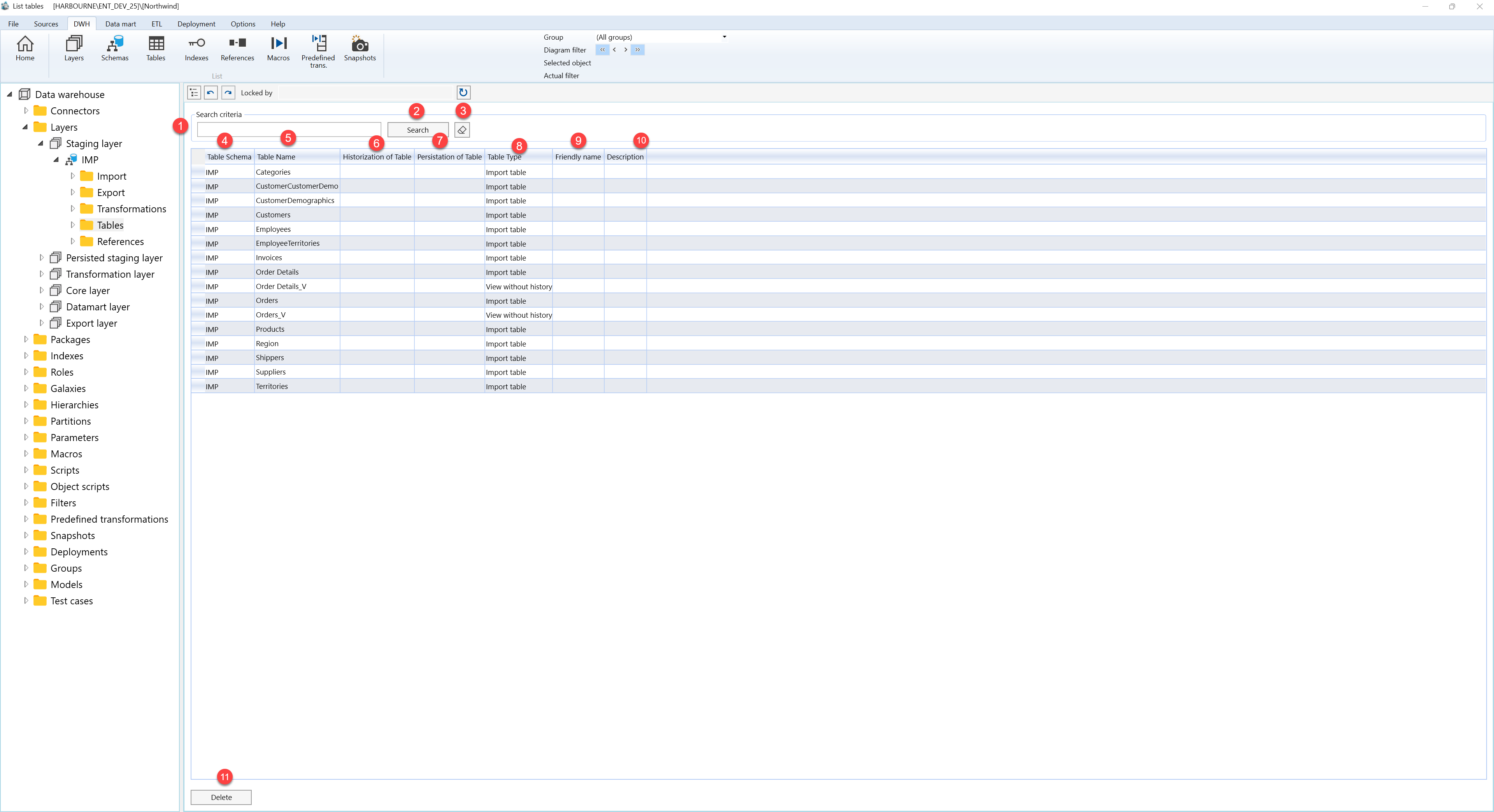
| ID | Property | Description |
|---|---|---|
| 1 | Search criteria | Area used to filter table rows. |
| 2 | Search | Applies the current search criteria. |
| 3 | Table Schema | Schema that contains the table. |
| 4 | Table Name | Name of the table. |
| 5 | Historization of Table | Historization relationship for the table. |
| 6 | Persistence of Table | Persisting relationship for the table. |
| 7 | Table Type | Business type assigned to the table. |
| 8 | Friendly name | Business-friendly display name. |
| 9 | Description | Business description or notes for the object. |
| 10 | Delete | Deletes the selected table. |
