
SQL Script
Overview
SQL Script is the searchable list page for SQL scripts used by AnalyticsCreator workflows, deployment steps, and repository operations. Use it to find scripts by name, review their category and description, open an existing script for editing, adjust script order inside a category, create a new script, or delete a script that is no longer needed.
Function
The page combines a search filter with a read-only result grid. The search field narrows the list by script name. The list can be opened across all script categories from the ETL toolbar, or from a specific script category in the navigation tree.
Each row shows the script name, script category, and description. Double-click a row to open the SQL Script page for that entry. Use the move up and move down buttons to change the selected script's order within its current category. Use New to create a script and Delete to remove the selected script after confirmation.
Access
Open the list from the Scripts area in the navigation tree or from the Scripts command in the ETL toolbar. Script category branches provide list and add commands for pre-creation, post-creation, pre-deployment, post-deployment, pre-workflow, post-workflow, and repository extension scripts.
How to access
Navigation tree
Scripts -> [script category] -> List [category] scripts
Toolbar
ETL -> Scripts
Diagram
Not opened directly from the diagram. Use the Scripts navigation tree or ETL toolbar to open the list.
Visual element
SQL Script list page
Screen overview
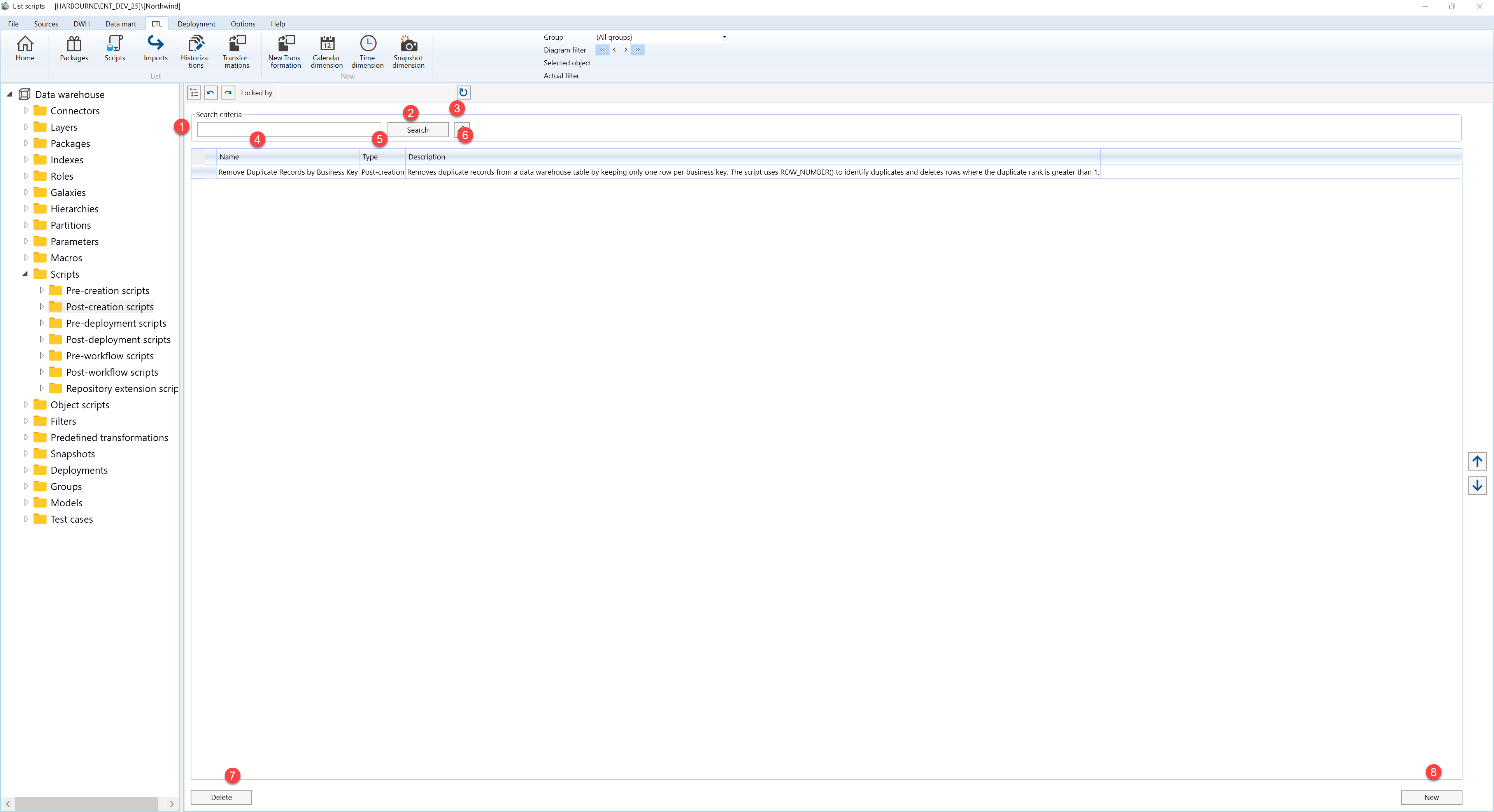
| ID | Property | Description |
|---|---|---|
| 1 | Search criteria | Filter area at the top of the page. |
| 2 | Search field | Text field used to filter SQL scripts by script name. Press Enter to run the same filter as the Search button. |
| 3 | Search | Applies the current search text and refreshes the SQL scripts grid. |
| 4 | Clear filter | Clears the search field and reloads scripts for the current category context or the full project list. |
| 5 | Status indicator | Indicator column for the row status icon. |
| 6 | Name | Grid column showing the script name. |
| 7 | Type | Grid column showing the script category, such as post-creation or pre-deployment. |
| 8 | Description | Grid column describing the purpose of the script. |
| 9 | SQL scripts grid | Read-only result list for reviewing scripts. Double-click a row to open it on the SQL Script page. |
| 10 | Move up | Moves the selected script earlier within the same script category, then refreshes the list. |
| 11 | Move down | Moves the selected script later within the same script category, then refreshes the list. |
| 12 | Delete | Deletes the selected script after user confirmation, then refreshes the list. |
| 13 | New | Opens the SQL Script page to create a new script. |
