
DWH
Overview
The DWH toolbar tab opens core data warehouse lists and maintenance pages.
Function
Use the DWH toolbar tab to open the commands listed in its ribbon groups.
Commands are enabled according to the current connection and application context.
Access
Open the DWH tab from the application toolbar.
How to access
Navigation tree
Not direct. This is a toolbar tab.
Toolbar
Toolbar -> DWH.
Diagram
Not opened directly from the diagram.
Visual element
DWH toolbar tab
Screen overview
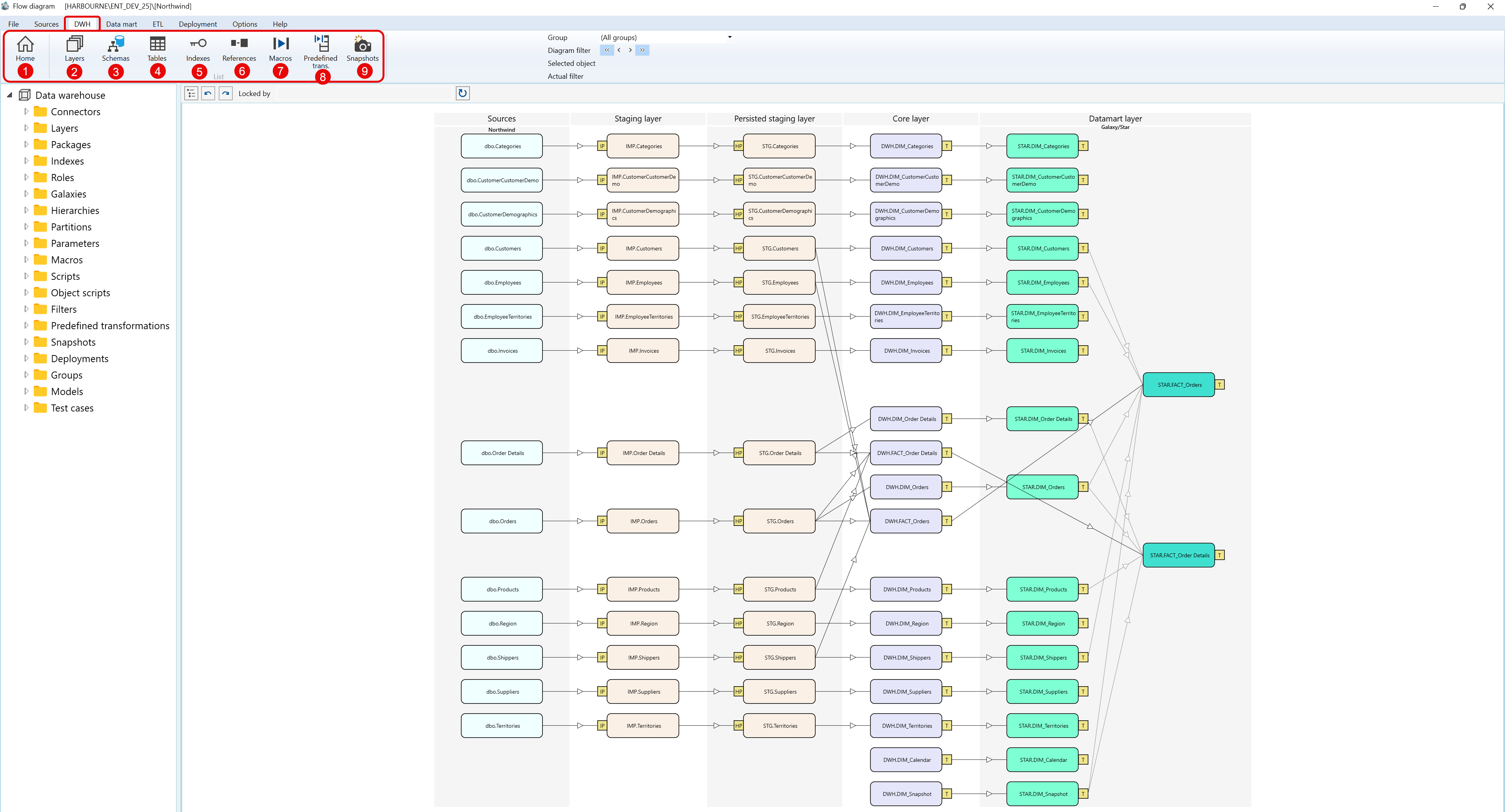
| ID | Property | Description |
|---|---|---|
| 1 | Home | Returns to the start page. |
| 2 | List | Group of data warehouse list commands. |
| 3 | Layers | Opens the Layers list. |
| 4 | Schemas | Opens the Schemas list. |
| 5 | Tables | Opens the Tables list. |
| 6 | Indexes | Opens the Indexes list. |
| 7 | References | Opens the References list. |
| 8 | Macros | Opens the Macros list. |
| 9 | Predefined trans. | Opens the Predefined transformations list. |
| 10 | Snapshots | Opens the Snapshots list. |
