
Source
Overview
The Source page maintains a source object inside a connector, including its schema, query or file settings, columns, references, and semantic metadata.
Function
The main fields identify the source name, source schema, connector, group, type, friendly name, description, and optional path or query settings.
The Definition grid maintains source columns, data types, precision, nullability, key position, anonymization, friendly names, display folders, and reference metadata.
Additional areas cover file and blob options, CSV parsing settings, SAP DeltaQ or ODP options, semantic capabilities, and source constraints.
Access
Open an existing source from a connector, from the Sources list, or by double-clicking a source object in the diagram.
How to access
Navigation tree
Connectors -> [connector] -> Sources -> [source] -> Edit source.
Toolbar
DWH -> Sources, then double-click a source row.
Diagram
Source object -> double-click.
Visual element
Source page
Screen overview
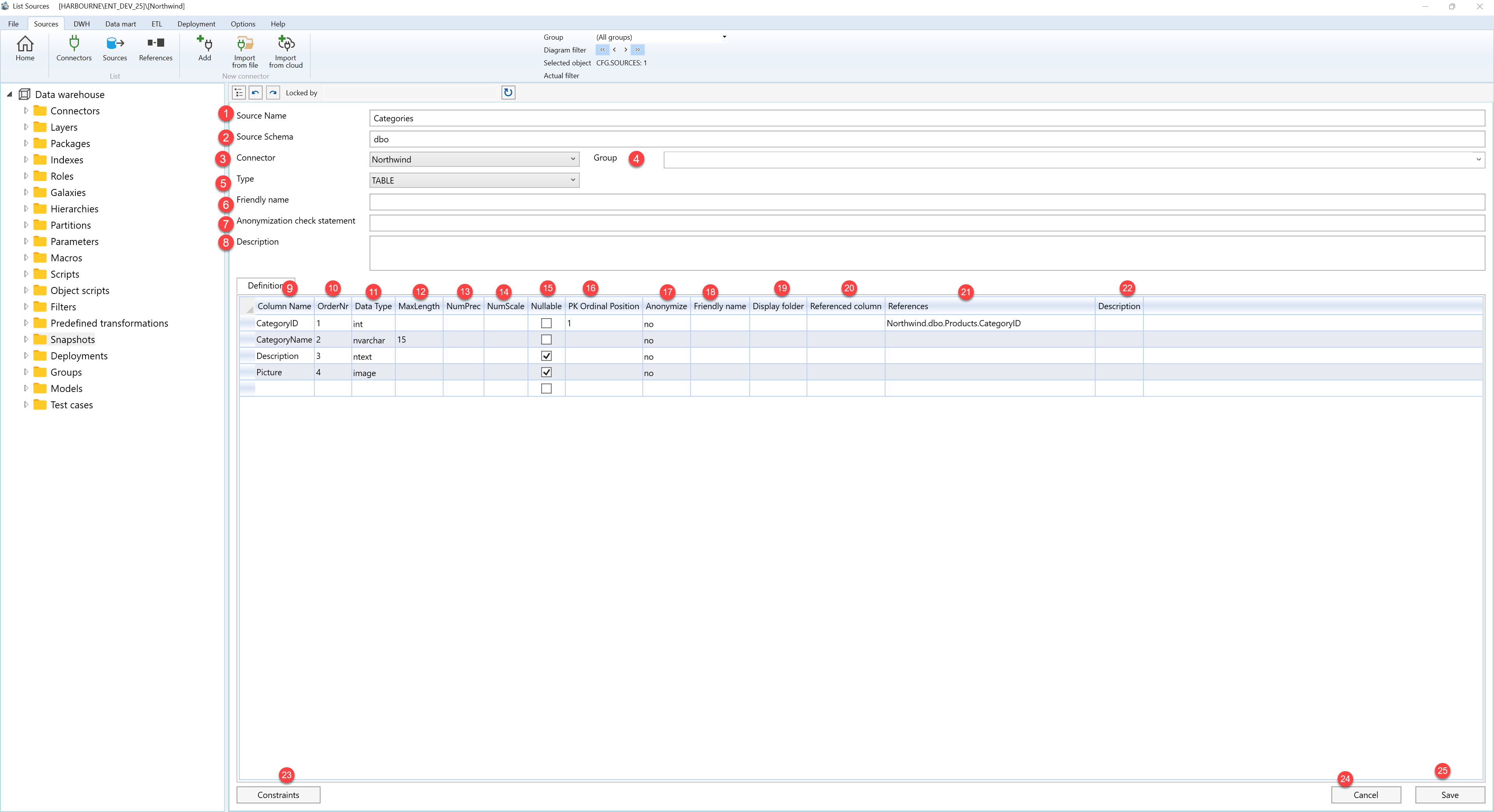
| ID | Property | Description |
|---|---|---|
| 1 | Source Name | Name of the source object. |
| 2 | Source Schema | Schema or namespace for the source object. |
| 3 | Connector | Connector that owns the source. |
| 4 | Group | Optional source group. |
| 5 | Blob type | Blob or file handling type when file-based data is used. |
| 6 | Type | Source category used by the connector. |
| 7 | Friendly name | Business-friendly source name. |
| 8 | Anonymization check statement | Statement used to validate anonymization handling. |
| 9 | Path | Path used for file- or folder-based sources. |
| 10 | Process files in directory | Processes files from a directory rather than a single file. |
| 11 | Directory | Directory path for file-based processing. |
| 12 | File extension | File extension included by the source. |
| 13 | Include subdirectories | Includes files from subdirectories. |
| 14 | ResourcePath | Resource path used by supported connector types. |
| 15 | QueryOptions | Additional query options passed to the connector. |
| 16 | Definition | Grid of source column definitions. |
| 17 | Column Name | Source column name. |
| 18 | Data Type | Column data type. |
| 19 | Nullable | Shows whether the source column can be empty. |
| 20 | PK Ordinal Position | Primary-key order for the source column. |
| 21 | Anonymize | Marks the source column for anonymization handling. |
| 22 | Display folder | Display folder used by semantic output. |
| 23 | Referenced column | Referenced column used by source references. |
| 24 | References | Reference metadata for the selected column. |
| 25 | Query | Source query statement. |
| 26 | CSV properties | CSV parsing settings for text files. |
| 27 | Column names first row | Uses the first row as column names. |
| 28 | Code page | Code page used to read text files. |
| 29 | Text qualifier | Text qualifier used by the file parser. |
| 30 | Column delimiter | Delimiter used to split columns. |
| 31 | SAP DeltaQ/ODP | SAP-specific extraction settings. |
| 32 | Extractor | SAP extractor name. |
| 33 | Mode | Extraction mode. |
| 34 | Auto sync. | Automatic synchronization option. |
| 35 | Supports full | Indicates full-load support. |
| 36 | Supports delta | Indicates delta-load support. |
| 37 | Get CSV structure | Reads column structure from a CSV file. |
| 38 | Constraints | Opens or maintains source constraints. |
| 39 | Save | Saves the current definition, refreshes the relevant navigation or list, and keeps the page consistent with the saved state. |
| 40 | Cancel | Leaves the page without continuing the current edit. |
