
Transformations
Overview
Transformations is the searchable list page for transformation definitions in the warehouse model. Use it to find transformations by schema, name, transformation type, historization type, or dummy-entry setting, then open the selected transformation for detailed maintenance.
Function
The page combines a search filter with a read-only result grid. The ETL toolbar opens the full transformation list. When the list is opened from a schema in the navigation tree, the results are scoped to that schema.
The search field filters by schema name, transformation name, and historization type. Press Enter or use Search to refresh the list, and use the clear-filter action to return to the current context's full result set.
Each row shows the schema, transformation name, transformation type, historization type, and whether dummy-entry creation is enabled. Double-click a row to open the Transformation page. Use New to start the transformation creation assistant, Duplicate to copy a supported selected transformation, and Delete to remove the selected transformation after confirmation.
Access
Open the list from a schema's Transformations node in the navigation tree or from the Transformations command in the ETL toolbar.
How to access
Navigation tree
Layers -> [layer] -> [schema] -> Transformations -> List transformations
Toolbar
ETL -> Transformations
Diagram
Not opened directly from the diagram. Use the navigation tree or ETL toolbar to open the list.
Visual element
Transformations list page
Screen overview
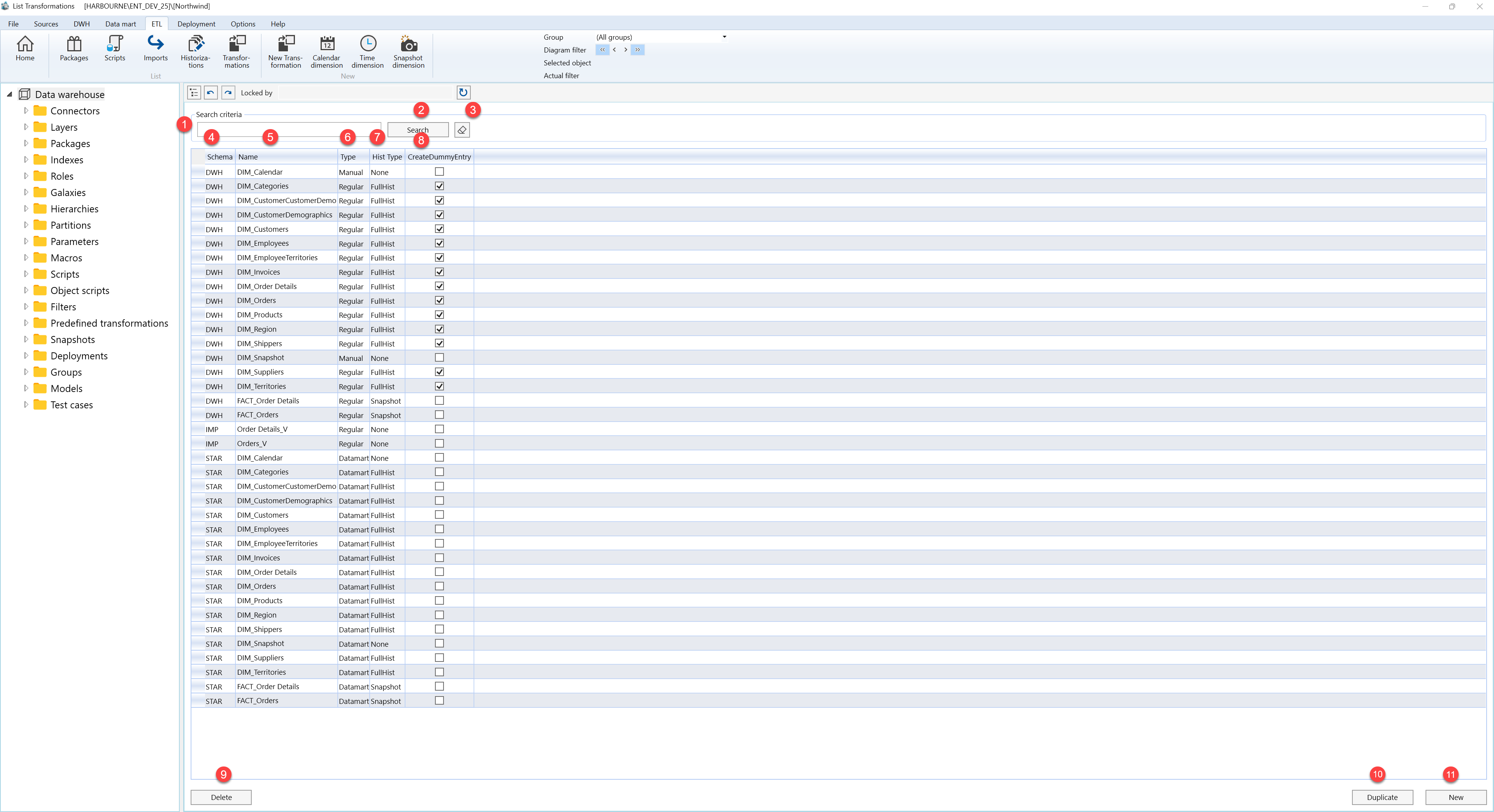
| ID | Property | Description |
|---|---|---|
| 1 | Search criteria | Filter area at the top of the page. |
| 2 | Search field | Text field used to filter transformations by schema name, transformation name, or historization type. Press Enter to run the same filter as the Search button. |
| 3 | Search | Applies the current search text and refreshes the Transformations grid. |
| 4 | Clear filter | Clears the search field and reloads transformations for the current schema context or the full project list. |
| 5 | Schema | Grid column showing the schema that contains the transformation. |
| 6 | Name | Grid column showing the transformation name. |
| 7 | Type | Grid column showing the transformation category. |
| 8 | Hist Type | Grid column showing the historization behavior assigned to the transformation. |
| 9 | CreateDummyEntry | Checkbox column indicating whether dummy-entry creation is enabled for the transformation. |
| 10 | Transformations grid | Read-only result list for reviewing transformations. Double-click a row to open it on the Transformation page. |
| 11 | New | Starts the transformation creation assistant. Depending on the selection, the flow can continue to the Transformation page or the related Table page. |
| 12 | Duplicate | Creates a copy of the selected transformation when that transformation can be duplicated, then refreshes the list. |
| 13 | Delete | Deletes the selected transformation after user confirmation, then refreshes the page. |
