
Object group content
Overview
Object group content is the list page used to review and maintain which repository objects belong to a selected object group. Use it when a group already exists and you need to manage the objects included in that group.
Function
The page combines a search filter with an editable membership grid. The search field narrows the list by group name or object name, and the clear-filter button reloads the full list for the selected group context.
When the page is opened from a specific group, new rows are assigned to that group automatically. Use the object column to add or change group membership, then choose whether related predecessor or successor objects should be included. Inherited rows can be excluded when they should not participate in the group. Save validates the inheritance choices and stores the changes; Cancel returns to the previous page without saving new edits.
Access
Open the page from an existing group in the navigation tree. It is not a direct toolbar command; it is a focused list for the selected group.
How to access
Navigation tree
Groups -> selected group -> List objects
Toolbar
Not direct. Use the selected group in the navigation tree.
Diagram
Not direct. Use the group navigation-tree command to review all objects in a group.
Visual element
Object group content list page
Screen overview
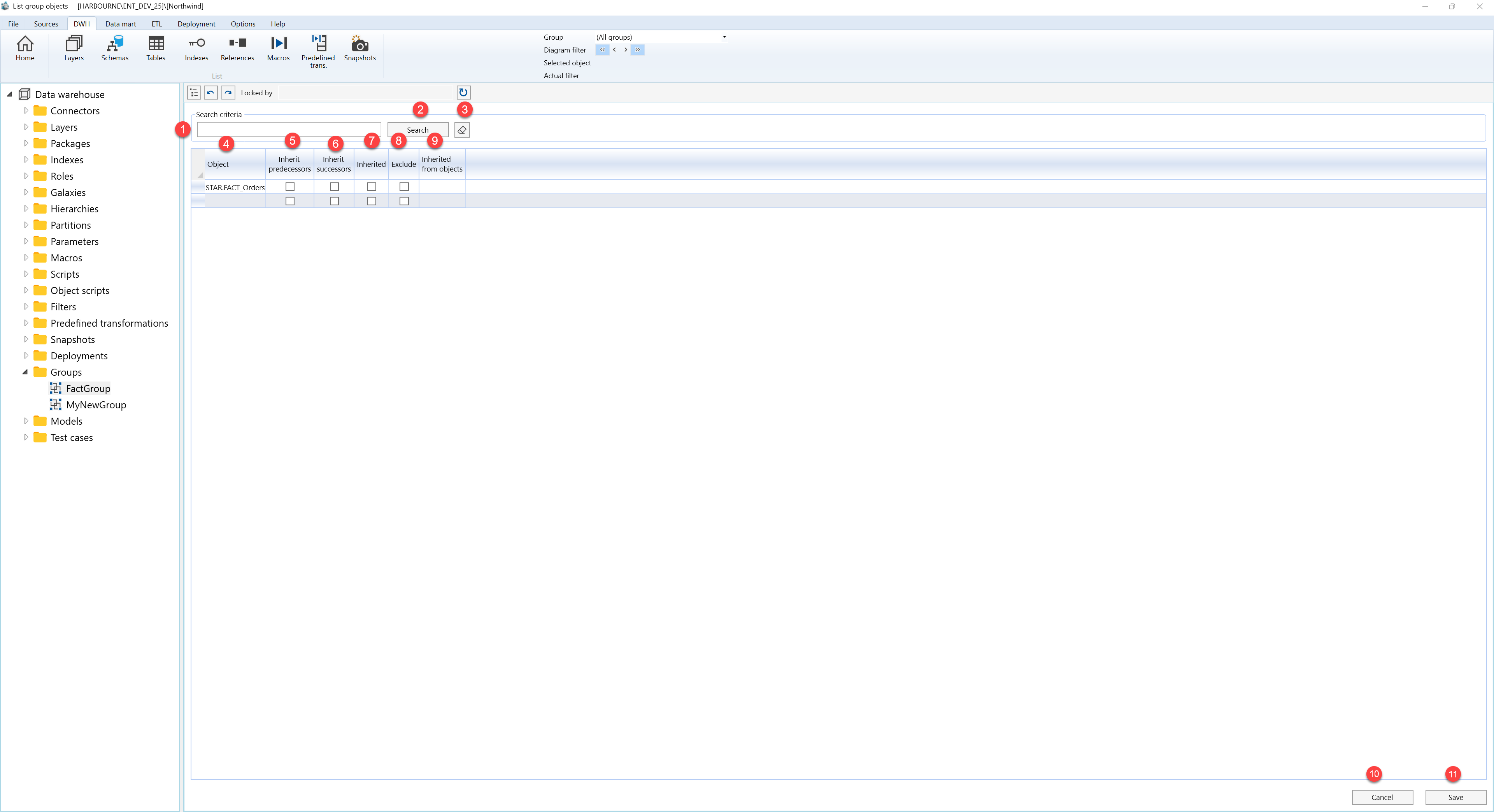
| ID | Property | Description |
|---|---|---|
| 1 | Search criteria | Filter area at the top of the page. |
| 2 | Search field | Text field used to filter group membership rows by group name or object name. |
| 3 | Search | Runs the filter and refreshes the membership grid. |
| 4 | Clear filter | Clears the search field and reloads the visible membership rows. |
| 5 | Group | Shows the group for each membership row. When the page is opened from a selected group, the group is fixed for new rows. |
| 6 | Object | Object assigned to the group membership row. |
| 7 | Inherit predecessors | Includes predecessor objects related to the selected membership row. |
| 8 | Inherit successors | Includes successor objects related to the selected membership row. |
| 9 | Inherited | Identifies membership that came from inheritance instead of direct assignment. |
| 10 | Exclude | Excludes an inherited object from the group while preserving the inheritance rule that brought it into view. |
| 11 | Inherited from objects | Shows which related objects caused an inherited membership entry. |
| 12 | Object group content grid | Editable list of group-object membership rows for the selected group context. |
| 13 | Save | Validates the inheritance and exclusion choices, stores grid changes, and refreshes the page. |
| 14 | Cancel | Returns to the previous page without saving new edits. |
