
Create import
Overview
The Create import wizard creates an import package item from a source object into a target table.
Function
Choose the source, target schema, target table name, and package, then finish the wizard to create the import definition.
Access
Open the wizard from the listed navigation, toolbar, or diagram context.
How to access
Navigation tree
Packages -> Import -> Add import package.
Toolbar
ETL -> Packages, open an import package, then add import content.
Diagram
Source object -> Add -> Import.
Visual element
Import wizard
Screen overview
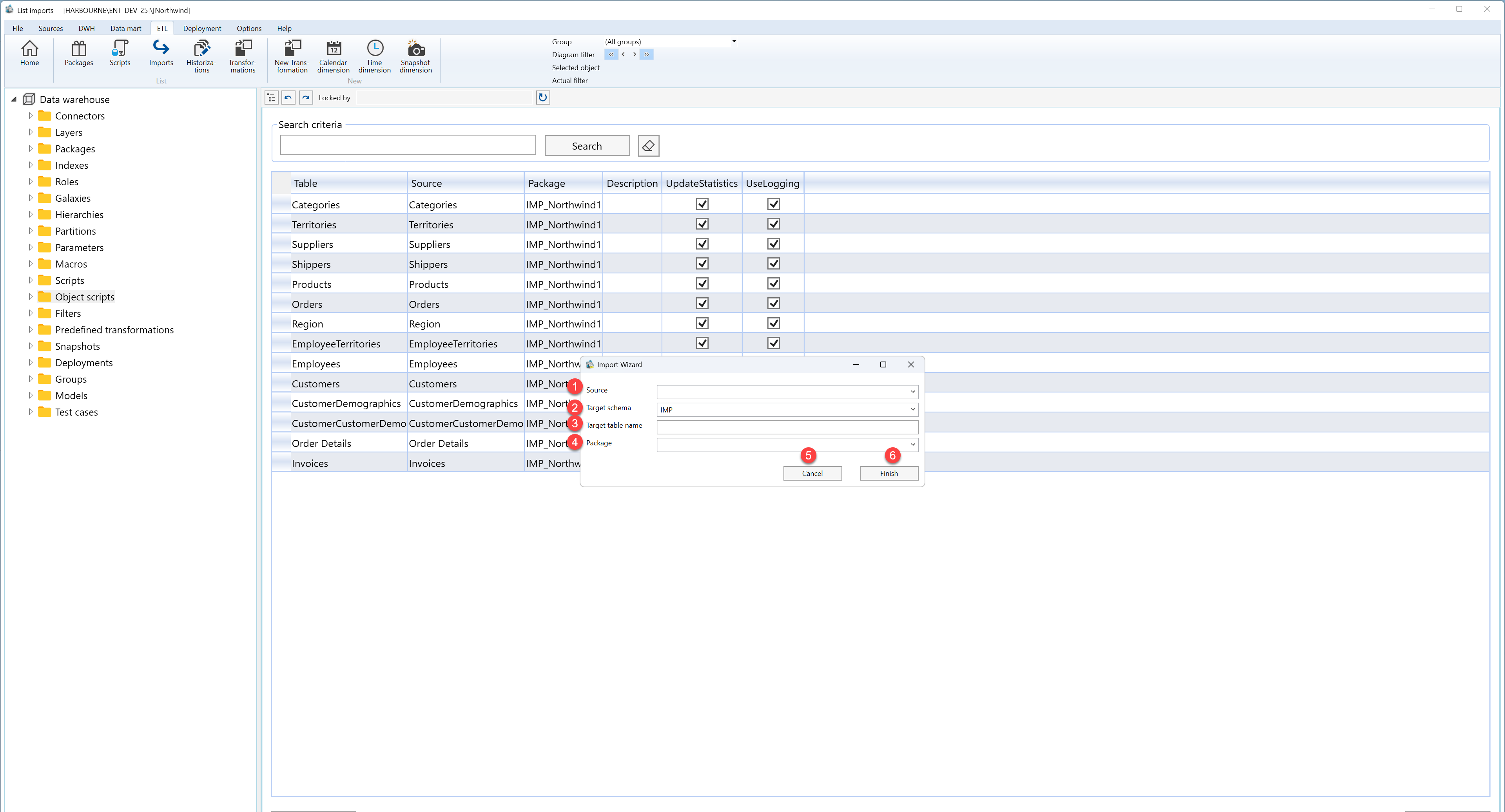
| ID | Property | Description |
|---|---|---|
| 1 | Source | Source object used for the import. |
| 2 | Target schema | Schema for the imported target table. |
| 3 | Target table name | Name of the imported target table. |
| 4 | Package | Import package that will contain the import item. |
| 5 | Finish | Completes the wizard and creates or updates the selected object. |
| 6 | Cancel | Leaves the page without continuing the current edit. |
