
Create historization
Overview
The Create historization wizard is used to create a historization definition for a selected source table or transformation. The wizard collects the source, target, package, SCD behavior, empty-record behavior, and VAULT ID primary-key setting before opening the detailed Historization page.
Function
Use this wizard when a source table or transformation needs to be historized into a target table. The wizard defines the main historization relationship and creates the initial configuration for the historization package item.
Source table defines the source object to historize. Target schema defines where the historized table is created. Target table name defines the name of the historized target table.
Package selects the historization package that will contain the new historization item.
SCD type defines the slowly changing dimension behavior. The available choices are SCD 0, SCD 1, and SCD 2.
Empty record behaviour defines how missing source records are handled. The visible choices are Close and Do not close.
Use VAULT ID as PK uses the VAULT ID as the primary-key basis where supported. Finish completes the wizard and creates the historization definition. Cancel closes the wizard without creating the historization.
Access
Open the wizard from the Historizations list when a new historization needs to be created.
How to access
Toolbar
ETL -> Historizations, then choose New.
Screen overview
The Create historization wizard contains the source and target settings, the package selection, the SCD behavior, the empty-record behavior, and the VAULT ID primary-key option. The table below follows the numbered markers in the screenshot.
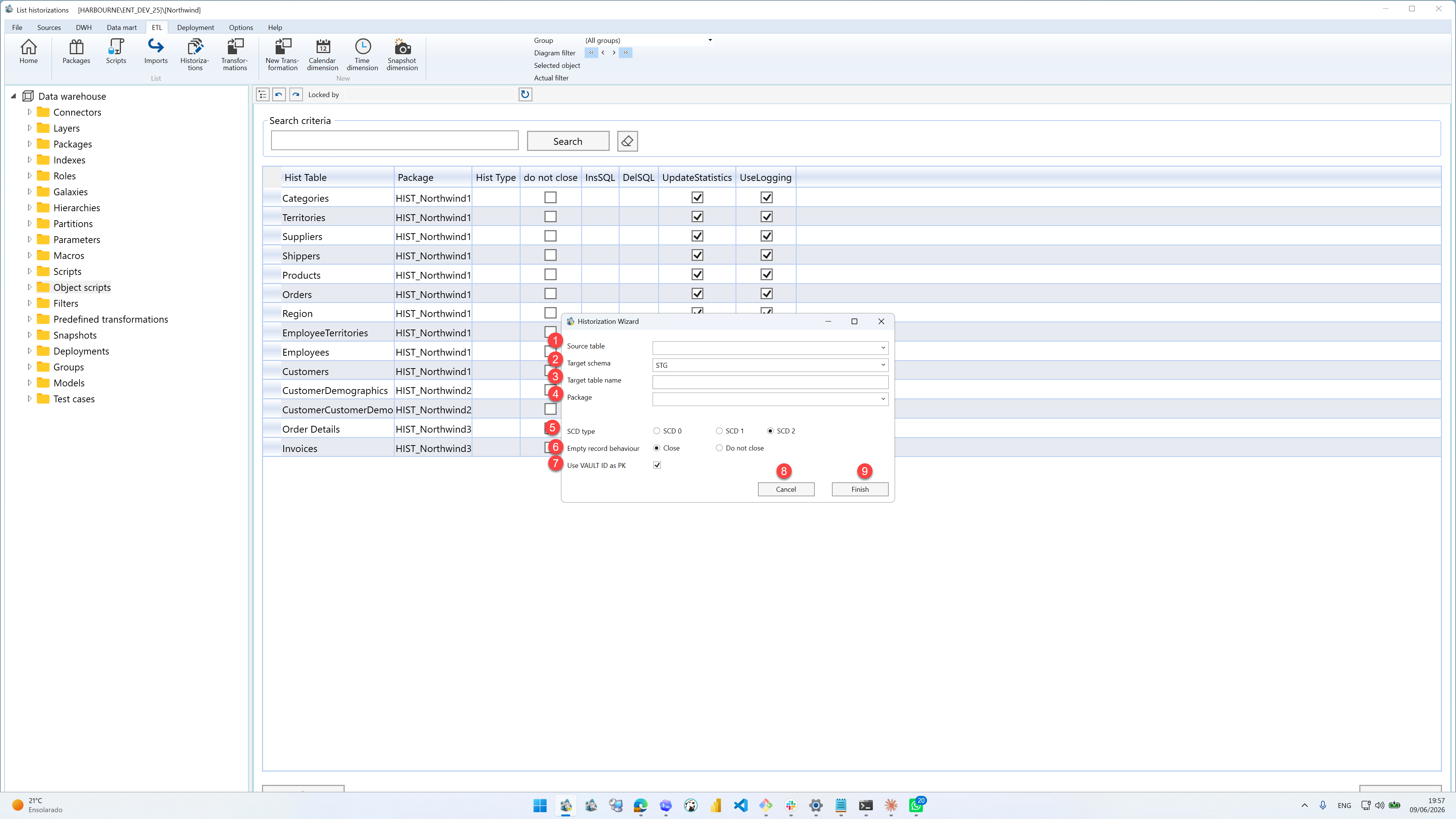
| ID | Property | Description |
|---|---|---|
| 1 | Source table | Source table or transformation used as the input for the historization. |
| 2 | Target schema | Schema where the historized target table is created. |
| 3 | Target table name | Name of the historized target table. |
| 4 | Package | Historization package that will contain the new historization definition. |
| 5 | SCD type | Slowly changing dimension behavior for the historization. The available choices are SCD 0, SCD 1, and SCD 2. |
| 6 | Empty record behaviour | Handling used when source records are missing. The visible choices are Close and Do not close. |
| 7 | Use VAULT ID as PK | Uses the VAULT ID as the primary-key basis where supported. |
| 8 | Cancel | Leaves the page without continuing the current edit. |
| 9 | Finish | Completes the wizard and creates or updates the selected object. |
