
Create DataVault object
Overview
The Create DataVault object wizard creates vault objects from a selected source table.
Function
Use the main step to select the source table and generated transformation names, then configure hub, link, satellite, historization, and package options as needed.
Access
Open the wizard from the listed navigation, toolbar, or diagram context.
How to access
Navigation tree
Model -> Layers -> [layer] -> [schema] -> Tables -> [table] -> Add vault.
Toolbar
Not direct. Start from a table context.
Diagram
Table object -> Add -> DataVault object.
Visual element
DataVault wizard
Screen overview
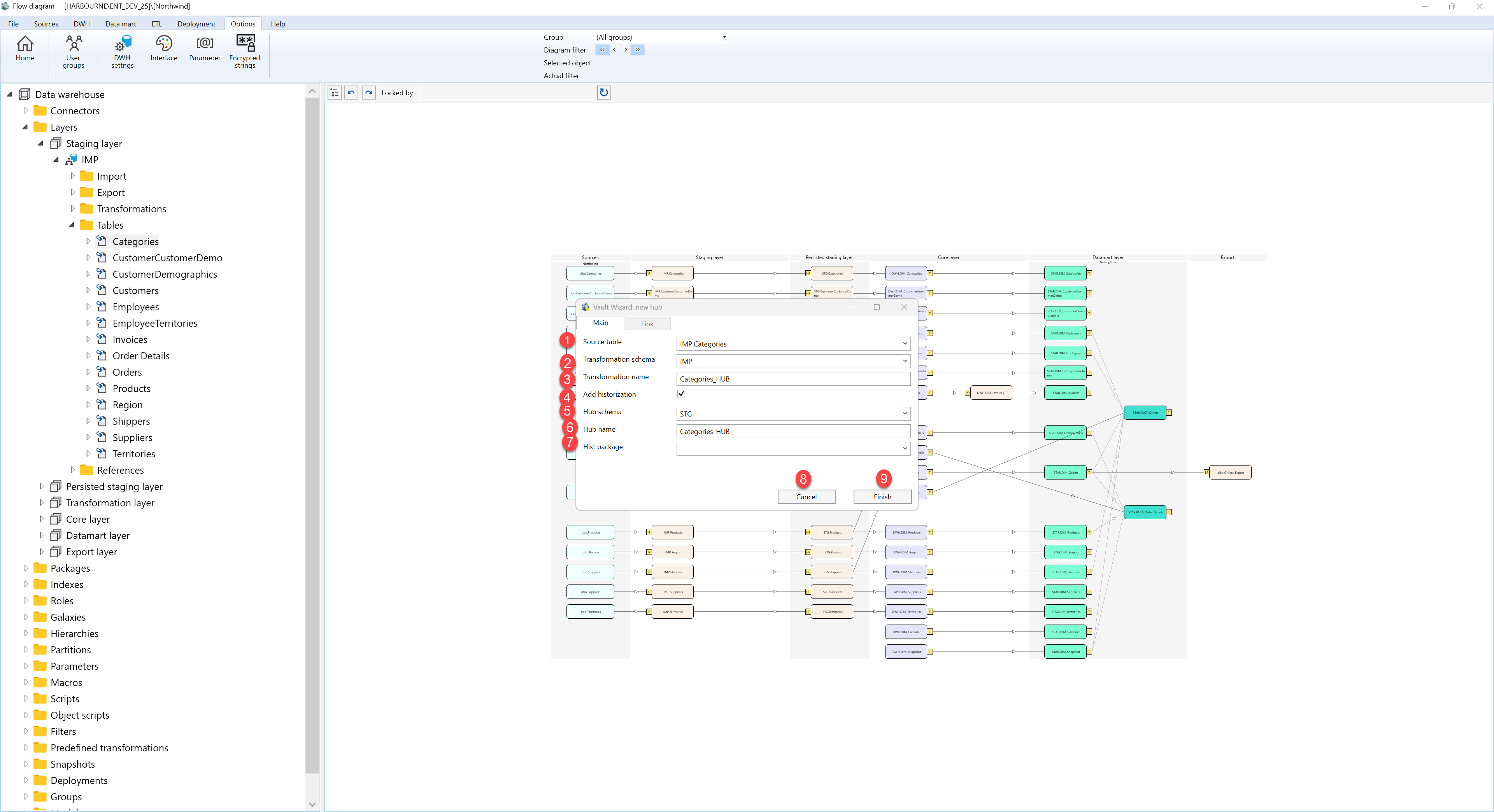
| ID | Property | Description |
|---|---|---|
| 1 | Source table | Table used as the source for the vault object. |
| 2 | Transformation schema | Schema for generated transformations. |
| 3 | Transformation name | Name for the generated transformation. |
| 4 | Add historization | Adds historization for the generated object. |
| 5 | Hub schema | Schema for the hub object. |
| 6 | Hub name | Name for the hub object. |
| 7 | Hist package | Historization package used by generated logic. |
| 8 | Finish | Completes the wizard and creates or updates the selected object. |
| 9 | Cancel | Leaves the page without continuing the current edit. |
