
Create calendar dimension
Overview
The Create calendar dimension wizard creates a calendar transformation for a selected date range. Use it to define the schema, transformation name, date range, date-to-ID function, and the stars that should use the generated calendar transformation.
Function
Use this wizard when a calendar dimension is required for a data mart or star-oriented model. The wizard creates a calendar transformation from the selected schema, name, start date, end date, and date-to-ID function.
Schema defines where the calendar transformation is created. Name defines the transformation name. Date from and Date to define the generated calendar range.
Date-to-ID function defines how calendar dates are converted into date identifiers. The Stars area controls which stars use the calendar transformation. Use >> to add a selected star to the active selection and << to remove it.
Finish completes the wizard and creates the calendar transformation. Cancel closes the wizard without creating the calendar transformation.
Access
Open the wizard from the ETL toolbar when a calendar dimension transformation is needed.
How to access
Toolbar
ETL -> Calendar dimension.
Screen overview
The Create calendar dimension wizard contains the target schema, transformation name, date range, date-to-ID function, and star selection controls. The table below follows the numbered markers in the screenshot.
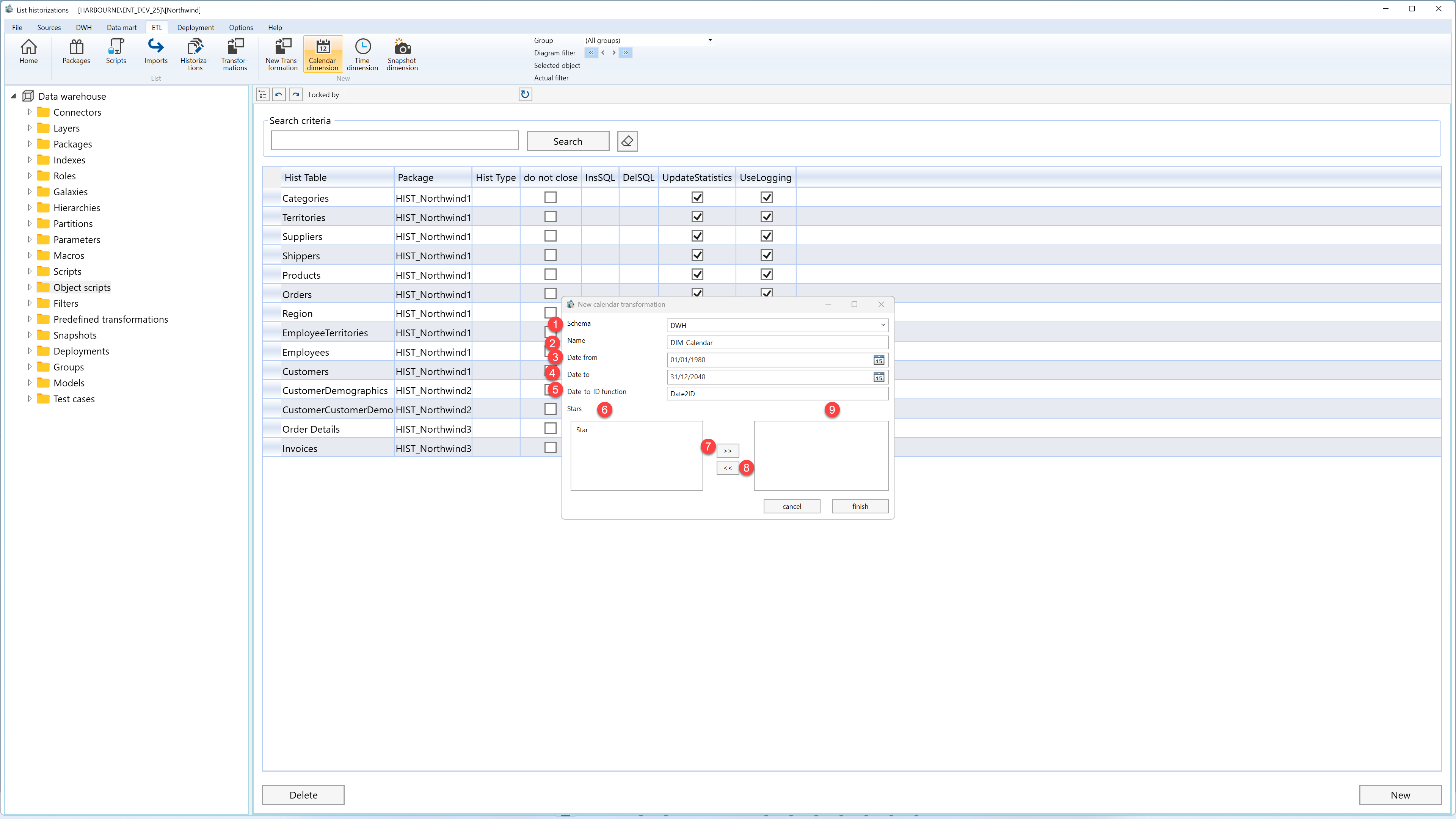
| ID | Property | Description |
|---|---|---|
| 1 | Schema | Schema where the calendar transformation is created. |
| 2 | Name | Name of the calendar transformation. |
| 3 | Date from | Start date for the generated calendar rows. |
| 4 | Date to | End date for the generated calendar rows. |
| 5 | Date-to-ID function | Function used to convert calendar dates into date identifiers. |
| 6 | Available stars | List of available stars that can be assigned to the calendar transformation. |
| 7 | >> | Adds the selected star to the active selection. |
| 8 | << | Removes the selected star from the active selection. |
| 9 | Selected stars | Stars selected to use the calendar transformation. |
