
Table reference
Overview
The Reference page defines a relationship between two warehouse tables. It stores the cardinality, join type, table pair, inheritance options, aliases, reference statement, column mapping, and transformation usage for the selected table reference.
Function
Use Cardinality, Join, Table 1, and Table 2 to define the basic relationship between the two tables.
Use Description, ParentDescription, and Reference Statement to document or define the reference statement shown in the editor.
Use the inheritance options to control how metadata inheritance is applied to the reference. Auto created indicates that the reference was created automatically, and Inactive disables the reference without removing it.
Use the Columns grid to map both sides of the reference. The Used in transformations grid shows where the reference is used by transformations.
Access
Open the References list from the DWH toolbar, then open an existing reference record from the list.
How to access
Toolbar
DWH -> References.
References list
Open an existing reference record from the References list.
Screen overview
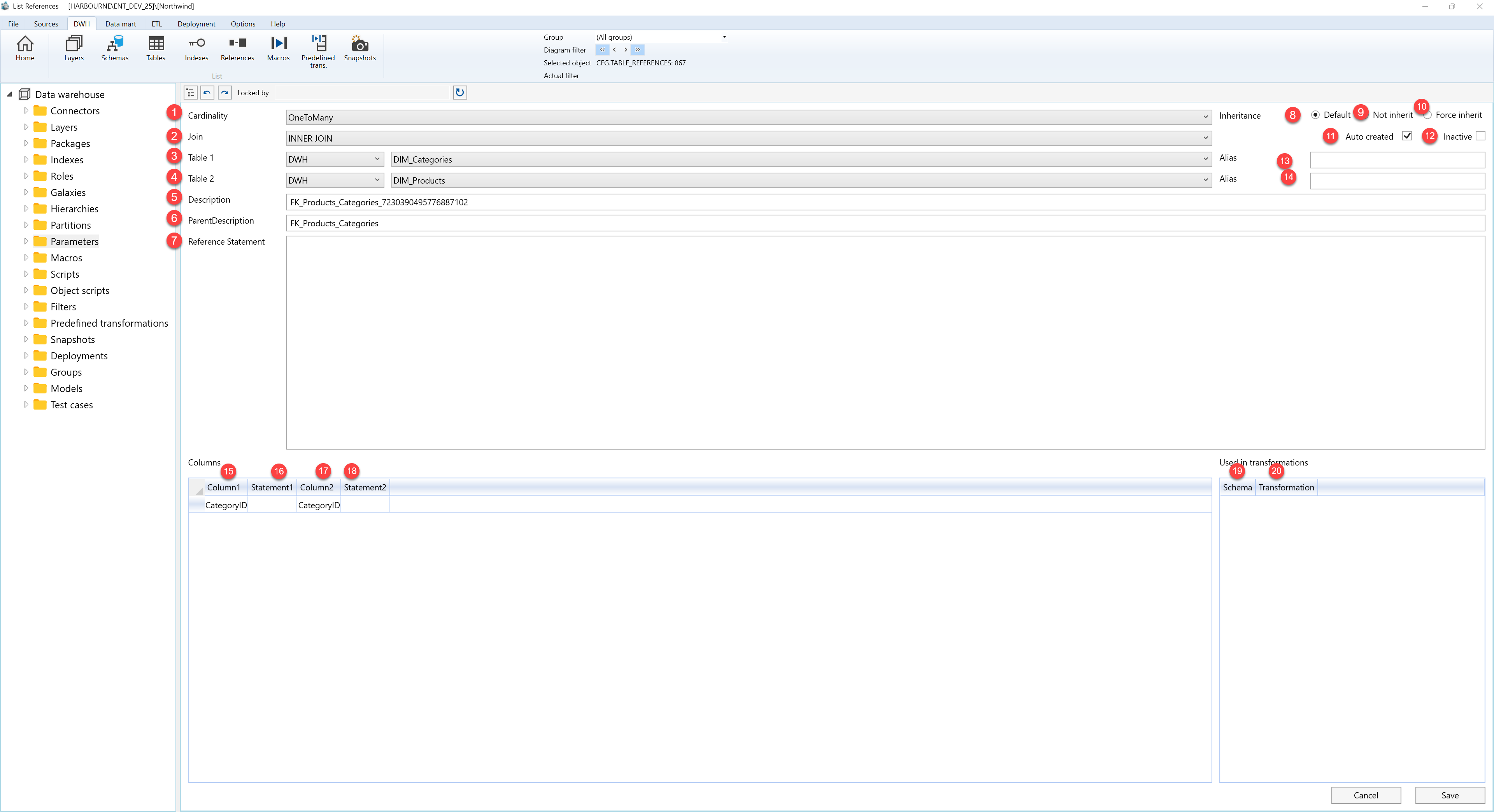
| ID | Property | Description |
|---|---|---|
| 1 | Cardinality | Defines the relationship cardinality between the two selected tables. |
| 2 | Join | Defines the join type used by the reference. |
| 3 | Table 1 | Selects the first table in the reference. |
| 4 | Table 2 | Selects the second table in the reference. |
| 5 | Description | Contains the reference description. |
| 6 | ParentDescription | Shows the parent description associated with the reference. |
| 7 | Reference Statement | Contains the reference statement shown for the selected relationship. |
| 8 | Default | Uses the default inheritance behaviour. |
| 9 | Not inherit | Prevents inheritance for the reference. |
| 10 | Force inherit | Forces inheritance for the reference. |
| 11 | Auto created | Indicates that the reference was created automatically. |
| 12 | Inactive | Marks the reference as inactive. |
| 13 | Alias | Alias field for the first table side of the reference. |
| 14 | Alias | Alias field for the second table side of the reference. |
| 15 | Column1 | Column from the first table side of the reference. |
| 16 | Statement1 | Statement value for the first table side, when used. |
| 17 | Column2 | Column from the second table side of the reference. |
| 18 | Statement2 | Statement value for the second table side, when used. |
| 19 | Schema | Schema of a transformation that uses the reference. |
| 20 | Transformation | Transformation that uses the reference. |
