
Snapshot group
Overview
The Snapshot group page maintains a group of snapshots that should be managed together.
Function
Use Group name and Description to identify the group and explain how it is used.
The Snapshot grid lists the snapshots assigned to the group.
Save stores the group definition and Cancel leaves the page without continuing the current edit.
Access
Open an existing snapshot group from the Snapshots branch or from the snapshot groups list.
How to access
Navigation tree
Snapshots -> Snapshot groups -> [snapshot group] -> Edit snapshot group.
Toolbar
DWH -> Snapshots, then use the snapshot group list and double-click a group.
Diagram
Not opened directly from the diagram.
Visual element
Snapshot group page
Screen overview
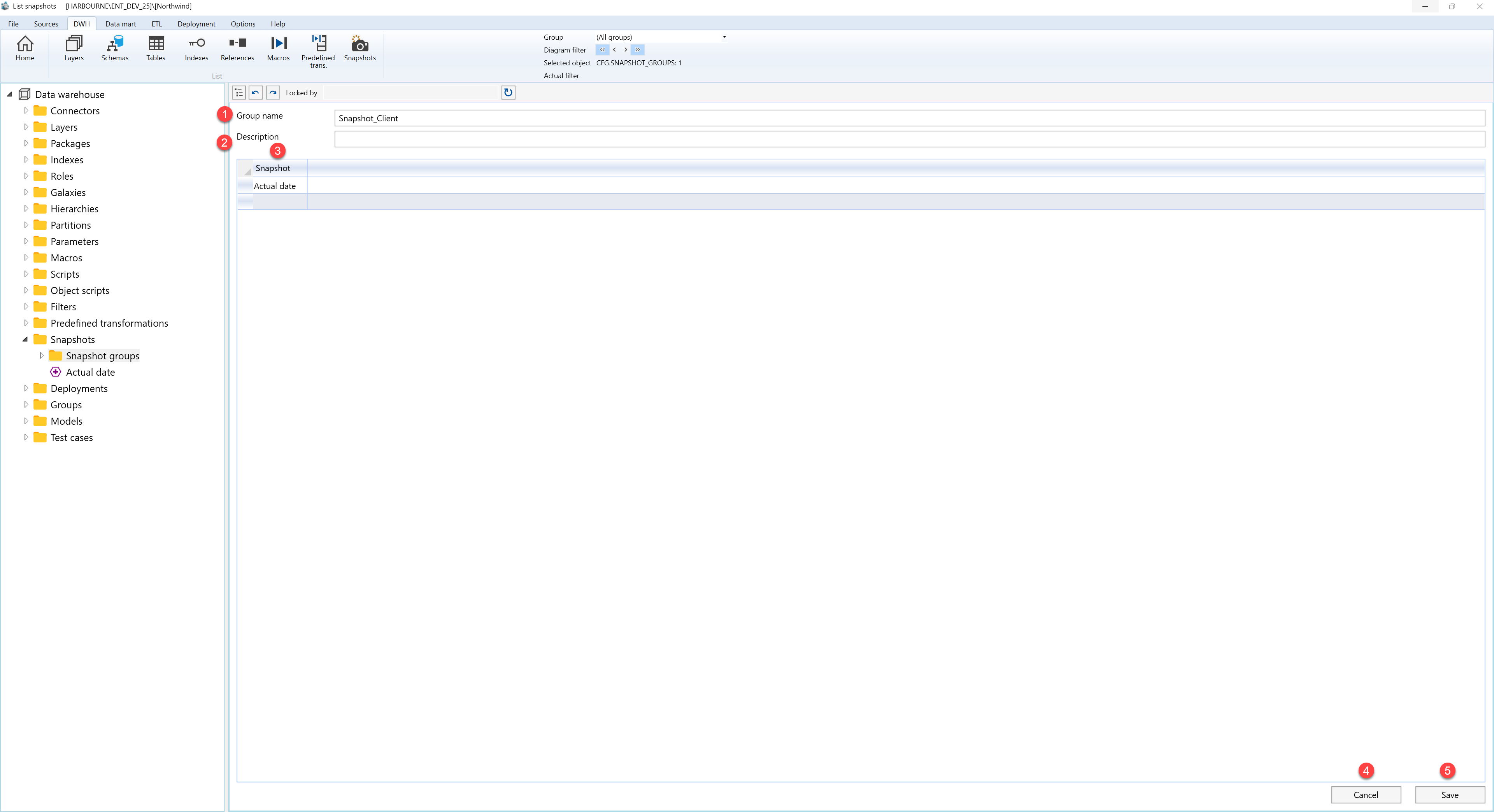
| ID | Property | Description |
|---|---|---|
| 1 | Group Name | Name shown for the snapshot group in lists and navigation. |
| 2 | Description | Business description or notes for the object. |
| 3 | Snapshot | Grid of snapshots assigned to the group. |
| 4 | Save | Saves the current definition, refreshes the relevant navigation or list, and keeps the page consistent with the saved state. |
| 5 | Cancel | Leaves the page without continuing the current edit. |
