
OLAP Role
Overview
The OLAP role page maintains Analysis Services security roles. Use it to name the role, describe its purpose, assign users, and configure tabular or multidimensional cube permissions.
Function
Name is the role name shown in the navigation tree and OLAP roles list. Description documents the business purpose of the role.
The Users grid assigns logins to the role. Add one login per row so the role can be granted to the correct users or groups.
The Tabular cube tab defines tabular-model access. Use Rights for the overall tabular permission setting, and use the table grid to disable individual tables or add a DAX Filter for row-level filtering.
The Multidimensional cube tab defines cube, dimension, and cube-dimension permissions. Use the top checkboxes for database-level rights, then maintain cube, dimension, and cube-dimension rows for read, write, process, member-set, and default-member permissions.
Save stores the role definition, refreshes the navigation tree, and reloads the page. Cancel closes the page without continuing the current edit.
Access
Open an existing role from the Roles branch in the navigation tree, or double-click it in the OLAP roles list. Use Add role from the Roles branch, or New from the list, to create a role.
How to access
Navigation tree
Data warehouse -> Roles -> [role] -> Edit role, or Data warehouse -> Roles -> Add role.
Toolbar
Data mart -> Roles, then double-click a role or choose New.
Diagram
Not opened directly from the diagram. Use the Data mart toolbar or the Roles navigation-tree branch.
Visual element
OLAP role page.
Screen overview
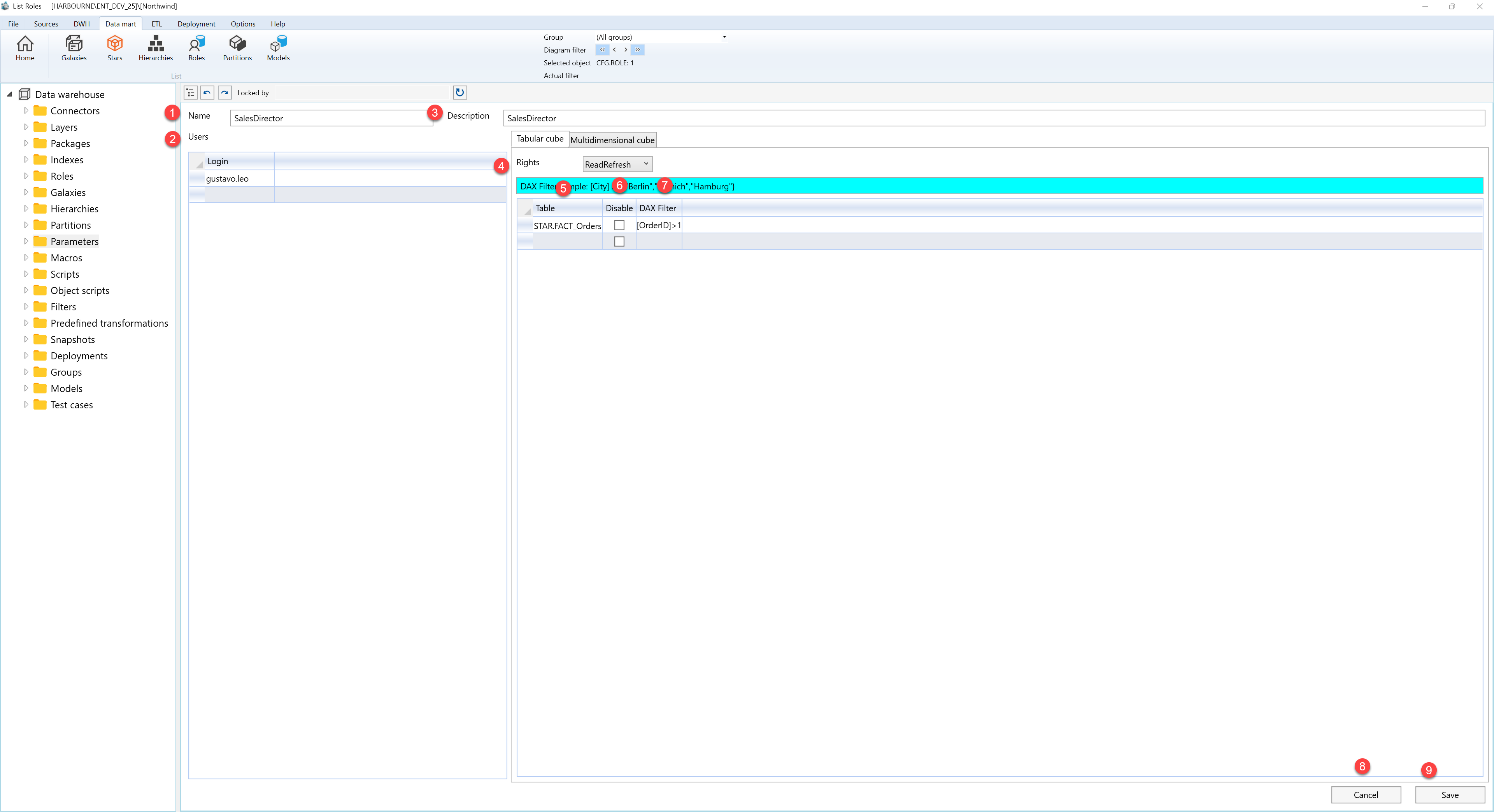
| ID | Property | Description |
|---|---|---|
| 1 | Name | Role name shown in the navigation tree and OLAP roles list. |
| 2 | Users | Grid for the users or groups assigned to the role. |
| 3 | Description | Business description for the role. |
| 4 | Rights | Overall permission setting for tabular-model access. |
| 5 | DAX Filter sample | Example line showing the expected DAX filter syntax. |
| 6 | Filter column example | Example column used in the DAX filter sample. |
| 7 | Filter values example | Example list of allowed values used in the DAX filter sample. |
| 8 | Cancel | Closes the page without continuing the current edit. |
| 9 | Save | Saves the role definition. |
