
OLAP Hierarchy
Overview
The OLAP Hierarchy page is used to add or edit hierarchy definitions for analytical tables. A hierarchy groups selected table columns into ordered levels so they can be used consistently in OLAP and data mart analysis.
Function
Use this page to select the schema and table, define the hierarchy name, add an optional description, and maintain the ordered hierarchy levels.
Schema defines the data mart schema. Table defines the analytical table that provides the available columns for the hierarchy.
Hierarchy name is required and identifies the hierarchy in the navigation tree and hierarchy lists. Description explains the purpose of the hierarchy.
The hierarchy columns area defines the levels of the hierarchy. Each row selects a table column, assigns a sequence number, and provides a readable level name and description.
Save stores the new or changed hierarchy definition. Cancel closes the page without continuing the current edit.
Hierarchy levels
Hierarchy levels are defined in sequence. The first level represents the highest level of the hierarchy, and the following rows define the lower levels. The SeqNr value controls this order.
When a new hierarchy column is added, AnalyticsCreator assigns the next sequence number. Users can adjust the sequence if the hierarchy level order must be changed.
Access
Open this page when you need to add a new OLAP hierarchy or edit an existing one. Existing hierarchies can be opened from the Hierarchies branch or from the Hierarchies list. New hierarchies can be created from the same hierarchy entry points.
How to access
Navigation tree
Data warehouse -> Hierarchies -> Add hierarchy, or Data warehouse -> Hierarchies -> [hierarchy] -> Edit hierarchy.
Toolbar
Data mart -> Hierarchies, then choose New to add a hierarchy or double-click an existing hierarchy to edit it.
Diagram
The OLAP Hierarchy page is not opened directly from the diagram. Use the navigation tree or the Data mart toolbar.
Screen overview
The screen contains the hierarchy header fields, the hierarchy level columns, and the action buttons used to save or cancel the edit.
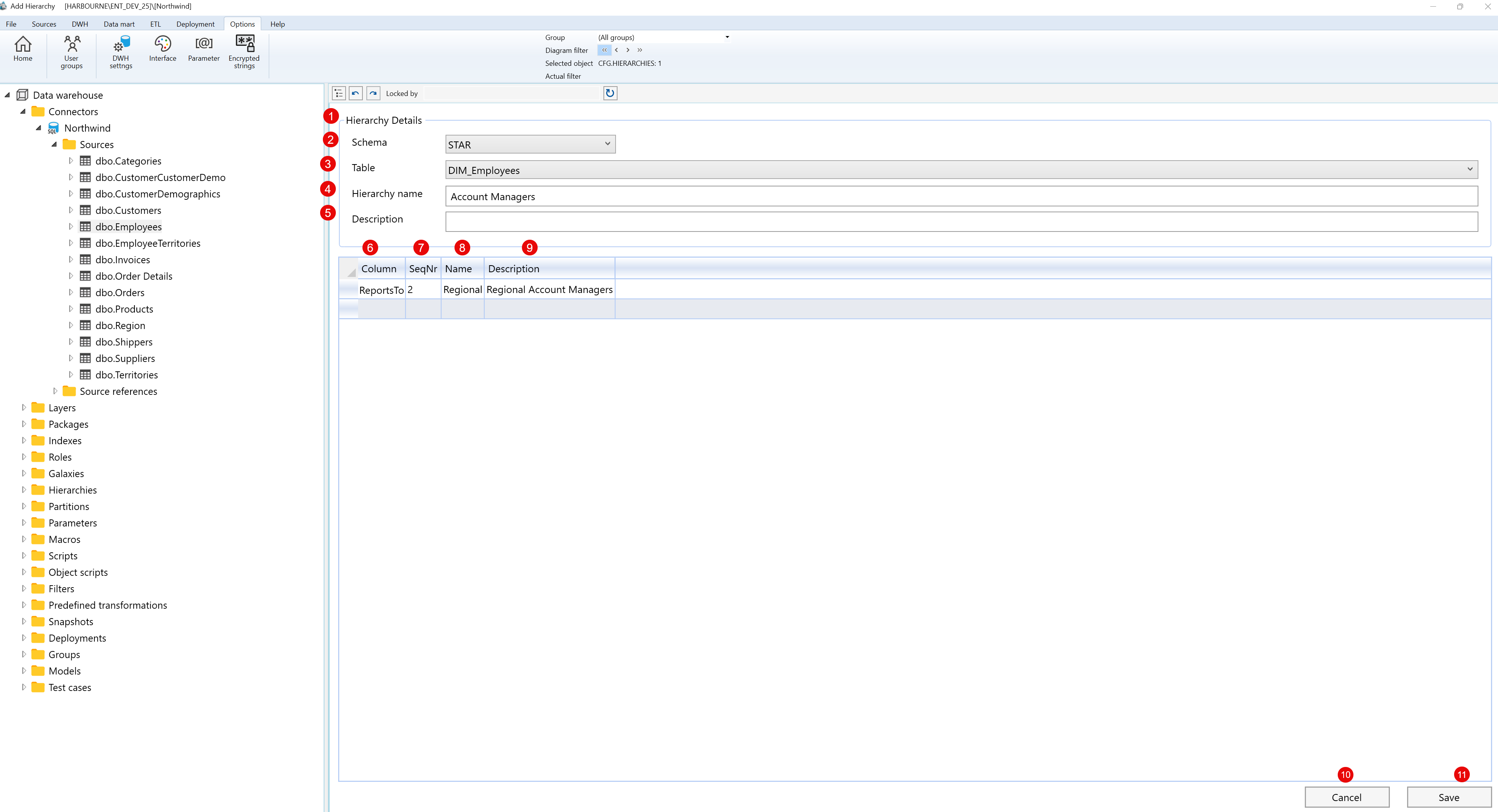
| ID | Property | Description |
|---|---|---|
| 1 | Hierarchy Details | Main editor area for adding or editing the OLAP hierarchy definition. |
| 2 | Schema | Data mart schema that contains the table used by the hierarchy. |
| 3 | Table | Analytical table used by the hierarchy. The selected table controls the available hierarchy columns. |
| 4 | Hierarchy name | Required name of the hierarchy, shown in hierarchy lists and the navigation tree. |
| 5 | Description | Optional description that documents the purpose of the hierarchy. |
| 6 | Column | Column from the selected table used as a hierarchy level. |
| 7 | SeqNr. | Sequence number that defines the order of the hierarchy levels. |
| 8 | Name | Readable name for the hierarchy level. |
| 9 | Description | Optional description for the hierarchy level. |
| 10 | Cancel | Closes the page without continuing the current edit. |
| 11 | Save | Saves the new or changed hierarchy definition and refreshes the related hierarchy information. |
