
Object script
Overview
The Object script page is used to add or edit reusable scripts for AnalyticsCreator repository objects. A script can be associated with a supported object type or maintained as a table-independent script.
Function
Script name is the required name used to identify the script in the navigation tree and Object Scripts list. Description documents the purpose of the script.
Object defines the repository object type associated with the script. When the page is opened with Add script from an object context, the related object type is preselected. Scripts without an object scope are listed under Table-independent scripts.
The parameters grid defines additional values accepted by the script. For object-related scripts, the first parameter is always the selected object ID. ParamNr shows the parameter sequence, Parameter defines its name, and Default value provides an optional value for checking or running the script.
Statement contains the script body. Check validates the current statement using the available object context and parameter values.
Save requires a script name and statement, stores the script and its parameter definitions, refreshes the navigation tree, and reloads the page. Cancel closes the page without continuing the current edit.
Object context menu
Supported repository objects provide List scripts, Add script, and Run script commands in their context menus.
List scripts opens the Object Scripts list filtered for the selected object type. Add script opens this page with the Object field preselected. Run script lists the scripts available for the selected object type and passes the selected object ID to the script.
Access
Open an existing object script from the Object scripts branch or from the Object Scripts list. Add a new object-related script from the context menu of a supported repository object.
How to access
Navigation tree
Data warehouse -> Object scripts -> All scripts -> [script], then right-click the script and select Edit object script. Scripts can also appear under Table-independent scripts or the relevant object-type branch.
Add from an object
Right-click a supported repository object and select Add script. The Object field is initialized from the selected object.
Edit from an object
Right-click a supported repository object and select List scripts, then double-click the required script in the Object Scripts list.
Screen overview
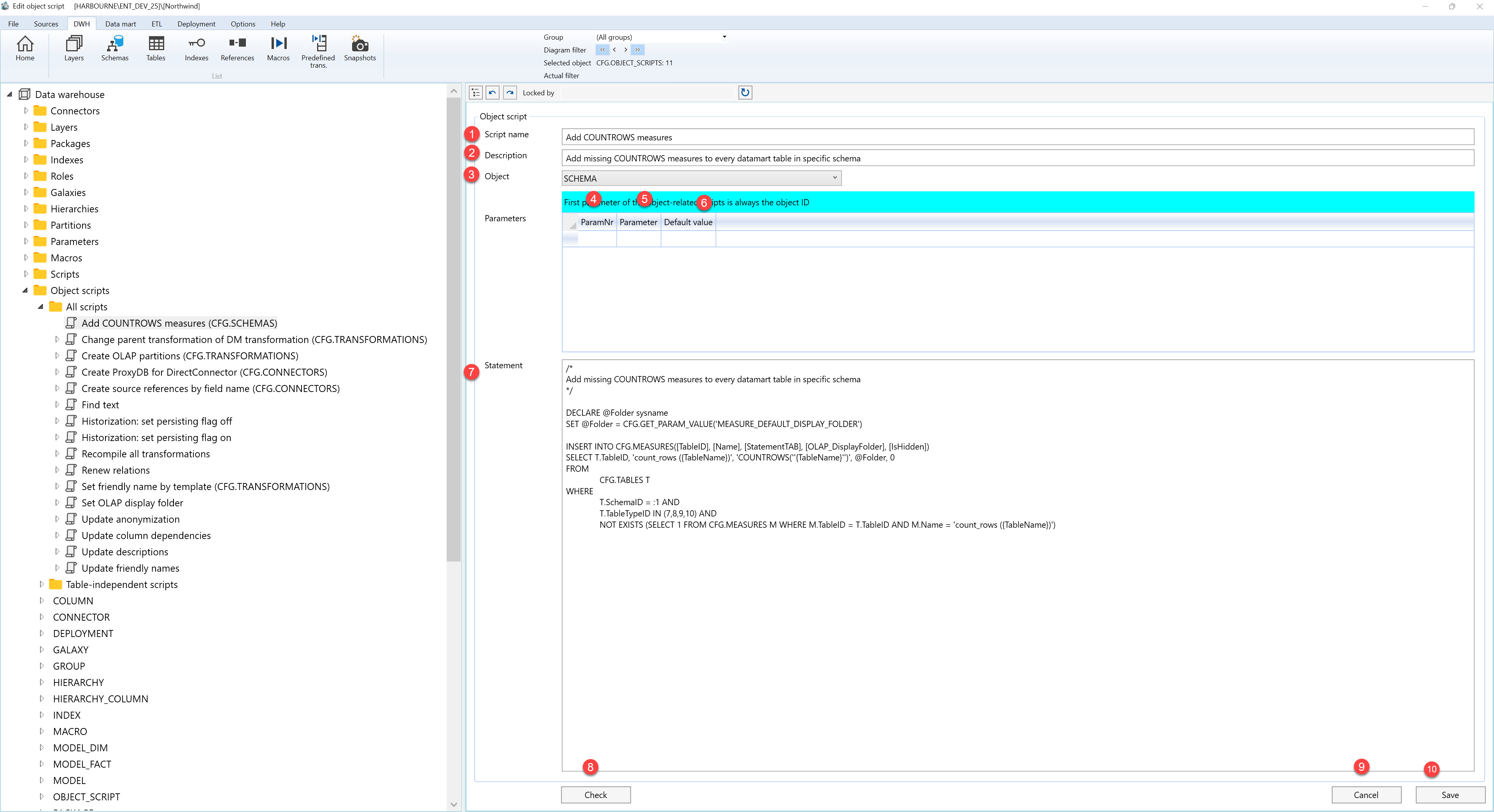
The Object script page contains the script details, object scope, parameter columns, statement editor, and page action buttons. The table follows the numbered markers in the screenshot.
| ID | Property | Description |
|---|---|---|
| 1 | Script name | Required name used to identify the script in the navigation tree and Object Scripts list. |
| 2 | Description | Optional description of the script's purpose. |
| 3 | Object | Repository object type associated with the script. The value can be preselected when the page is opened from an object context. |
| 4 | ParamNr | Read-only sequence number for the parameter. For object-related scripts, the first parameter is always the selected object ID. |
| 5 | Parameter | Name of an additional parameter accepted by the script. |
| 6 | Default value | Optional default value used when checking or running the script. |
| 7 | Statement | Script body executed for the selected repository object. |
| 8 | Check | Validates the current statement using the available object context and parameter values. |
| 9 | Cancel | Closes the page without continuing the current edit. |
| 10 | Save | Validates the required fields and stores the object script and parameter definitions. |
