
Index
Overview
The Index page is used to add or edit a table index in AnalyticsCreator. Use it to select the table, define the index name, configure index properties, and maintain the ordered index columns.
Function
Use this page to create or maintain indexes for warehouse tables. The index definition combines the owning table, index name, compression setting, index behaviour flags, and the list of columns included in the index.
The Index Details area defines the table that owns the index. Schema filters the available tables, and Table controls which columns can be selected in the index-columns grid.
Index name is required. Description documents the purpose of the index. Compression type defines the compression option assigned to the index.
The index flags control how the index is generated. Is unique marks the index as unique, Is clustered marks it as clustered, Is primary key marks it as the table primary key, and Is columnstore marks it as a columnstore index.
The lower grid defines the index columns. Column selects the table column, Position controls the index column order, Is descending sets descending sort order for the selected column, and Include only keeps the column as an included column instead of a key column.
Save validates and stores the index definition. Cancel closes the page without continuing the current edit.
Index rules
AnalyticsCreator validates index settings before saving. A table can have only one primary-key index and only one clustered index. Columnstore indexes cannot be saved as unique or primary-key indexes.
Access
Open this page when you need to add a new table index or edit an existing one. Existing indexes can be opened from the Indexes branch in the navigation tree, from a table's Indexes branch, or from the Indexes list.
How to access
Navigation tree
Data warehouse -> Indexes -> [index] -> Edit index, or Data warehouse -> [schema] -> [table] -> Indexes -> [index] -> Edit index.
Toolbar
DWH -> Indexes, then use New to add an index or double-click an existing row to edit it.
Diagram
The Index page is not opened directly from the diagram. Use the navigation tree, toolbar, or Indexes list.
Screen overview
The Index page contains the index details fields, index behaviour flags, index-column grid, and page action buttons. The table below follows the numbered markers in the screenshot.
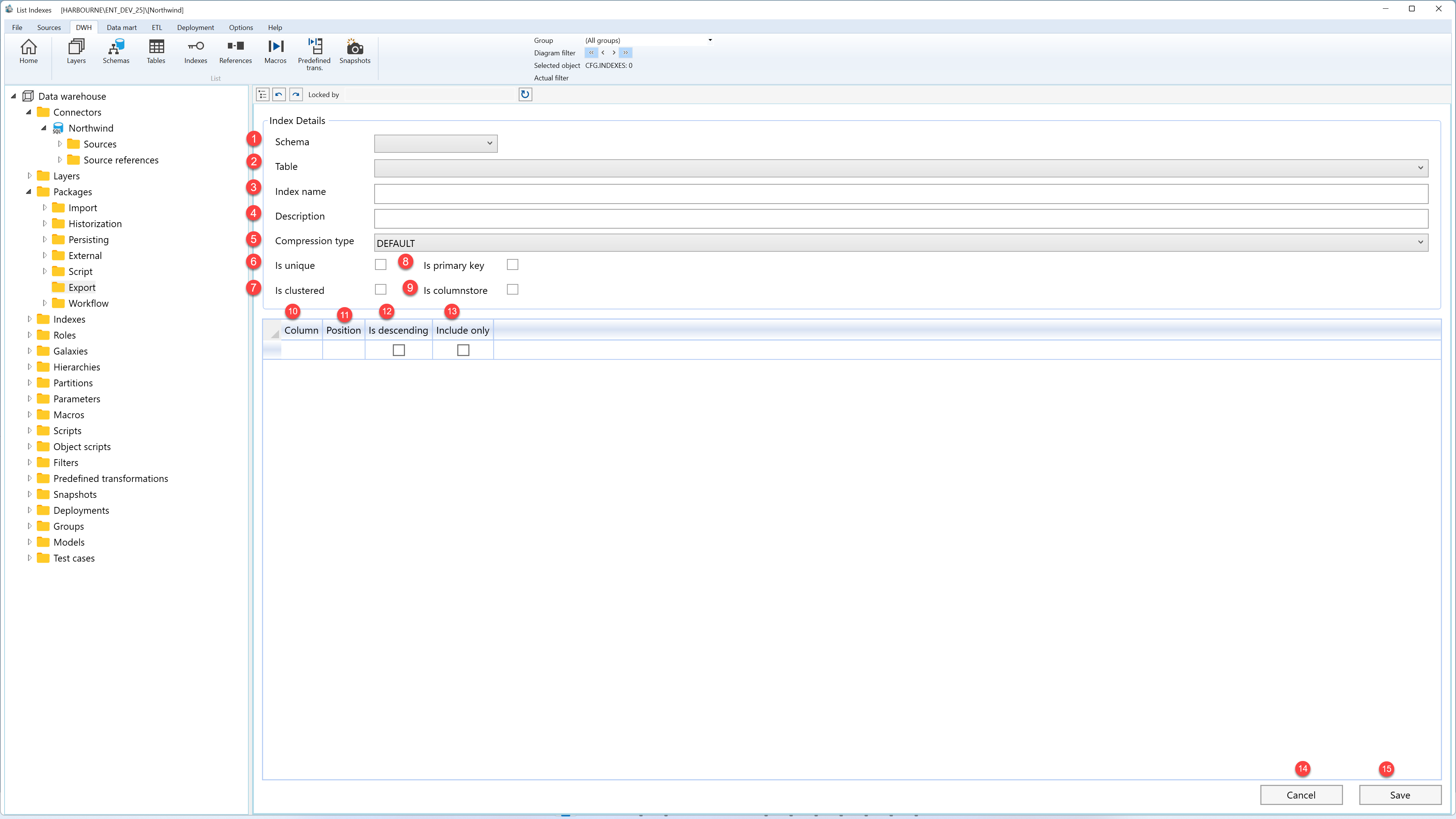
| ID | Property | Description |
|---|---|---|
| 1 | Schema | Schema that contains the table for the index. Changing the schema filters the table list. |
| 2 | Table | Table that owns the index. Changing the table refreshes the available index columns. |
| 3 | Index name | Required name for the index. |
| 4 | Description | Optional description for the index. |
| 5 | Compression type | Compression option assigned to the index. |
| 6 | Is unique | Marks the index as unique when selected. |
| 7 | Is clustered | Marks the index as clustered when selected. Only one clustered index is allowed per table. |
| 8 | Is primary key | Marks the index as the table primary key. Only one primary-key index is allowed per table. |
| 9 | Is columnstore | Marks the index as a columnstore index. Columnstore indexes cannot be saved as unique or primary-key indexes. |
| 10 | Column | Table column included in the index definition. |
| 11 | Position | Order of the column inside the index. |
| 12 | Is descending | Uses descending sort order for the selected index column. |
| 13 | Include only | Includes the column in the index without using it as a key column. |
| 14 | Cancel | Closes the page without continuing the current edit. |
| 15 | Save | Validates and stores the index definition, then refreshes the related navigation information. |
