
Export
Overview
The Edit Export page is used to add or maintain a data export in AnalyticsCreator. Use it to define the export package, review the table-to-target export relationship, configure export settings, map source fields to target fields, maintain package variables, and save the export definition.
Function
An export moves data from an AnalyticsCreator table to a target source or destination. The Edit Export page stores the export mapping in an export package and provides the settings needed to control how the export is generated and executed.
The page includes the main export settings, field mapping, package variables, and additional tabs for scripts and export options. Users can define which source columns are exported, how they map to target columns, which package variables are available, and which options control the generated export package.
Edit Export
The Edit Export page is opened when users edit an existing export from the Packages branch, double-click an export row in the Exports list, or double-click an export marker on the dataflow diagram. It is the main page for maintaining an existing data export.
Access
Open the Edit Export page from the Packages branch in the navigation tree, from the Exports list, or from the dataflow diagram. Use Edit export when maintaining an existing export, or double-click the export where the interface supports direct opening.
How to access
Navigation tree
ETL -> Packages -> Export
Toolbar
No direct toolbar command. Open the export from the package navigation tree, the Exports list, or the dataflow diagram.
Diagram
Double-click the export marker or EP icon on the dataflow diagram to open the export.
Exports list
Double-click an export row in the Exports list to open the Edit Export page.
Screen overview
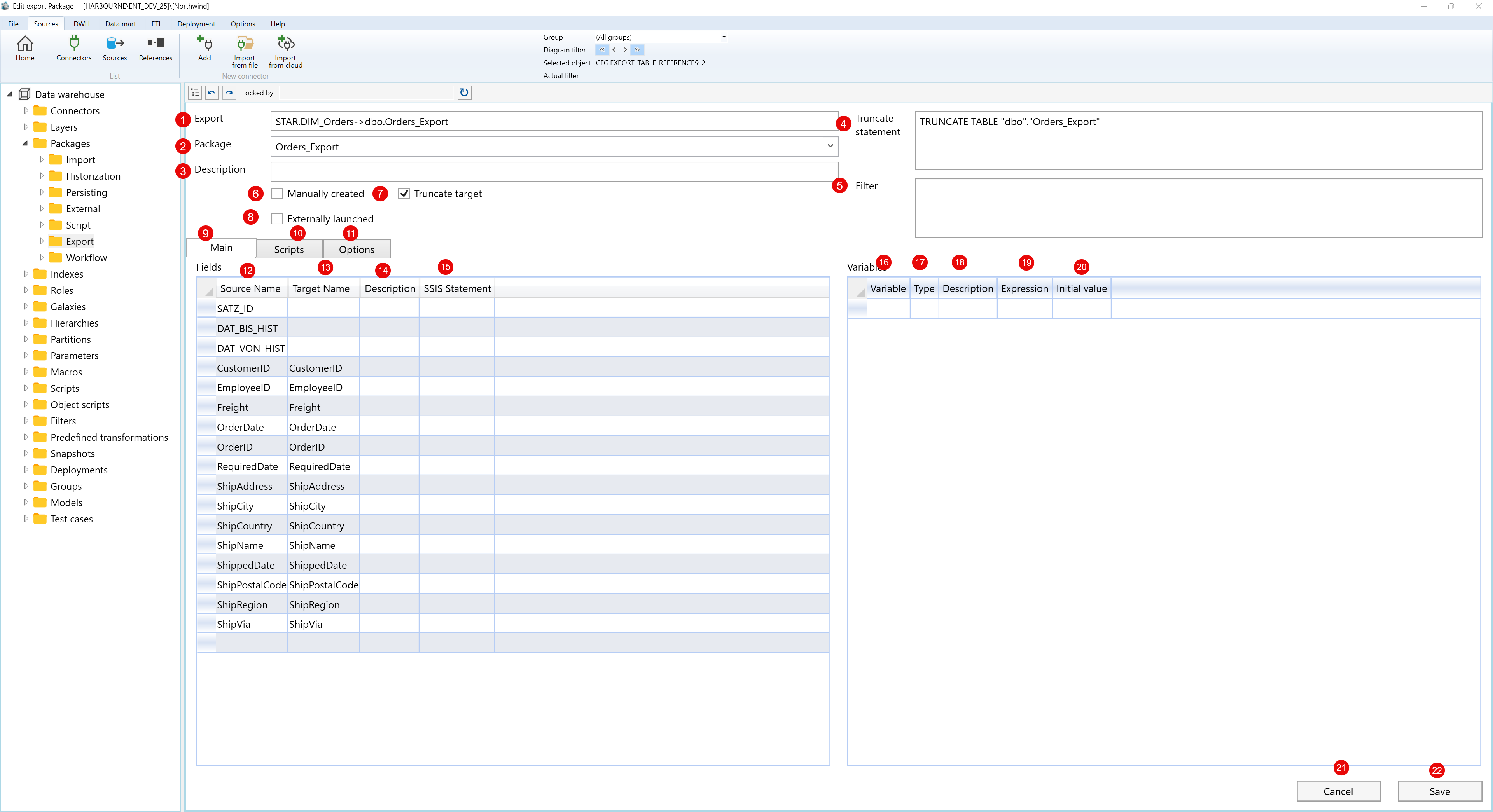
Screen overview: The Edit Export page is used to maintain a data export, map source fields to target fields, configure variables, and save the export definition.
| ID | Property | Description |
|---|---|---|
| 1 | Export | Read-only relationship label showing the table-to-target export being edited. |
| 2 | Package | Export package that owns and executes the export mapping. |
| 3 | Description | Optional description for the export definition. |
| 4 | Truncate statement | SQL statement used when the target is truncated before the export runs. |
| 5 | Filter | Optional filter applied to the data selected for export. |
| 6 | Manually created | Marks the export package as manually maintained. |
| 7 | Truncate target | Controls whether the target is cleared before the export writes data. |
| 8 | Externally launched | Marks the export package as launched outside the standard package run flow. |
| 9 | Main tab | Contains the field mapping grid and package-variable grid. |
| 10 | Scripts tab | Stores SQL that runs before or after the export process. |
| 11 | Options tab | Contains package loading and performance settings for the export. |
| 12 | Source Name | Source table column selected for export. |
| 13 | Target Name | Target column that receives the exported value. |
| 14 | Description | Optional field-level description for the export mapping. |
| 15 | SSIS Statement | Optional package statement for the selected field mapping. |
| 16 | Variable | Variable name available to the generated export package. |
| 17 | Type | Variable data type used by the export package. |
| 18 | Description | Optional description for the package variable. |
| 19 | Expression | Optional expression assigned to the package variable. |
| 20 | Initial value | Initial value assigned to the package variable. |
| 21 | Cancel | Closes the page without continuing the current edit. |
| 22 | Save | Validates and stores the export mapping, variables, scripts, and options. |
