
Deployment
Overview
The Deployment page is used to define and run a deployment package for the active AnalyticsCreator repository. Use it to name the deployment, choose the output directory, configure deployment options, select generated deployment artifacts, maintain SQLCMD variables, and review deployment progress in the log.
Function
Use this page to maintain the deployment name, output directory, data warehouse deployment settings, SSIS settings, optional output files, tabular OLAP deployment settings, multidimensional OLAP deployment settings, deployment artifacts, and SQLCMD variables.
The Options tab contains the deployment configuration. It controls database deployment, package output, BI output, OLAP deployment scripts, generated package selection, and deployment variables.
Deploy starts the deployment run and writes progress to the log. Interrupt stops an active run. Save stores the deployment definition. Cancel closes the page without continuing the current edit.
Deployment context
A deployment definition controls which AnalyticsCreator artifacts are generated or deployed. The same page is used to create a new deployment definition, edit an existing deployment definition, or run a saved deployment.
Access
Open this page from the Deployments branch in the navigation tree, from the Deployment toolbar, or from the Deployments list.
How to access
Navigation tree
Data warehouse -> Deployments -> Add deployment, List deployments, or [deployment] -> Edit/Run deployment.
Toolbar
Deployment -> Deployment package.
Diagram
Not opened directly from the diagram. Use the Deployments branch or the Deployment toolbar.
Screen overview
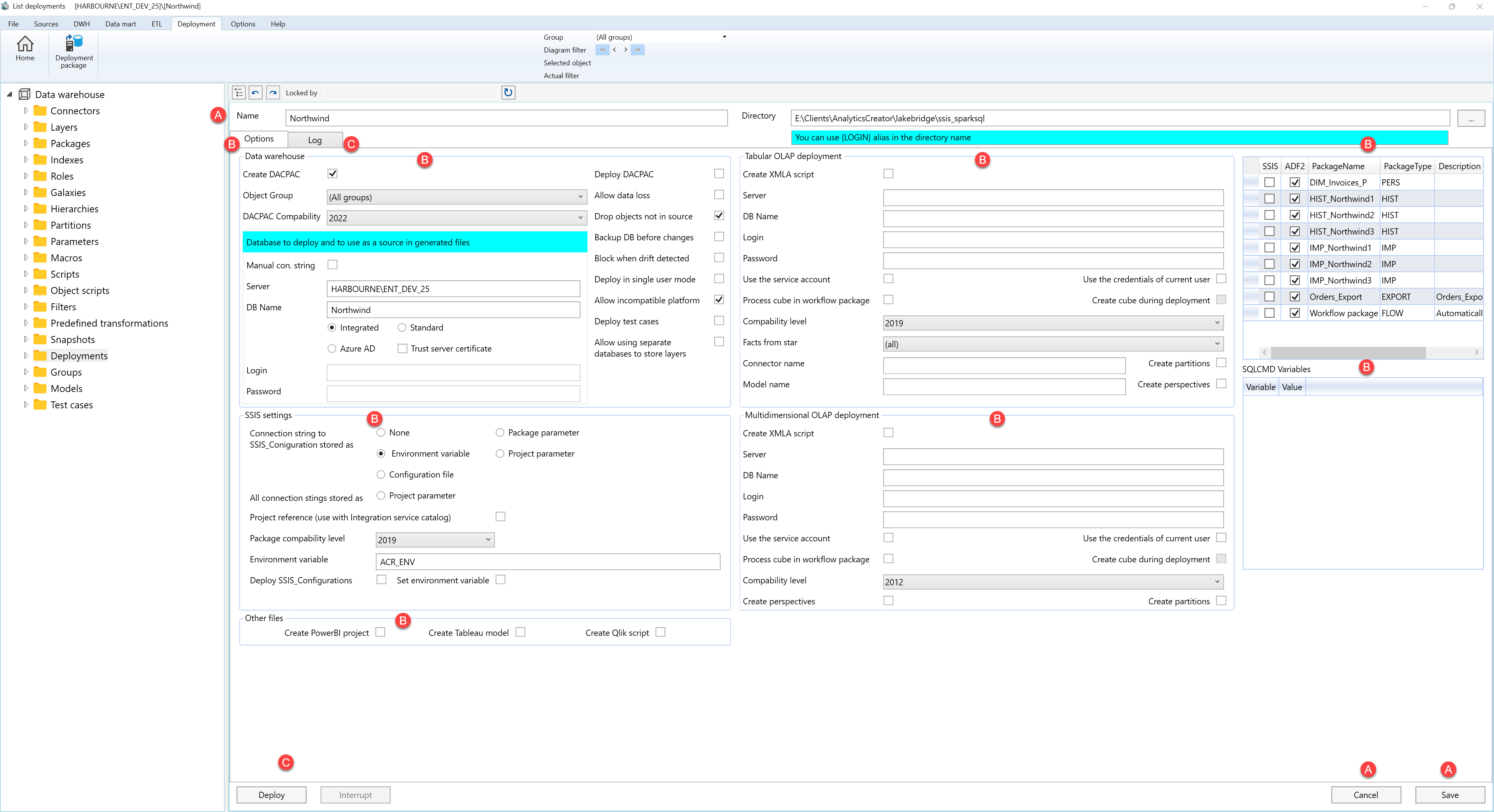
The Deployment page is split into three main areas: deployment identity and page actions, deployment options, and deployment run controls. The deployment options area is documented in separate tables because it contains multiple configuration sections.
A. Deployment identity and page actions
Area A contains the deployment name, output directory, and page-level actions.
| ID | Property / Action | Description |
|---|---|---|
| A.1 | Name | Deployment name shown in the Deployments list and navigation tree. |
| A.2 | Directory | Output directory used for generated deployment files. The directory can use the {LOGIN} alias. |
| A.3 | Cancel | Closes the page without continuing the current edit. |
| A.4 | Save | Stores the current deployment definition. |
B. Deployment options
Area B contains the deployment configuration sections, deployment artifact selection, and SQLCMD variables.
B.1 Data warehouse
| ID | Property | Description |
|---|---|---|
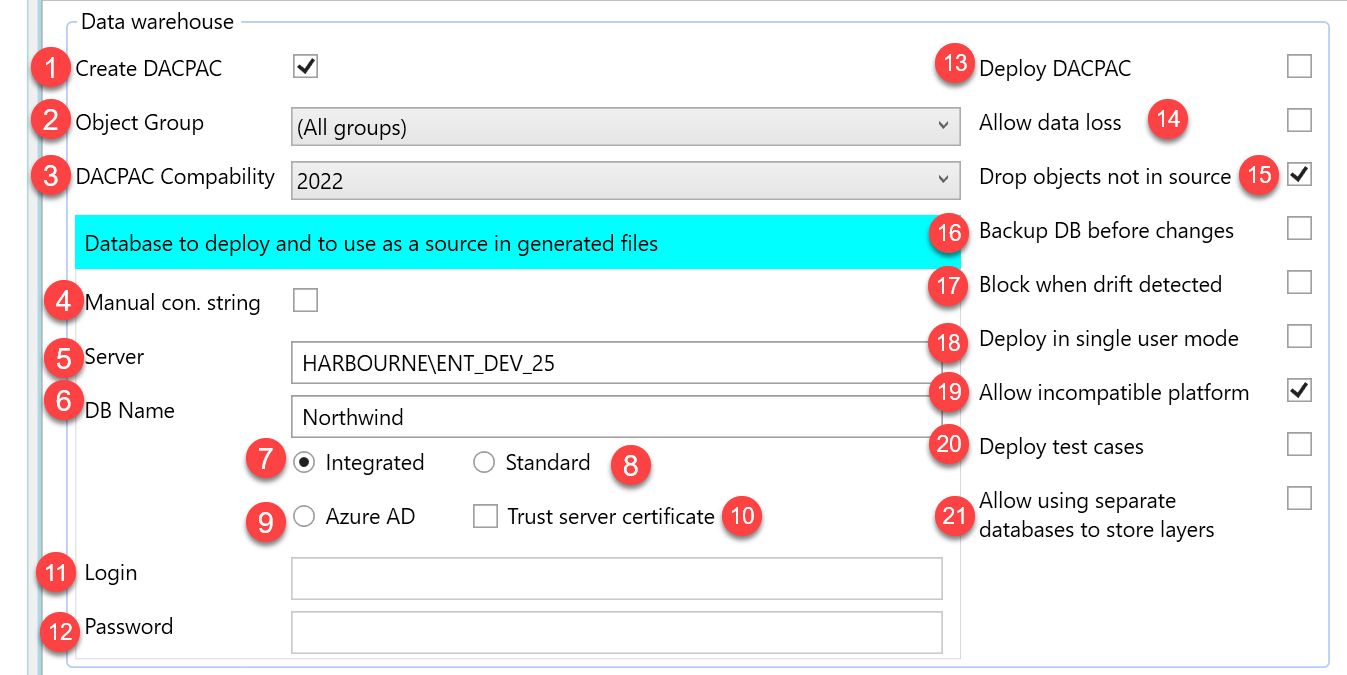
| B.1 | Data warehouse | Section used to configure DACPAC generation, target database connection, deployment safety options, and layer-database handling. |
| B.1.1 | Create DACPAC | Generates a DACPAC for the selected repository objects. |
| B.1.2 | Object Group | Limits the deployment to a selected object group or keeps all groups selected. |
| B.1.3 | DACPAC Compatibility | Compatibility level used when generating the DACPAC. |
| B.1.4 | Database to deploy and to use as source in generated files | Target database connection used by the deployment and generated output files. |
| B.1.5 | Manual con. string | Uses a manual connection string instead of the individual connection fields. |
| B.1.6 | Server | Target database server. |
| B.1.7 | DB Name | Target database name. |
| B.1.8 | Authentication options | Selects the database authentication mode: Integrated, Standard, or Azure AD. |
| B.1.9 | Trust server certificate | Allows the connection to trust the server certificate. |
| B.1.10 | Login | Login used when the selected authentication mode requires credentials. |
| B.1.11 | Password | Password used when the selected authentication mode requires credentials. |
| B.1.12 | Deploy DACPAC | Deploys the generated DACPAC to the configured target database. |
| B.1.13 | Allow data loss | Allows deployment changes that may cause data loss. |
| B.1.14 | Drop objects not in source | Drops target objects that are not present in the generated source model. |
| B.1.15 | Backup DB before changes | Creates a database backup before applying deployment changes. |
| B.1.16 | Block when drift detected | Blocks deployment when target drift is detected. |
| B.1.17 | Deploy in single user mode | Runs deployment in single-user mode. |
| B.1.18 | Allow incompatible platform | Allows deployment when the target platform is marked as incompatible. |
| B.1.19 | Deploy test cases | Includes test-case deployment output. |
| B.1.20 | Allow using separate databases to store layers | Enables layer-specific database handling for deployments that store layers in separate databases. |
B.2 SSIS settings
| ID | Property | Description |
|---|---|---|
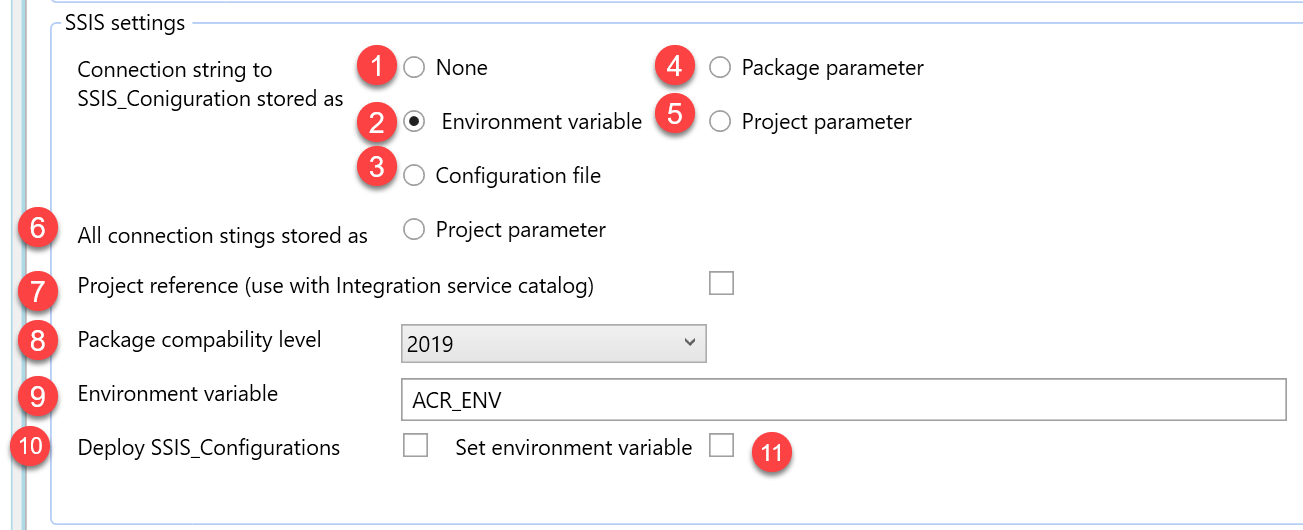
| B.2 | SSIS settings | Section used to configure generated SSIS package settings. |
| B.2.1 | Connection string to SSIS_Configuration stored as | Defines how the SSIS_Configuration connection string is stored. |
| B.2.2 | Storage mode options | Available storage options include None, Environment variable, Configuration file, Package parameter, and Project parameter. |
| B.2.3 | All connection strings stored as | Defines how all generated package connection strings are stored. |
| B.2.4 | Project reference | Uses project-reference behaviour with the Integration Services catalog. |
| B.2.5 | Package compatibility level | SQL Server package compatibility level used for generated SSIS output. |
| B.2.6 | Environment variable | Environment variable name used when environment-variable storage is selected. |
| B.2.7 | Deploy SSIS_Configurations | Includes SSIS_Configurations deployment output. |
| B.2.8 | Set environment variable | Sets the configured environment variable during deployment generation. |
B.3 Other files

| ID | Property | Description |
|---|---|---|
| B.3 | Other files | Section used to select additional BI and script output files. |
| B.3.1 | Create PowerBI project | Generates Power BI project output. |
| B.3.2 | Create Tableau model | Generates Tableau model output. |
| B.3.3 | Create Qlik script | Generates Qlik script output. |
B.4 Tabular OLAP deployment
| ID | Property | Description |
|---|---|---|
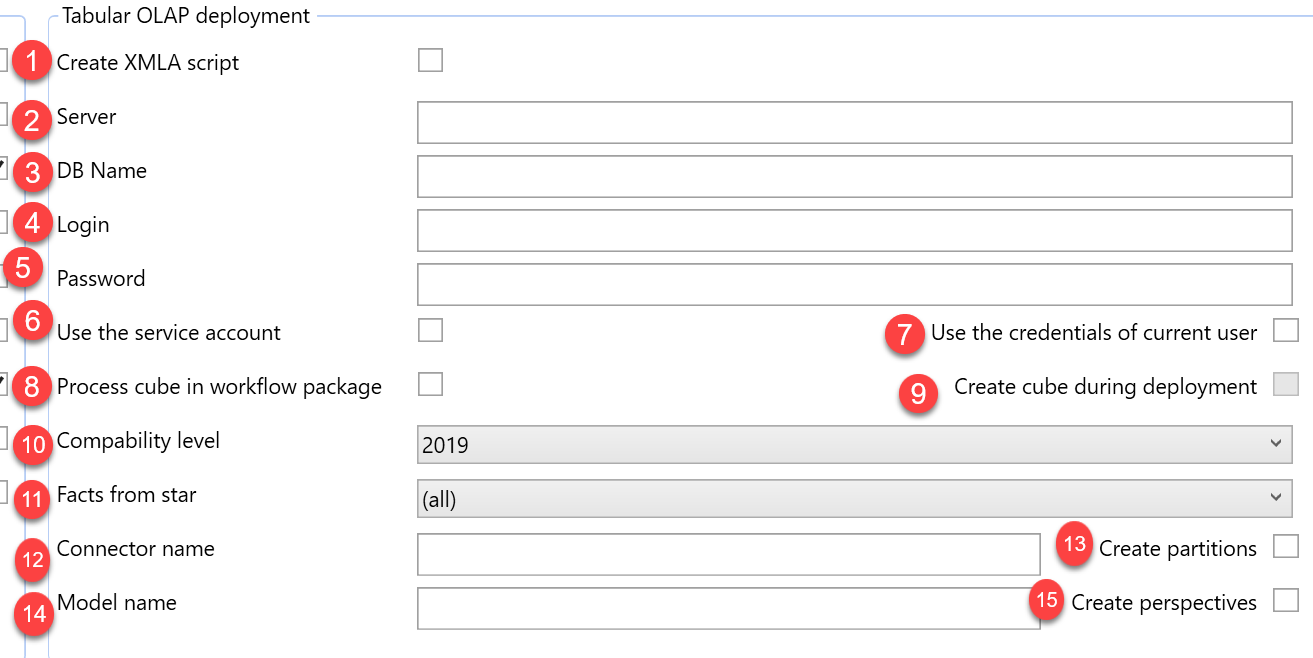
| B.4 | Tabular OLAP deployment | Section used to configure tabular OLAP deployment output. |
| B.4.1 | Create XMLA script | Generates an XMLA script for the tabular OLAP model. |
| B.4.2 | Server | Tabular OLAP server. |
| B.4.3 | DB Name | Tabular OLAP database name. |
| B.4.4 | Login | Login used for the tabular OLAP deployment target when credentials are required. |
| B.4.5 | Password | Password used for the tabular OLAP deployment target when credentials are required. |
| B.4.6 | Use the service account | Uses the service account for the tabular OLAP deployment connection. |
| B.4.7 | Use the credentials of current user | Uses the current user credentials for the tabular OLAP deployment connection. |
| B.4.8 | Process cube in workflow package | Includes cube processing in the workflow package. |
| B.4.9 | Create cube during deployment | Creates the tabular cube during deployment. |
| B.4.10 | Compatibility level | Compatibility level for the tabular OLAP model. |
| B.4.11 | Facts from star | Star context used for fact generation in the tabular model. |
| B.4.12 | Connector name | Connector name used by the tabular model output. |
| B.4.13 | Model name | Model name used for the tabular OLAP output. |
| B.4.14 | Create partitions | Includes tabular partition creation. |
| B.4.15 | Create perspectives | Includes tabular perspective creation. |
B.5 Multidimensional OLAP deployment
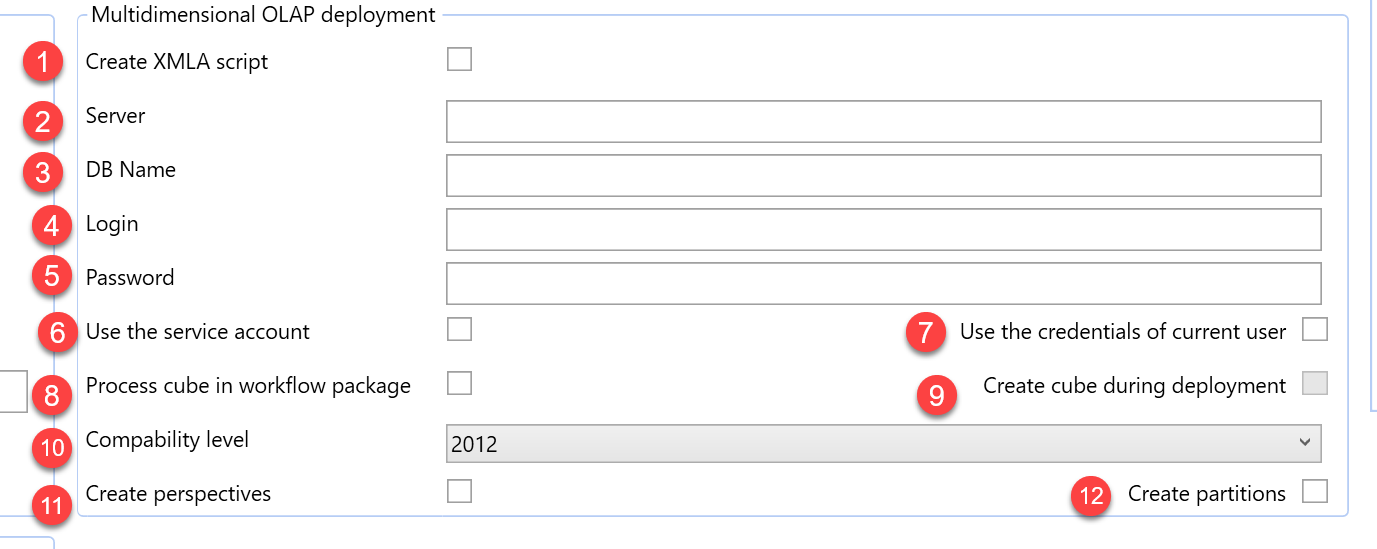
| ID | Property | Description |
|---|---|---|
| B.5 | Multidimensional OLAP deployment | Section used to configure multidimensional OLAP deployment output. |
| B.5.1 | Create XMLA script | Generates an XMLA script for the multidimensional OLAP model. |
| B.5.2 | Server | Multidimensional OLAP server. |
| B.5.3 | DB Name | Multidimensional OLAP database name. |
| B.5.4 | Login | Login used for the multidimensional OLAP deployment target when credentials are required. |
| B.5.5 | Password | Password used for the multidimensional OLAP deployment target when credentials are required. |
| B.5.6 | Use the service account | Uses the service account for the multidimensional OLAP deployment connection. |
| B.5.7 | Use the credentials of current user | Uses the current user credentials for the multidimensional OLAP deployment connection. |
| B.5.8 | Process cube in workflow package | Includes cube processing in the workflow package. |
| B.5.9 | Create cube during deployment | Creates the multidimensional cube during deployment. |
| B.5.10 | Compatibility level | Compatibility level for the multidimensional OLAP model. |
| B.5.11 | Create perspectives | Includes multidimensional perspective creation. |
| B.5.12 | Create partitions | Includes multidimensional partition creation. |
B.6 Deployment Packages
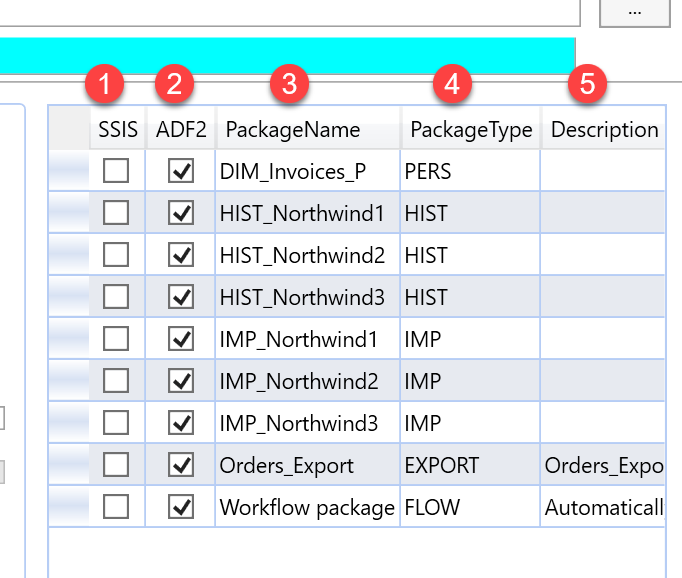
| ID | Property | Description |
|---|---|---|
| B.6 | Deployment artifacts | Grid used to select generated packages for deployment output. |
| B.6.1 | SSIS | Includes the package in SSIS output. |
| B.6.2 | ADF2 | Includes the package in Azure Data Factory v2 output. |
| B.6.3 | PackageName | Generated package name. |
| B.6.4 | PackageType | Generated package type. |
| B.6.5 | Description | Description of the generated package. |
B.7 SQLCMD Variables
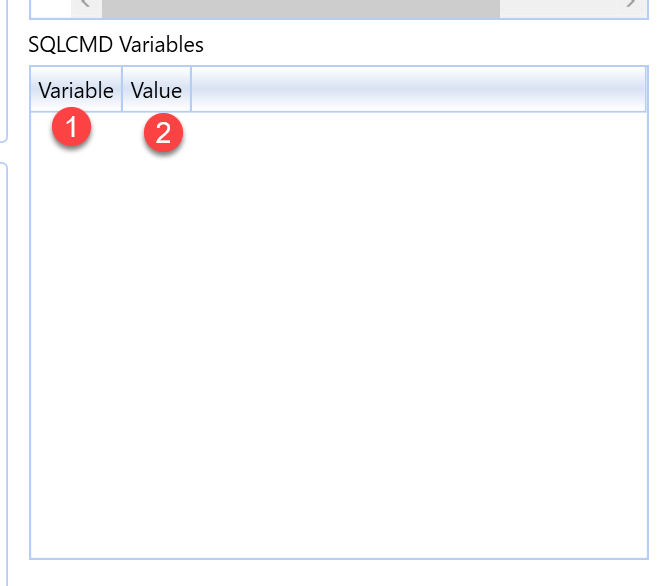
| ID | Property | Description |
|---|---|---|
| B.7 | SQLCMD Variables | Grid used to maintain deployment variables. |
| B.7.1 | Variable | SQLCMD variable name. |
| B.7.2 | Value | Value assigned to the SQLCMD variable. |
C. Log and run controls
Area C contains the Log tab and deployment run controls.
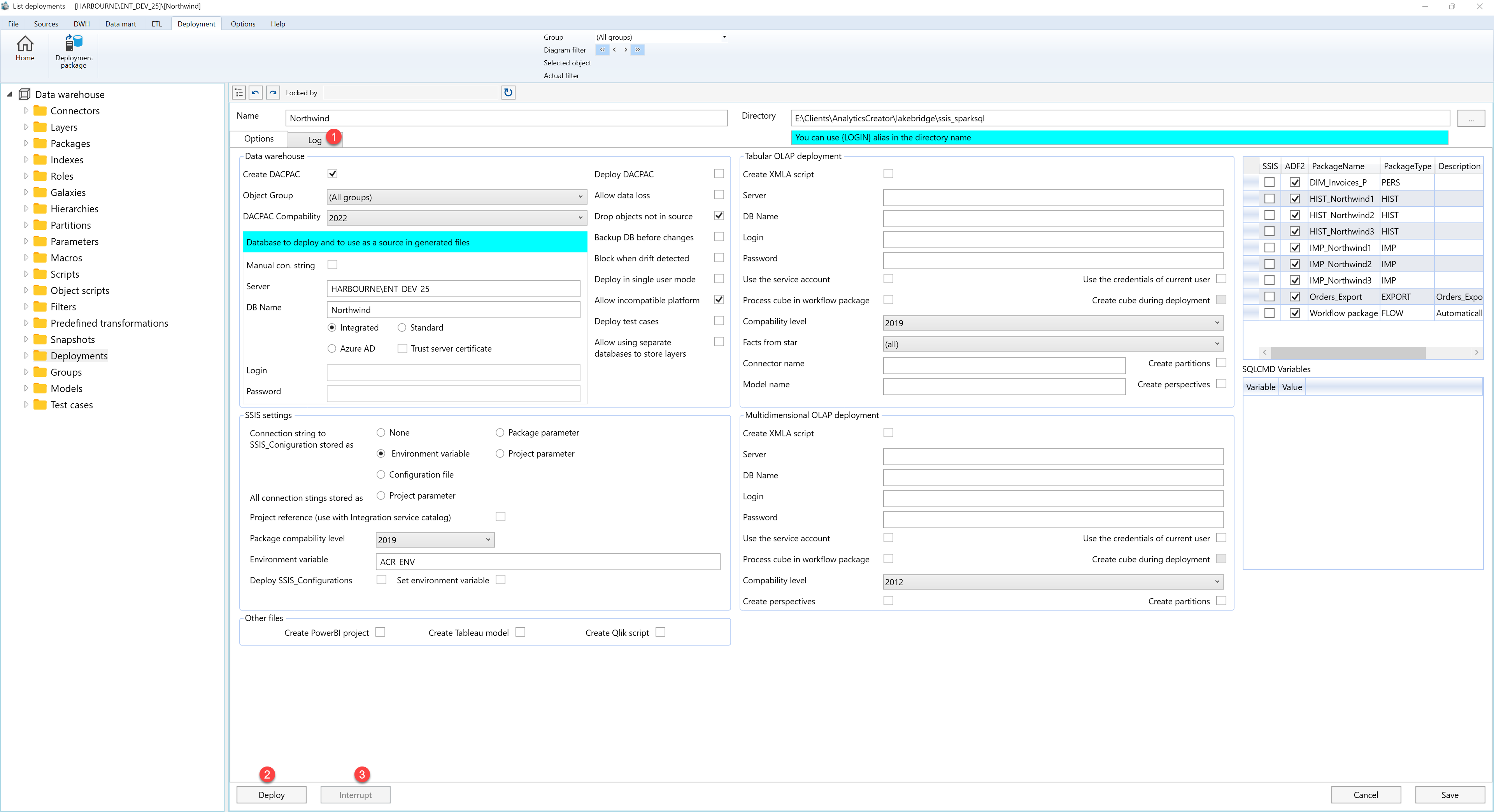
| ID | Property / Action | Description |
|---|---|---|
| C.1 | Log | Tab used to display deployment progress and run messages after deployment starts. |
| C.2 | Deploy | Starts the deployment run and writes progress to the log. |
| C.3 | Interrupt | Stops an active deployment run. |
