
Layers
Overview
The Layers feature in AnalyticsCreator defines the logical and sequential structure in which metadata objects are grouped and generated. Each object in a project is assigned to a layer, which determines its build order and visibility during solution generation.
Function
Layers represent vertical slices in a project's architecture, such as Source, Staging, Persisted Staging, Transformation, Data Warehouse - Core, or Datamart. One layer can have one or more schemas associated with it. They are used to control:
Object assignment and isolation
Layers define where objects belong and keep architectural responsibilities clearly separated.
Deployment sequencing
Layers control the order in which structures are generated and deployed across environments.
Selective generation
Specific parts of the solution can be included or excluded based on layer configuration.
Dependency resolution
Layer order influences build-time logic and helps resolve dependencies between generated objects.
Layer configuration impacts how AnalyticsCreator generates the SQL database schema, Azure Data Factory pipelines, and semantic models.
Access
Layers are accessible from the DWH section. A dedicated Layers panel displays all defined layers, their order, and their assignment status.
How to access
Navigation tree
Data warehouse > Layers > LAYER > Edit layer
Toolbar
DWH > Layers
Diagram
Not direct. Use the navigation tree or DWH toolbar list command.
Visual element
List Layers page
Screen overview
The image below shows the List Layers interface with columns labeled for easy identification.
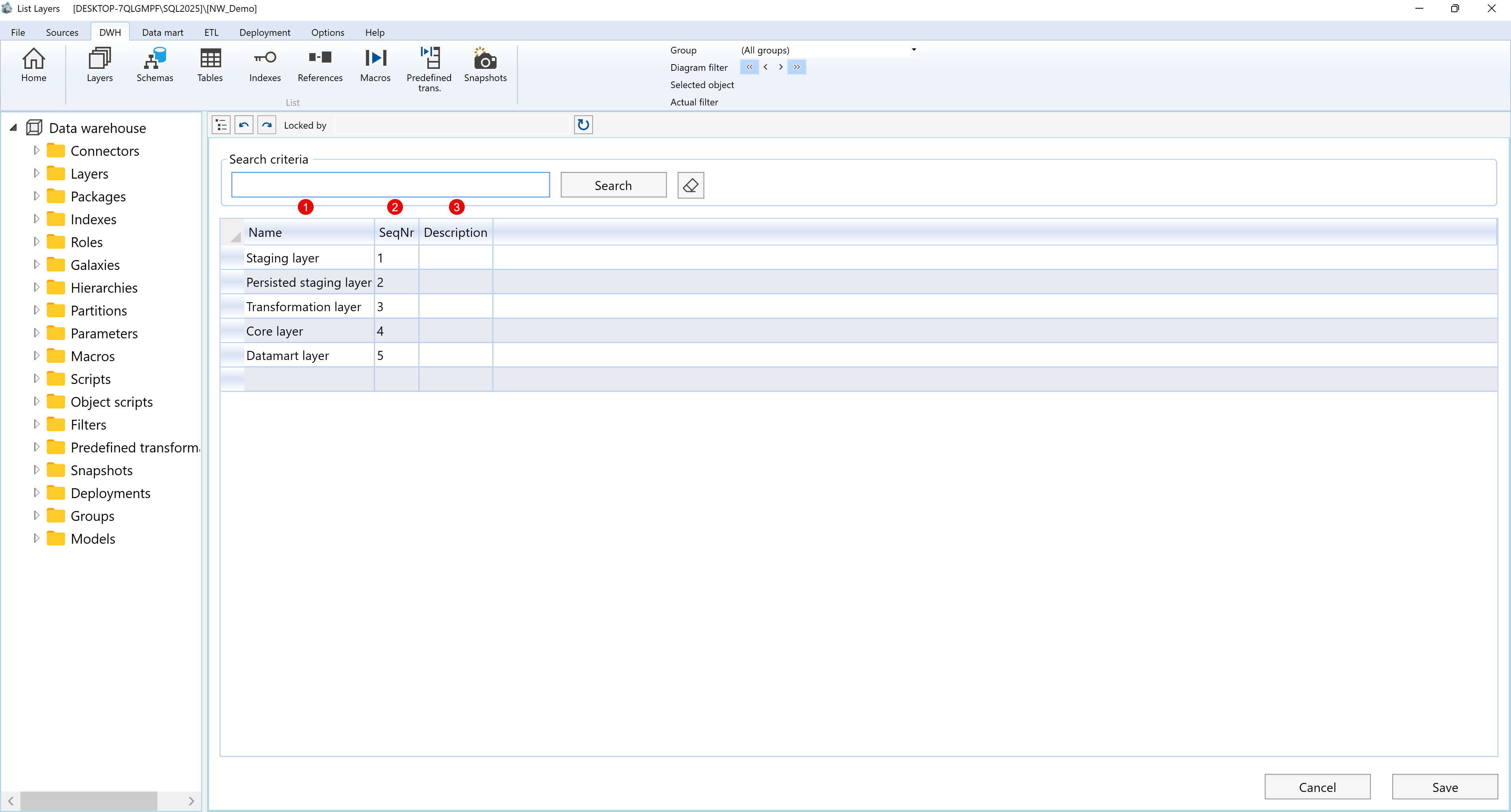
| ID | Property | Description |
|---|---|---|
| 1 | Name | Name of the layer used to identify it within the project structure. |
| 2 | SeqNr | Defines the sequence number of the layer and controls its display order in the lineage. |
| 3 | Description | Optional field used to provide a more detailed description of the layer. |
Context menus access - Layers - Where I can find it
The context menu examples below use Data warehouse > Layers > Core layer > DWH as the representative branch. This covers the layer, schema, export, references, tables, indexes, columns, and transformations nodes captured under the Layers navigation tree.
Paste image here: Layers navigation tree overview
A.1) Layers
Paste image here: Data warehouse > Layers
| ID | Command | Description |
|---|---|---|
| 1 | Refresh | Reloads the Layers branch. |
| 2 | DWH Wizard | Opens the Data Warehouse wizard from the Layers context. |
A.2) Layers - Example - Core layer
Paste image here: Data warehouse > Layers > Core layer
| ID | Command | Description |
|---|---|---|
| 1 | Refresh | Reloads the selected layer branch. |
| 2 | Add schema | Creates a schema under the selected layer. |
| 3 | Edit layer | Opens the selected layer for editing. |
| 4 | Delete layer | Deletes the selected layer. |
A.3) Layers - Example - Core layer > DWH schema
Paste image here: Data warehouse > Layers > Core layer > DWH
| ID | Command | Description |
|---|---|---|
| 1 | Set diagram filter | Sets the diagram filter to the selected schema. |
| 2 | Add to diagram filter | Adds the selected schema to the current diagram filter. |
| 3 | Edit schema | Opens the selected schema for editing. |
| 4 | Delete schema | Deletes the selected schema. |
| 5 | List scripts | Lists scripts available for the selected schema context. |
| 6 | Add script | Creates a new script for the selected schema context. |
| 7 | Run script | Runs a script available for the selected schema context. |
B.1) Core layer > DWH > Export
Paste image here: Core layer > DWH > Export
| ID | Command | Description |
|---|---|---|
| 1 | Refresh | Reloads the Export branch for the selected schema. |
| 2 | List packages | Opens the package list for the selected export context. |
| 3 | Add export package | Creates a new export package for the selected schema. |
| 4 | List scripts | Lists scripts available for the selected export context. |
| 5 | Add script | Creates a new script for the selected export context. |
| 6 | Run script | Runs a script available for the selected export context. |
C.1) Core layer > DWH > References
Paste image here: Core layer > DWH > References
| ID | Command | Description |
|---|---|---|
| 1 | Refresh | Reloads the References branch for the selected schema. |
| 2 | List references | Opens the references list for the selected schema context. |
| 3 | Add reference | Creates a new reference for the selected schema context. |
| 4 | List scripts | Lists scripts available for the selected references context. |
| 5 | Add script | Creates a new script for the selected references context. |
| 6 | Run script | Runs a script available for the selected references context. |
C.2) Core layer > DWH > References > Reference group
Paste image here: Core layer > DWH > References > Unused other references
| ID | Command | Description |
|---|---|---|
| 1 | Refresh | Reloads the selected reference group. |
| 2 | List references | Opens the references list for the selected reference group. |
| 3 | Add reference | Creates a new reference in the selected reference group. |
| 4 | List scripts | Lists scripts available for the selected reference group context. |
| 5 | Add script | Creates a new script for the selected reference group context. |
| 6 | Run script | Runs a script available for the selected reference group context. |
C.3) Core layer > DWH > References > Reference
Paste image here: Core layer > DWH > References > FK_CustomerCustomerDemo
| ID | Command | Description |
|---|---|---|
| 1 | Refresh | Reloads the selected table reference. |
| 2 | Edit table reference | Opens the selected table reference for editing. |
| 3 | Delete table reference | Deletes the selected table reference. |
| 4 | List scripts | Lists scripts available for the selected table-reference context. |
| 5 | Add script | Creates a new script for the selected table-reference context. |
| 6 | Run script | Runs a script available for the selected table-reference context. |
C.4) Core layer > DWH > References > Reference group > Reference
Paste image here: Unused other references > FK_DIM_Customers_FACT_Orders_FK_Customers
| ID | Command | Description |
|---|---|---|
| 1 | Refresh | Reloads the selected table reference. |
| 2 | Edit table reference | Opens the selected table reference for editing. |
| 3 | Delete table reference | Deletes the selected table reference. |
| 4 | List scripts | Lists scripts available for the selected table-reference context. |
| 5 | Add script | Creates a new script for the selected table-reference context. |
| 6 | Run script | Runs a script available for the selected table-reference context. |
D.1) Core layer > DWH > Tables
Paste image here: Core layer > DWH > Tables
| ID | Command | Description |
|---|---|---|
| 1 | Refresh | Reloads the Tables branch for the selected schema. |
| 2 | List tables | Opens the table list for the selected schema. |
| 3 | Add externally filled table | Creates an externally filled table under the selected schema. |
| 4 | List scripts | Lists scripts available for the selected tables context. |
| 5 | Add script | Creates a new script for the selected tables context. |
| 6 | Run script | Runs a script available for the selected tables context. |
D.2) Core layer > DWH > Tables > Table
Paste image here: Core layer > DWH > Tables > DIM_Invoices_T
| ID | Command | Description |
|---|---|---|
| 1 | Locate in diagram | Locates the selected table in the dataflow diagram. |
| 2 | Set diagram filter | Sets the diagram filter to the selected table. |
| 3 | Add to diagram filter | Adds the selected table to the current diagram filter. |
| 4 | Edit table | Opens the selected table for editing. |
| 5 | Delete table | Deletes the selected table. |
| 6 | Add historization | Runs the add-historization command for the selected table. |
| 7 | Add vault hub | Runs the add-vault-hub command for the selected table. |
| 8 | Add vault satellite | Runs the add-vault-satellite command for the selected table. |
| 9 | Add vault link | Runs the add-vault-link command for the selected table. |
| 10 | Show reference diagram | Opens the reference diagram for the selected table. |
| 11 | List scripts | Lists scripts available for the selected table context. |
| 12 | Add script | Creates a new script for the selected table context. |
| 13 | Run script | Runs a script available for the selected table context. |
D.3) Core layer > DWH > Tables > Table > Columns
Paste image here: DIM_Invoices_T > Columns
| ID | Command | Description |
|---|---|---|
| 1 | Refresh | Reloads the Columns branch for the selected table. |
| 2 | List columns | Opens the column list for the selected table. |
| 3 | List scripts | Lists scripts available for the selected columns context. |
| 4 | Add script | Creates a new script for the selected columns context. |
| 5 | Run script | Runs a script available for the selected columns context. |
D.4) Core layer > DWH > Tables > Table > Column
Paste image here: DIM_Invoices_T > Columns > Address
| ID | Command | Description |
|---|---|---|
| 1 | Edit column | Opens the selected column for editing. |
| 2 | Delete column | Deletes the selected column. |
| 3 | List scripts | Lists scripts available for the selected column context. |
| 4 | Add script | Creates a new script for the selected column context. |
| 5 | Run script | Runs a script available for the selected column context. |
D.5) Core layer > DWH > Tables > Table > Indexes
Paste image here: DIM_Invoices_T > Indexes
| ID | Command | Description |
|---|---|---|
| 1 | Refresh | Reloads the Indexes branch for the selected table. |
| 2 | List indexes | Opens the index list for the selected table. |
| 3 | Add index | Creates a new index for the selected table. |
| 4 | List scripts | Lists scripts available for the selected indexes context. |
| 5 | Add script | Creates a new script for the selected indexes context. |
| 6 | Run script | Runs a script available for the selected indexes context. |
D.6) Core layer > DWH > Tables > Table > Index
Paste image here: DIM_Invoices_T > Indexes > Ix_Order
| ID | Command | Description |
|---|---|---|
| 1 | Refresh | Reloads the selected index. |
| 2 | Edit index | Opens the selected index for editing. |
| 3 | Delete index | Deletes the selected index. |
| 4 | List scripts | Lists scripts available for the selected index context. |
| 5 | Add script | Creates a new script for the selected index context. |
| 6 | Run script | Runs a script available for the selected index context. |
D.7) Core layer > DWH > Tables > Table > Index > Column
Paste image here: Ix_Order > OrderID
| ID | Command | Description |
|---|---|---|
| 1 | Edit index columns | Opens the index-column editor for the selected index column. |
D.8) Core layer > DWH > Tables > Table > References
Paste image here: DIM_Invoices_T > References
| ID | Command | Description |
|---|---|---|
| 1 | Refresh | Reloads the References branch for the selected table. |
| 2 | List references | Opens the references list for the selected table. |
| 3 | Add reference | Creates a new reference for the selected table. |
| 4 | List scripts | Lists scripts available for the selected table-references context. |
| 5 | Add script | Creates a new script for the selected table-references context. |
| 6 | Run script | Runs a script available for the selected table-references context. |
D.9) Core layer > DWH > Tables > Table > References > Reference group
Paste image here: DIM_Invoices_T > References > Unused other references
| ID | Command | Description |
|---|---|---|
| 1 | Refresh | Reloads the selected table-reference group. |
| 2 | List references | Opens the references list for the selected table-reference group. |
| 3 | Add reference | Creates a new reference in the selected table-reference group. |
| 4 | List scripts | Lists scripts available for the selected table-reference group context. |
| 5 | Add script | Creates a new script for the selected table-reference group context. |
| 6 | Run script | Runs a script available for the selected table-reference group context. |
E.1) Core layer > DWH > Transformations
Paste image here: Core layer > DWH > Transformations
| ID | Command | Description |
|---|---|---|
| 1 | Refresh | Reloads the Transformations branch for the selected schema. |
| 2 | List transformations | Opens the transformations list for the selected schema. |
| 3 | Add transformation | Creates a new transformation under the selected schema. |
| 4 | Add calendar dimension | Creates a calendar dimension under the selected schema. |
| 5 | Add time dimension | Creates a time dimension under the selected schema. |
| 6 | Add snapshot dimension | Creates a snapshot dimension under the selected schema. |
| 7 | List scripts | Lists scripts available for the selected transformations context. |
| 8 | Add script | Creates a new script for the selected transformations context. |
| 9 | Run script | Runs a script available for the selected transformations context. |
E.2) Core layer > DWH > Transformations > Transformation
Paste image here: Transformations > DIM_Calendar
| ID | Command | Description |
|---|---|---|
| 1 | Locate in diagram | Locates the selected transformation in the dataflow diagram. |
| 2 | Set diagram filter | Sets the diagram filter to the selected transformation. |
| 3 | Add to diagram filter | Adds the selected transformation to the current diagram filter. |
| 4 | Edit transformation | Opens the selected transformation for editing. |
| 5 | Delete transformation | Deletes the selected transformation. |
| 6 | Duplicate transformation | Duplicates the selected transformation. |
| 7 | Create model | Runs the create-model command for the selected transformation. |
| 8 | Add to model | Runs the add-to-model command for the selected transformation. |
| 9 | Show reference diagram | Opens the reference diagram for the selected transformation. |
| 10 | List scripts | Lists scripts available for the selected transformation context. |
| 11 | Add script | Creates a new script for the selected transformation context. |
| 12 | Run script | Runs a script available for the selected transformation context. |
E.3) Core layer > DWH > Transformations > Transformation > Table
Paste image here: Transformations > DIM_Calendar > DIM_Calendar
| ID | Command | Description |
|---|---|---|
| 1 | Locate in diagram | Locates the selected table in the dataflow diagram. |
| 2 | Set diagram filter | Sets the diagram filter to the selected table. |
| 3 | Add to diagram filter | Adds the selected table to the current diagram filter. |
| 4 | Edit table | Opens the selected table for editing. |
| 5 | Delete table | Deletes the selected table. |
| 6 | Add historization | Runs the add-historization command for the selected table. |
| 7 | Add vault hub | Runs the add-vault-hub command for the selected table. |
| 8 | Add vault satellite | Runs the add-vault-satellite command for the selected table. |
| 9 | Add vault link | Runs the add-vault-link command for the selected table. |
| 10 | Show reference diagram | Opens the reference diagram for the selected table. |
| 11 | List scripts | Lists scripts available for the selected table context. |
| 12 | Add script | Creates a new script for the selected table context. |
| 13 | Run script | Runs a script available for the selected table context. |
E.4) Core layer > DWH > Transformations > Transformation > Table > Columns
Paste image here: DIM_Calendar > Columns
| ID | Command | Description |
|---|---|---|
| 1 | Refresh | Reloads the Columns branch for the selected table. |
| 2 | List columns | Opens the column list for the selected table. |
| 3 | List scripts | Lists scripts available for the selected columns context. |
| 4 | Add script | Creates a new script for the selected columns context. |
| 5 | Run script | Runs a script available for the selected columns context. |
E.5) Core layer > DWH > Transformations > Transformation > Table > Column
Paste image here: DIM_Calendar > Columns > CurrentDate
| ID | Command | Description |
|---|---|---|
| 1 | Edit column | Opens the selected column for editing. |
| 2 | Delete column | Deletes the selected column. |
| 3 | List scripts | Lists scripts available for the selected column context. |
| 4 | Add script | Creates a new script for the selected column context. |
| 5 | Run script | Runs a script available for the selected column context. |
E.6) Core layer > DWH > Transformations > Transformation > Table > References
Paste image here: DIM_Calendar > References
| ID | Command | Description |
|---|---|---|
| 1 | Refresh | Reloads the References branch for the selected transformation table. |
| 2 | List references | Opens the references list for the selected transformation table. |
| 3 | Add reference | Creates a new reference for the selected transformation table. |
| 4 | List scripts | Lists scripts available for the selected transformation-table references context. |
| 5 | Add script | Creates a new script for the selected transformation-table references context. |
| 6 | Run script | Runs a script available for the selected transformation-table references context. |
E.7) Core layer > DWH > Transformations > Transformation > Table > References > Reference group
Paste image here: DIM_Calendar > References > Unused other references
| ID | Command | Description |
|---|---|---|
| 1 | Refresh | Reloads the selected transformation-table reference group. |
| 2 | List references | Opens the references list for the selected transformation-table reference group. |
| 3 | Add reference | Creates a new reference in the selected transformation-table reference group. |
| 4 | List scripts | Lists scripts available for the selected transformation-table reference group context. |
| 5 | Add script | Creates a new script for the selected transformation-table reference group context. |
| 6 | Run script | Runs a script available for the selected transformation-table reference group context. |
Behavior
Execution order
Layers are executed in the defined top-down order.
Generation scope
Disabling a layer excludes its objects from generation.
Object assignment
Each object must belong to one and only one layer.
Build influence
Layers influence SQL build context and pipeline generation.
Usage context
Layers are typically aligned with logical data architecture phases. Common usage includes separating ingestion, transformation, modeling, and reporting responsibilities.
Notes
Layer configurations are stored within the project metadata.
Changes to layer order or status require regeneration of the solution.
Layer visibility and behavior apply across all deployment targets.
