
Connectors
Overview
The Connectors menu in AnalyticsCreator defines metadata for establishing a connection to a source system. Each connector includes a name, a source type, and a connection string. These connections are used in ETL packages to access external data sources during data warehouse generation.
Function
Connectors allow AnalyticsCreator to integrate with relational databases and other supported systems. The connection string is stored in the project metadata and referenced during package execution. Each connector is project-specific and can be reused across multiple packages or layers.
Access
Connectors are managed under the Sources section in the AnalyticsCreator user interface. All defined connectors are listed in a searchable grid, and new entries can be created or deleted from this screen. Selecting New opens a connector definition form with metadata fields and a connection string editor.
How to access
Navigation tree
Connectors → CONNECTOR → Edit connector; Connectors → Add connector
Toolbar
Sources → Add
Diagram
Not applicable
Visual element
{SearchConnectors} → CONNECTOR → double-click
Screen overview
The first image below shows the main Connectors interface. The second shows the editor that appears when a new connector is created.
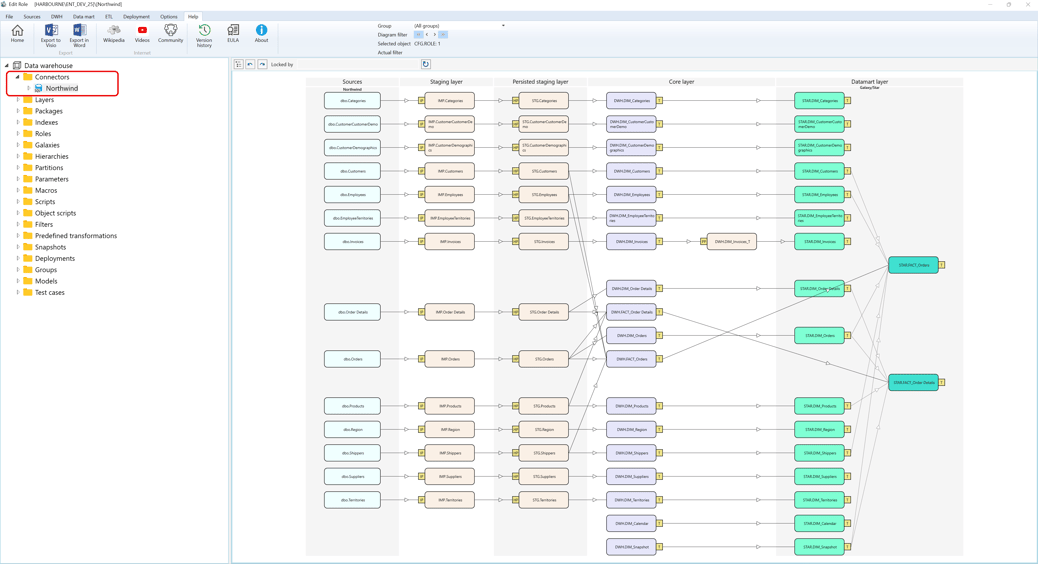
Context menus access - Connectors - Where I can find it
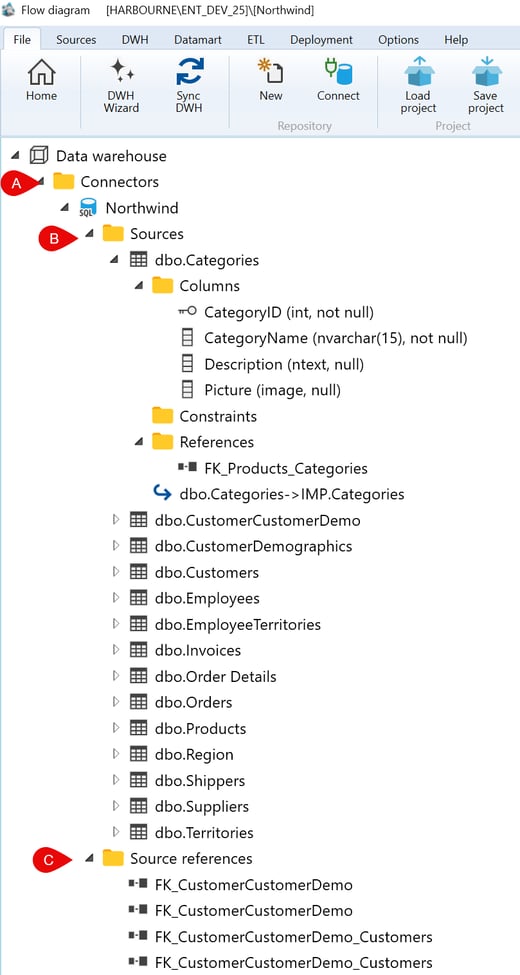
 Connectors
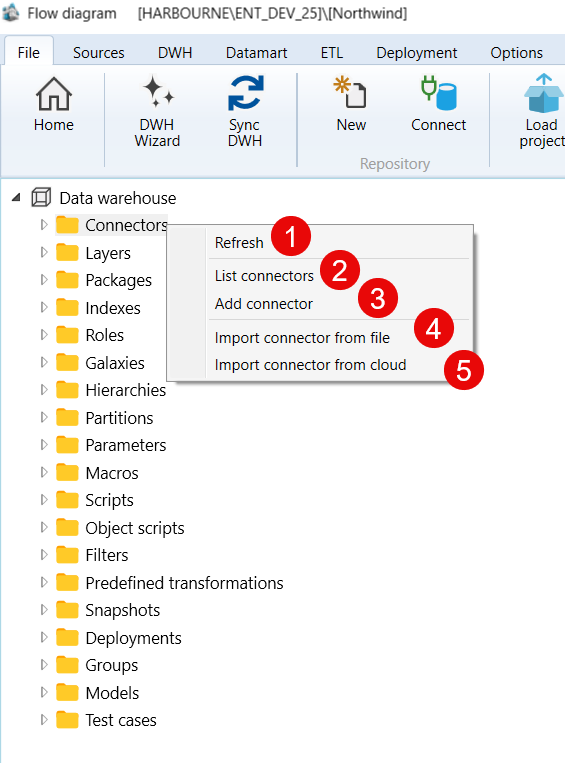
| ID | Context Menu Option | Description |
|---|---|---|
| 1 | Refresh | Refresh all objects under Connector node |
| 2 | List connectors | List your connectors for more info see - List connectors |
| 3 | Add connector | Add ca new connector for more info see - New connector |
| 4 | Import connector from file | Opens a local file picker for .accon / .acconx connector export files and imports a connector definition into the repository. |
| 5 | Import connector from cloud | Opens cloud file selection and imports a connector package from cloud storage into the repository. |
A.1) Connectors - Example - Source -> Microsoft SQL Server Northwind Database
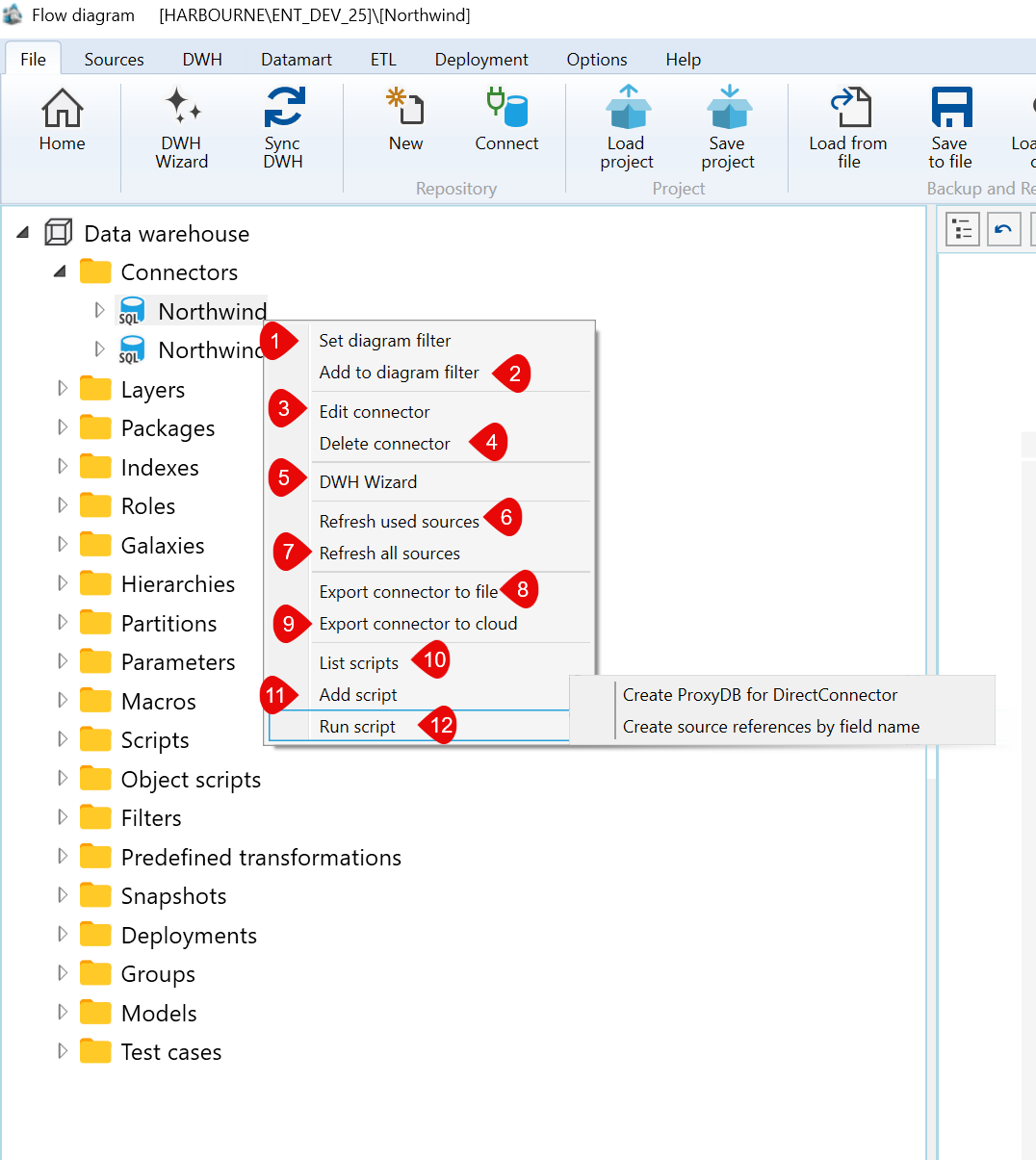
| ID | Context Menu Option | Description |
|---|---|---|
| 1 | Set diagram filter | Set a new diagram filter for the selected connector. |
| 2 | Add to diagram filter | Add an additional condition to the current diagram filter for this connector. |
| 3 | Edit connector | Open the selected connector for editing and update its settings. |
| 4 | Delete connector | Delete the selected connector from the repository. |
| 5 | DWH Wizard | Open the Data Warehouse wizard for this connector. |
| 6 | Refresh used sources | Refreshes metadata only for sources currently used by the selected connector. |
| 7 | Refresh all sources | Refreshes metadata for all connector sources. |
| 8 | Export connector to file | Exports the selected connector to a local .accon/.acconx file. |
| 9 | Export connector to cloud | Exports the selected connector package to cloud storage. |
| 10 | List scripts | List scripts associated with this connector. |
| 11 | Add script | Add a new script to this connector. |
| 12 | Run script | Run a script for this two scenarios 1) Create ProxyDB for DirectConnector 2) Create source references by field name |
A.2) Connectors - Example - Sources -> Microsoft SQL Server Northwind Database
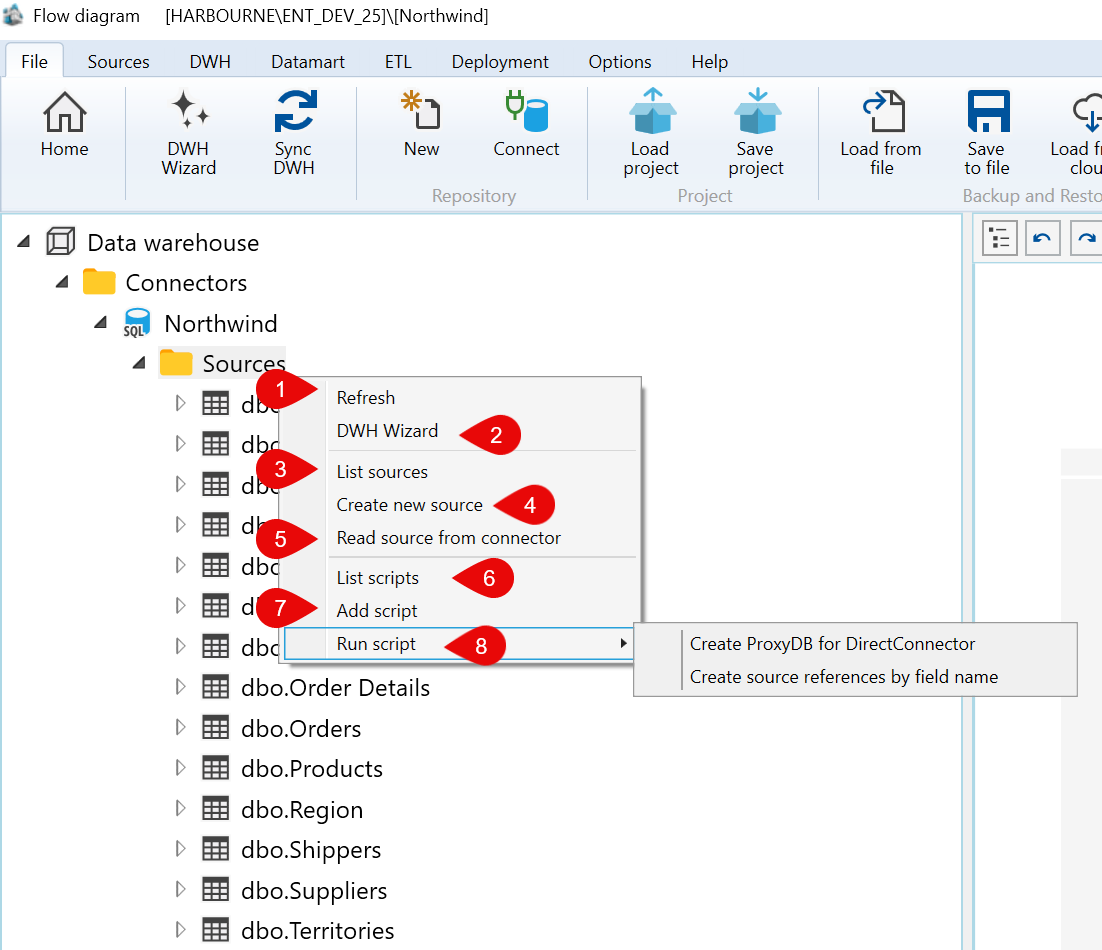
| ID | Command | Description |
|---|---|---|
| 1 | Refresh | Reloads the Sources branch for the selected connector. |
| 2 | DWH Wizard | Opens the DWH Wizard from the selected connector source context. |
| 3 | List sources | Opens the Sources list for the selected connector. |
| 4 | Create new source | Creates a new source definition manually. |
| 5 | Read source from connector | Opens the Create source wizard to read source metadata from the selected connector. |
| 6 | List scripts | Lists object scripts available for the selected connector source context. |
| 7 | Add script | Creates a new object script for the selected connector source context. |
| 8 | Run script | Run a script for this two scenarios 1) Create ProxyDB for DirectConnector 2) Create source references by field name |
A.3) Connectors - Example - Sources -> Table dbo.Categories from Microsoft Northwind Database
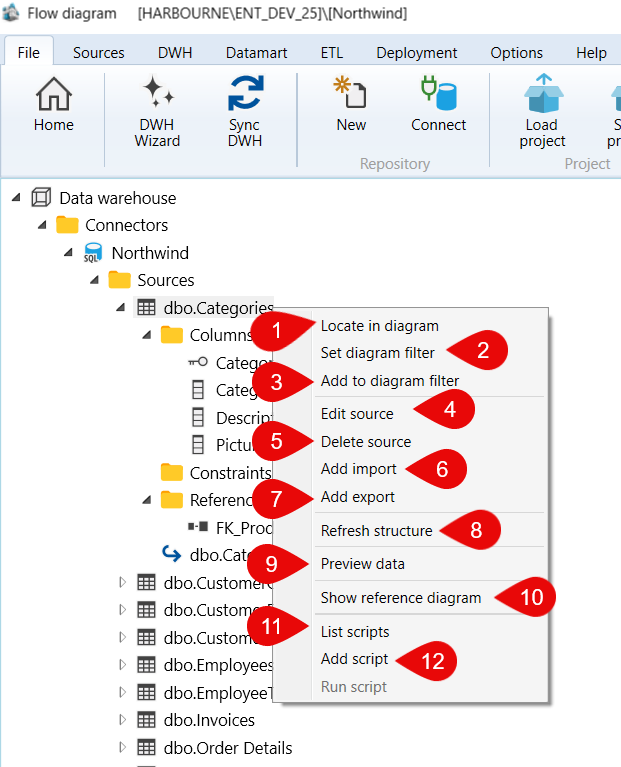
| ID | Command | Description |
|---|---|---|
| 1 | Locate in diagram | Locates the selected source object in the dataflow diagram. |
| 2 | Set diagram filter | Sets the diagram filter to focus on the selected source object. |
| 3 | Add to diagram filter | Adds the selected source object to the current diagram filter. |
| 4 | Edit source | Opens the Source page for the selected source object. |
| 5 | Delete source | Deletes the selected source object after confirmation. |
| 6 | Add import | Starts the import creation workflow for the selected source object. |
| 7 | Add export | Starts the export creation workflow for the selected source object. |
| 8 | Refresh structure | Refreshes the structure and metadata for the selected source object. |
| 9 | Preview data | Opens a preview of the data available from the selected source object. |
| 10 | Show reference diagram | Opens the reference diagram for the selected source object. |
| 11 | List scripts | Lists object scripts available for the selected source object. |
| 12 | Add script | Creates a new object script for the selected source object. |
A.4) Connectors - Example - Sources -> Table dbo.Categories -> Columns
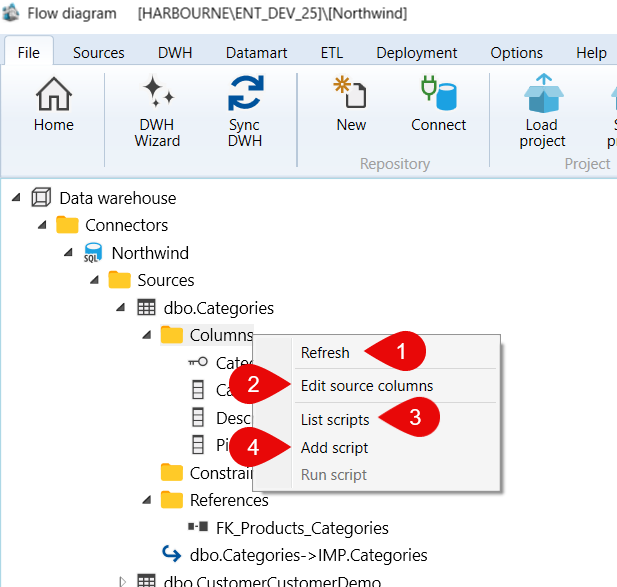
| ID | Command | Description |
|---|---|---|
| 1 | Refresh | Reloads the Columns branch for the selected source table. |
| 2 | Edit source columns | Opens the source-column editor for the selected source table. |
| 3 | List scripts | Lists object scripts available for the selected source-columns context. |
| 4 | Add script | Creates a new object script for the selected source-columns context. |
A.4) Connectors - Example - Sources -> Table dbo.Categories -> Column
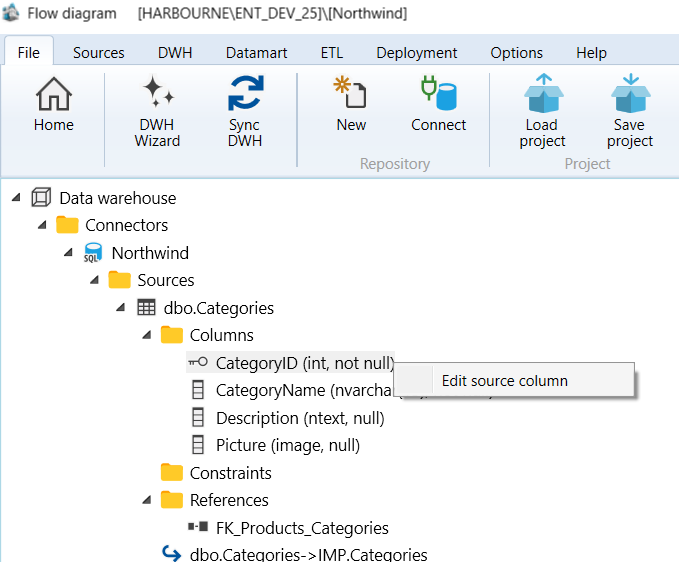
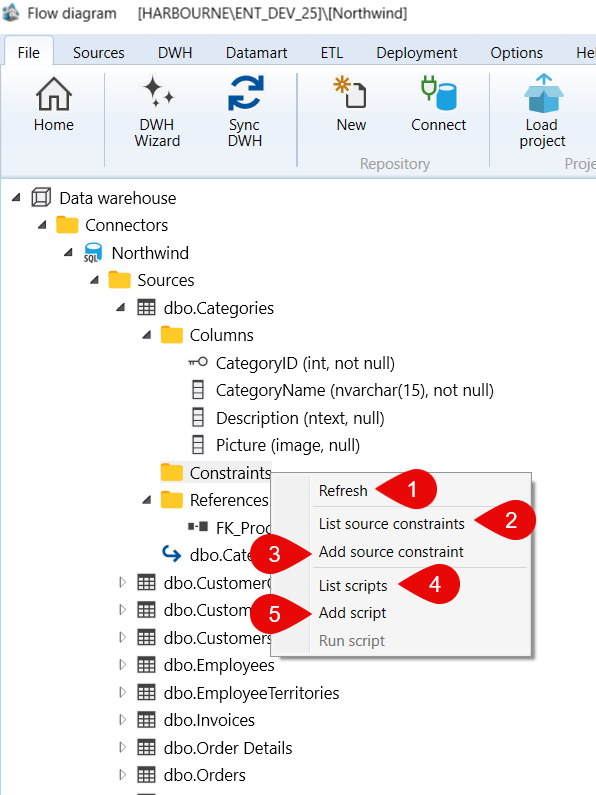
A.5) Connectors - Example - Sources -> Table dbo.Categories -> Constraints
A.6) Connectors - Example - Sources -> Table dbo.Categories -> References
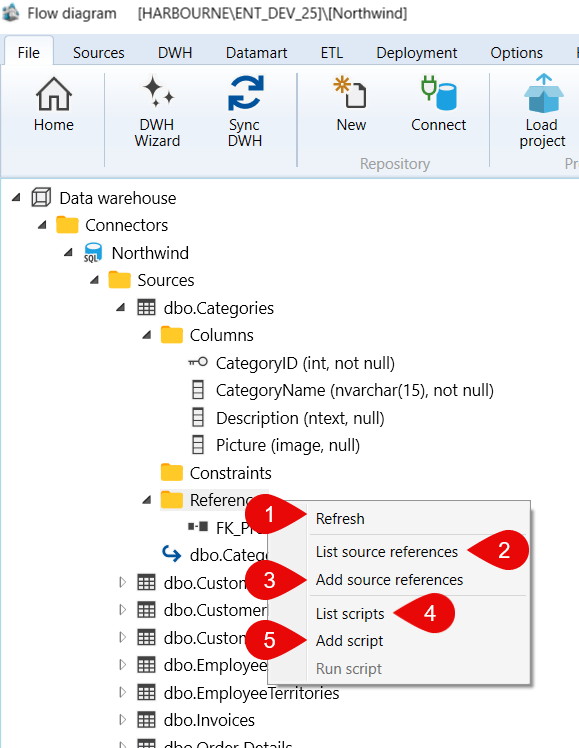
| ID | Command | Description |
|---|---|---|
| 1 | Refresh | Reloads the Constraints branch for the selected source table. |
| 2 | List source constraints | Opens the list of source constraints for the selected source table. |
| 3 | Add source constraint | Creates a new source constraint for the selected source table. |
| 4 | List scripts | Lists object scripts available for the selected source-constraints context. |
| 5 | Add script | Creates a new object script for the selected source-constraints context. |
A.7) Connectors - Example - Sources -> Table dbo.Categories -> References -> FK_Products_Categories
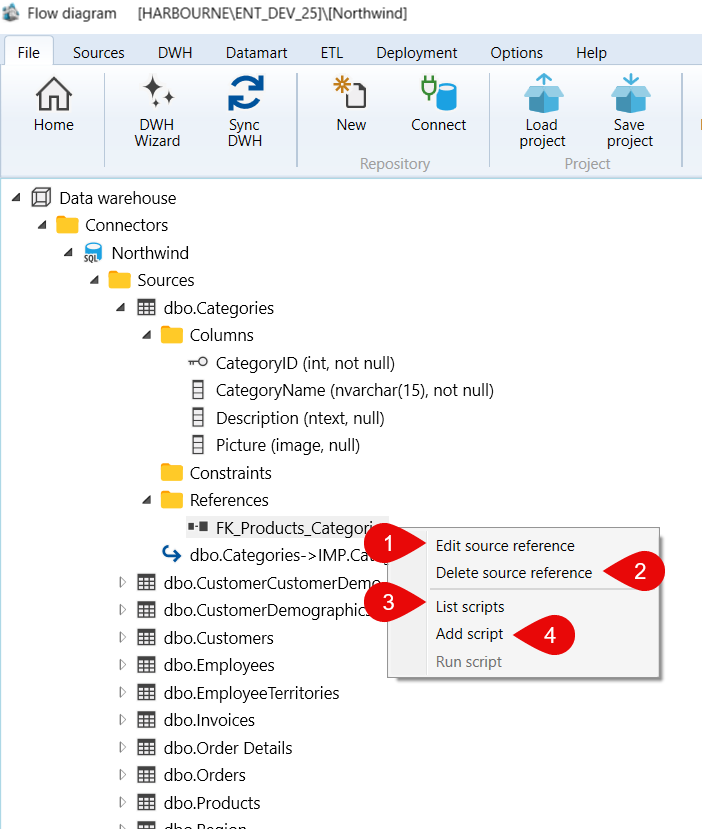
| ID | Command | Description |
|---|---|---|
| 1 | Edit source reference | Opens the source reference editor for the selected source reference. |
| 2 | Delete source reference | Deletes the selected source reference after confirmation. |
| 3 | List scripts | Lists object scripts available for the selected source-reference context. |
| 4 | Add script | Creates a new object script for the selected source-reference context. |
A.8) Connectors - Example - Sources -> Table dbo.Categories -> IMP.Categories
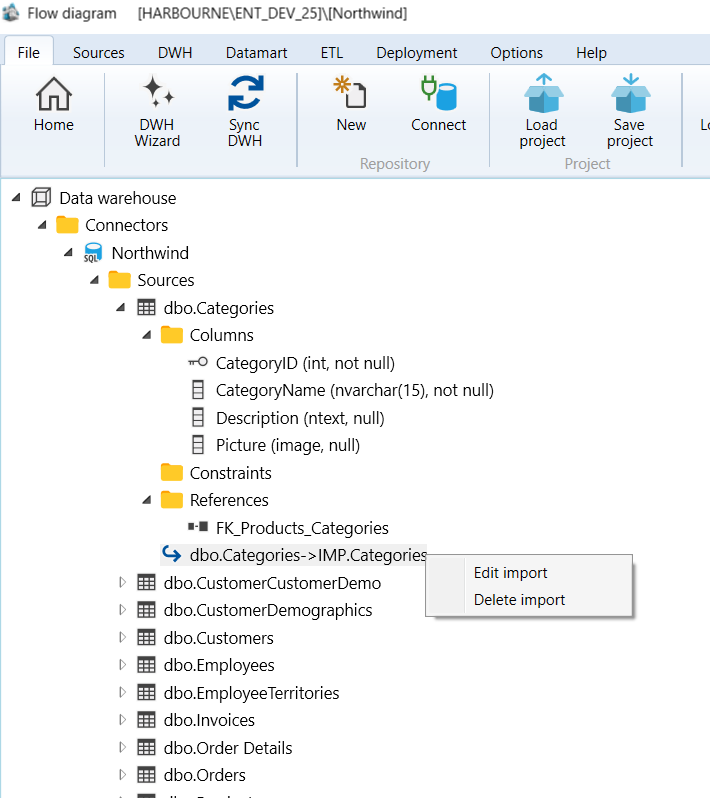
| ID | Command | Description |
|---|---|---|
| 1 | Edit import | Opens the Import page for the selected source-to-import mapping. |
| 2 | Delete import | Deletes the selected import mapping after confirmation. |
C) Source references
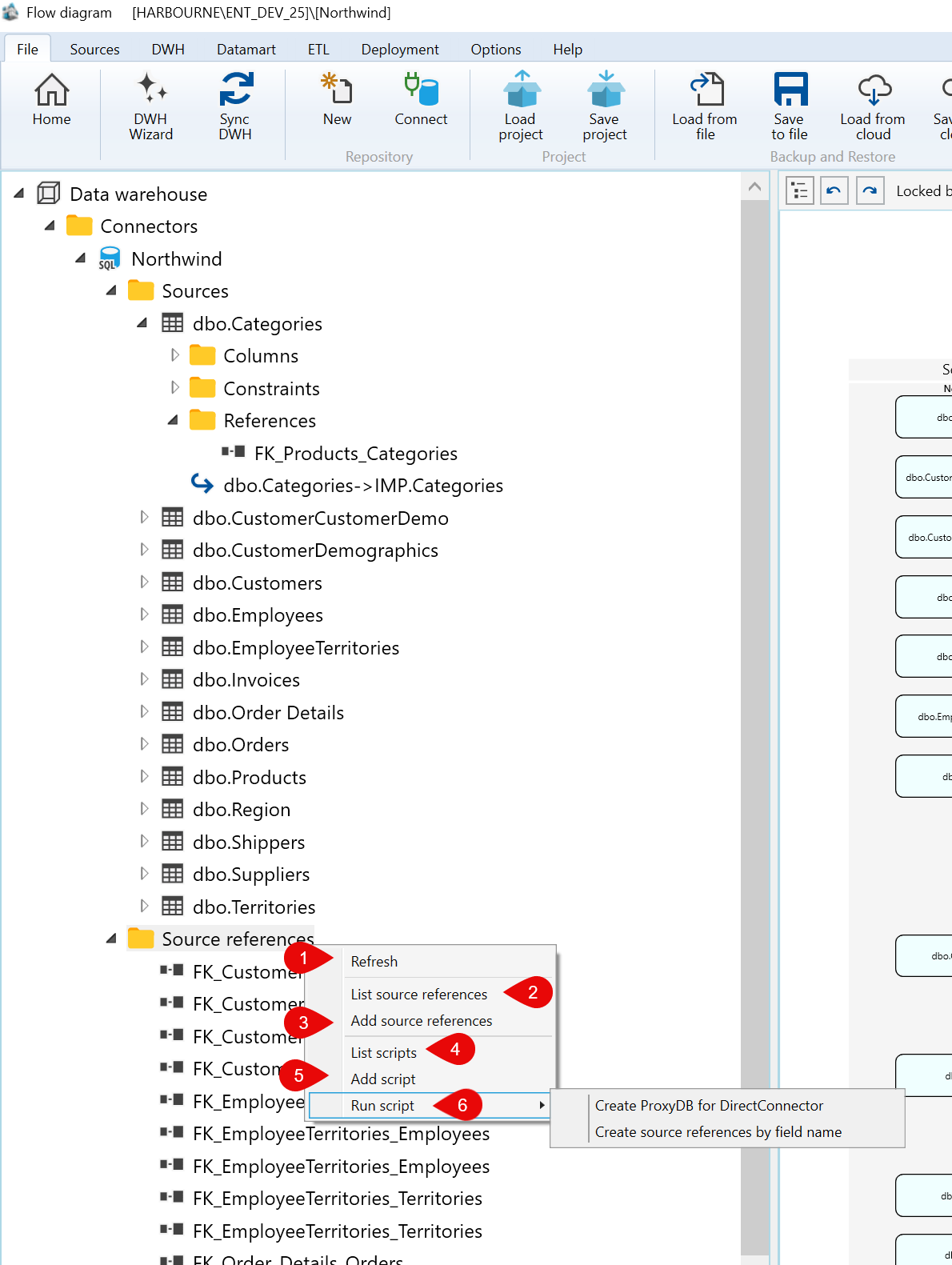
| ID | Command | Description |
|---|---|---|
| 1 | Refresh | Reloads the Source references branch for the selected connector. |
| 2 | List source references | Opens the list of source references for the selected connector context. |
| 3 | Add source references | Creates source references for the selected connector context. |
| 4 | List scripts | Lists object scripts available for the selected source-references context. |
| 5 | Add script | Creates a new object script for the selected source-references context. |
| 6 | Run script |
Run a script for this two scenarios 1) Create ProxyDB for DirectConnector |
C) Source references - > Example FK_CustomerCustomerDemo
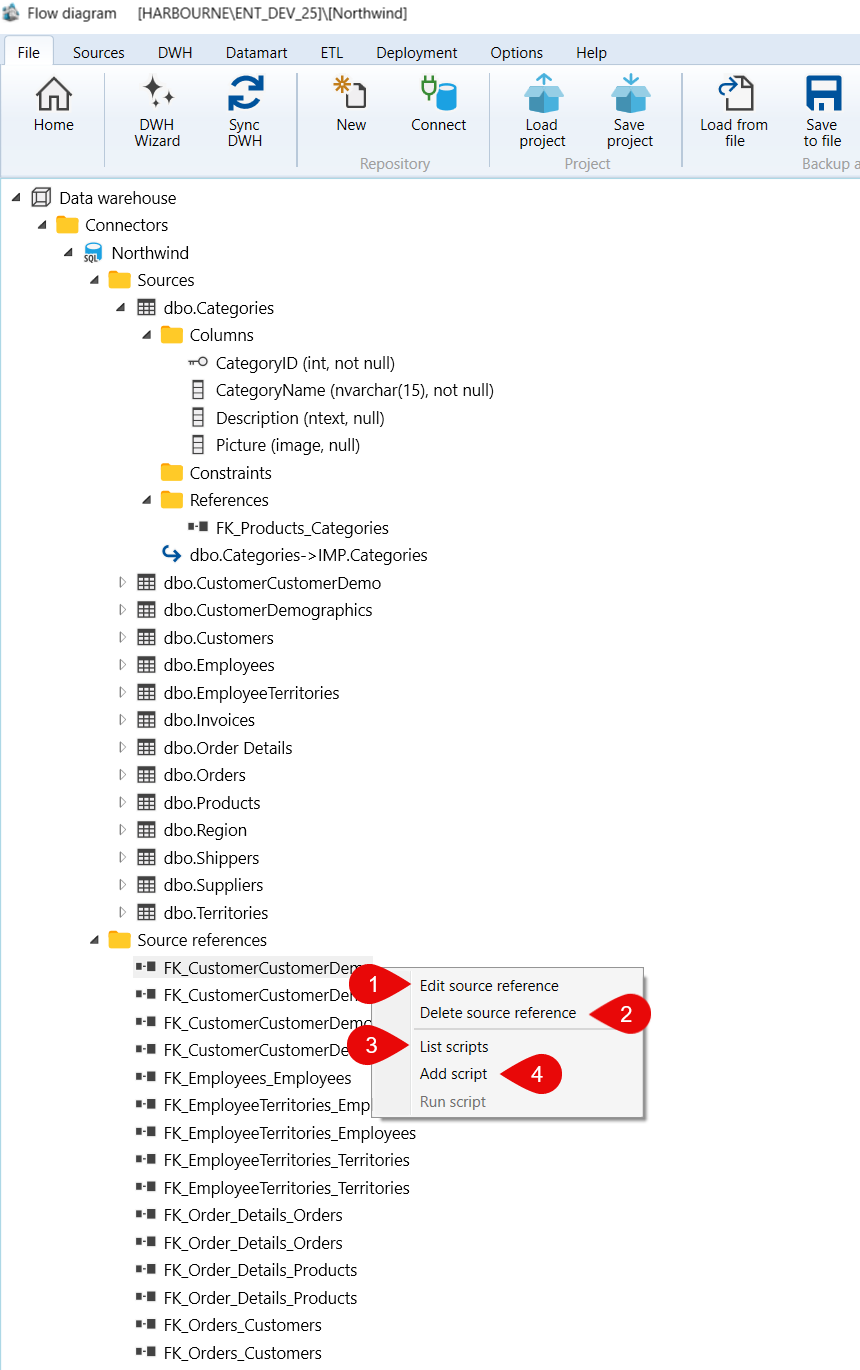
| ID | Command | Description |
|---|---|---|
| 1 | Edit source reference | Opens the source reference editor for the selected source reference. |
| 2 | Delete source reference | Deletes the selected source reference after confirmation. |
| 3 | List scripts | Lists object scripts available for the selected source-reference context. |
| 4 | Add script | Creates a new object script for the selected source-reference context. |
