
Table references
Overview
Table references is the searchable list page for relationships between warehouse tables. Use it to find references by table, schema, cardinality, relationship condition, description, or inheritance state, then open the selected reference for detailed maintenance.
Function
The page combines a search filter with a result grid. The DWH toolbar opens the full reference list. When the list is opened from a schema, table, or diagram context, the results are scoped to that schema, table, or table pair.
The search field filters by description, parent description, both table names, both schema names, table aliases, join type, cardinality, and reference statement text. Double-click a row to open the Table reference page. Use New to create a reference and Delete to remove the selected reference after confirmation.
The list also supports quick maintenance of Inactive, Force inheritance, and Don't inherit. Change those values in the grid, then use Save to persist the list-level changes.
Access
Open the list from a table's References node in the navigation tree, from the References command in the DWH toolbar, or from the reference commands on the diagram context menu.
How to access
Navigation tree
Layers -> [layer] -> [schema] -> Tables -> [table] -> References -> List references
Toolbar
DWH -> References
Diagram
References -> List references from a diagram object. A relationship with multiple matching references can also open this list.
Visual element
Table references list page
Screen overview
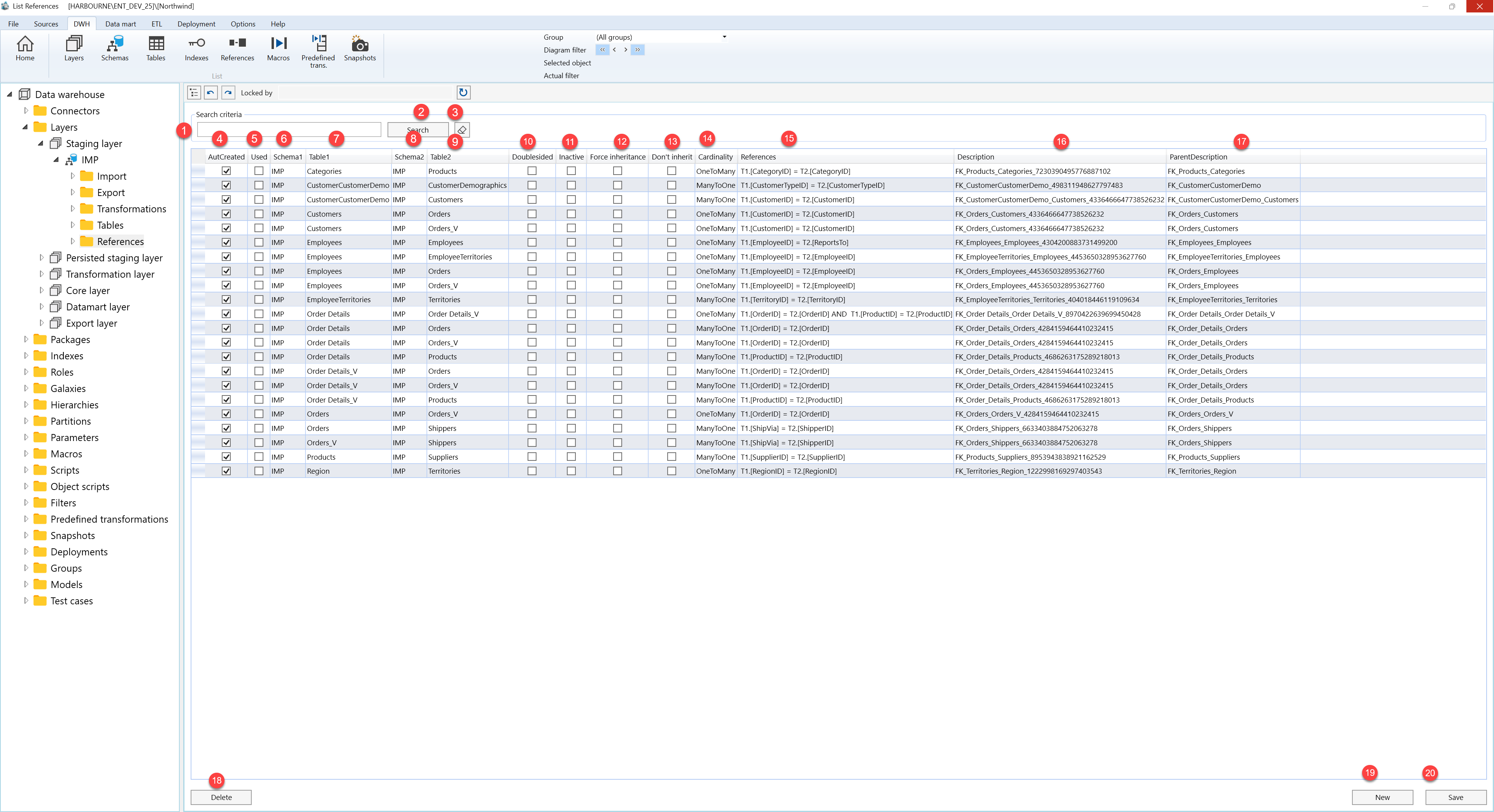
| ID | Property | Description |
|---|---|---|
| 1 | Search criteria | Filter area at the top of the page. |
| 2 | Search field | Text field used to filter table references by table, schema, alias, cardinality, join type, reference statement, description, or parent description. Press Enter to run the same filter as the Search button. |
| 3 | Search | Applies the current search text and refreshes the Table references grid. |
| 4 | Clear filter | Clears the search field and reloads references for the current context or the full project list. |
| 5 | AutCreated | Checkbox column indicating whether the reference was created automatically. |
| 6 | Used | Checkbox column indicating whether the reference is used by a transformation. |
| 7 | Schema1 | Grid column showing the schema for the first table in the reference. |
| 8 | Table1 | Grid column showing the first table in the reference. |
| 9 | Schema2 | Grid column showing the schema for the second table in the reference. |
| 10 | Table2 | Grid column showing the second table in the reference. |
| 11 | Doublesided | Checkbox column for two-sided reference handling when that state is available. |
| 12 | Inactive | Editable checkbox for deactivating or reactivating the reference. Use Save to persist changes. |
| 13 | Force inheritance | Editable checkbox for forcing inheritance behavior on the reference. Use Save to persist changes. |
| 14 | Don't inherit | Editable checkbox for preventing inherited behavior on the reference. Use Save to persist changes. |
| 15 | Cardinality | Grid column showing the relationship cardinality. |
| 16 | References | Grid column showing the relationship condition between the two tables. |
| 17 | Description | Grid column describing the table reference. |
| 18 | ParentDescription | Grid column showing the parent reference description when one exists. |
| 19 | Table references grid | Result list for reviewing table references. Double-click a row to open it on the Table reference page. |
| 20 | New | Opens the Table reference page to create a new reference. |
| 21 | Save | Saves list-level changes to inactive and inheritance settings, then refreshes the list. |
| 22 | Delete | Deletes the selected table reference after user confirmation, then refreshes the page. |
