
Sources
Overview
Sources is the searchable list page for source definitions under AnalyticsCreator connectors. Use it to find sources by schema, name, connector, type, path, friendly name, or description, then open the selected source for review or maintenance.
Function
The page combines a search filter with a read-only result grid. When the list is opened from a connector branch, it is scoped to that connector. When it is opened from the Sources toolbar, it lists sources across the project.
The search field filters by description, connector name, source schema, or source name. Press Enter or use Search to apply the filter, and use the clear-filter button to reset the list. Double-click a row to open the Source page for that entry. Use Delete to remove the selected source after confirmation.
Access
Open the list from a connector branch in the navigation tree or from the Sources command in the Sources toolbar. The connector branch also offers Create new source and Read source from connector, but those commands open separate creation flows rather than adding a row from this list.
How to access
Navigation tree
Connectors -> [connector] -> Sources -> List sources
Toolbar
Sources -> Sources
Diagram
Not opened directly from the diagram. Use the navigation tree or Sources toolbar to open the list.
Visual element
Sources list page
Screen overview
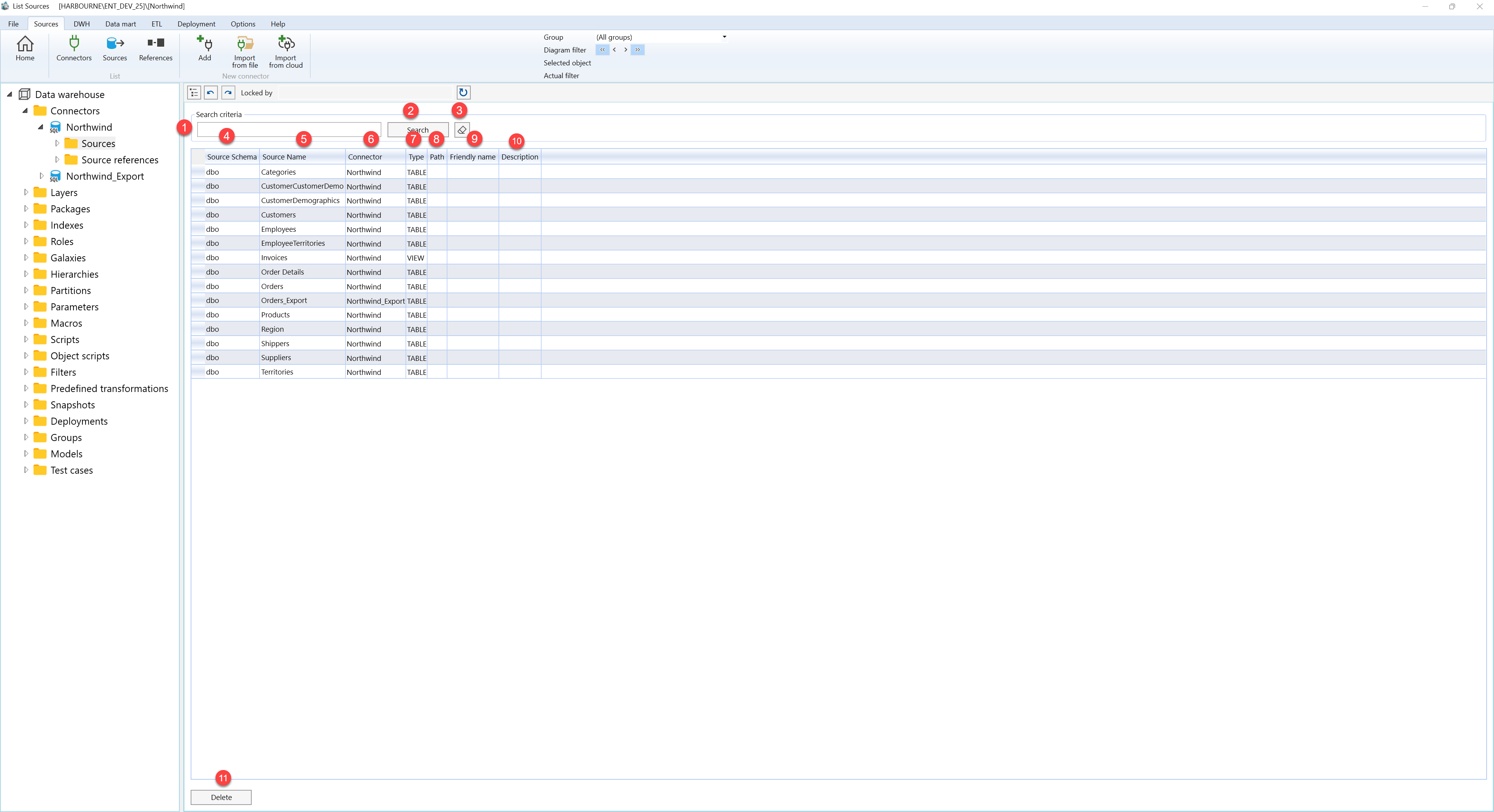
| ID | Property | Description |
|---|---|---|
| 1 | Search criteria | Filter area at the top of the page. |
| 2 | Search field | Text field used to search sources by description, connector name, source schema, or source name. Press Enter to run the same filter as the Search button. |
| 3 | Search | Applies the current search text and refreshes the Sources grid. |
| 4 | Clear filter | Clears the search field and reloads sources for the current connector context or the full project list. |
| 5 | Source Schema | Grid column showing the schema assigned to the source. |
| 6 | Source Name | Grid column showing the source name. |
| 7 | Connector | Grid column showing the connector that owns the source. |
| 8 | Type | Grid column showing the source type. |
| 9 | Path | Grid column for the source path when a path is configured. |
| 10 | Friendly name | Grid column for the business-friendly source name. |
| 11 | Description | Grid column describing the source. |
| 12 | Sources grid | Read-only result list for reviewing sources. Double-click a row to open it on the Source page. |
| 13 | Delete | Deletes the selected source after user confirmation, then refreshes the list. |
