
Indexes
Overview
Indexes is the searchable list page for table indexes in the warehouse area. Use it to find index definitions by schema, table, or index name, and then open an index for maintenance.
Function
The page combines a search filter with a read-only indexes grid. The search field narrows the list by index name, schema, or table.
The grid shows where each index belongs and whether it is clustered, unique, or marked as the primary key. Double-click an index row to open the selected index in the Index page. Use New to create an index, or Delete to remove the selected index after confirmation.
Access
Open the indexes list from the DWH toolbar or from the Indexes node in the navigation tree. When opened from a table context, the list can focus the index records related to that table.
How to access
Navigation tree
Indexes -> List indexes. From a table index, use Edit index.
Toolbar
DWH -> Indexes
Diagram
Not direct. Use the DWH toolbar or the Indexes navigation-tree node.
Visual element
Indexes list page
Screen overview
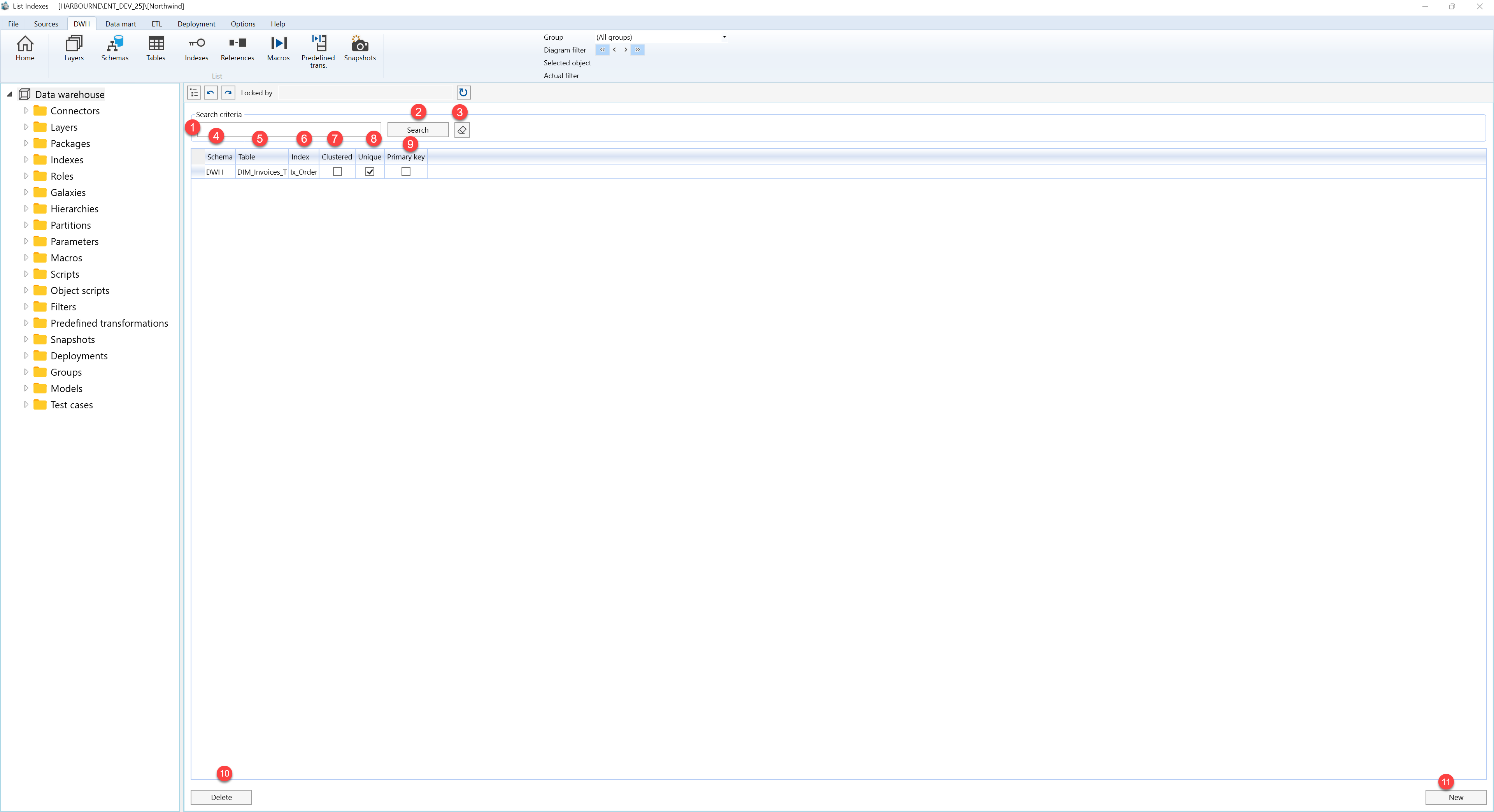
| ID | Property | Description |
|---|---|---|
| 1 | Search criteria | Filter area at the top of the page. |
| 2 | Search field | Text field used to filter index records by index name, schema, or table. |
| 3 | Search | Runs the filter and refreshes the indexes grid. |
| 4 | Clear filter | Clears the search field and reloads the full indexes list. |
| 5 | Schema | Grid column that shows the schema for the indexed table. |
| 6 | Table | Grid column that shows the table connected to the index. |
| 7 | Index | Grid column that shows the index name. |
| 8 | Clustered | Grid column that shows whether the index is clustered. |
| 9 | Unique | Grid column that shows whether the index enforces unique values. |
| 10 | Primary key | Grid column that shows whether the index is the primary key for the table. |
| 11 | Indexes grid | Read-only result list. Double-click a row to open the selected index. |
| 12 | New | Opens the Index page for a new index. |
| 13 | Delete | Removes the selected index after confirmation. |
