
Hierarchies
Overview
Hierarchies is the searchable list page for data mart hierarchies. Use it to find hierarchy definitions by schema, table, or hierarchy name, and then open a hierarchy for maintenance.
Function
The page combines a search filter with a read-only hierarchies grid. The search field narrows the list by hierarchy name, schema, or table.
Double-click a hierarchy row to open the selected hierarchy in the OLAP Hierarchy page. Use New to create a hierarchy, or Delete to remove the selected hierarchy after confirmation.
Access
Open the hierarchies list from the Data mart toolbar or from the Hierarchies node in the navigation tree. When opened from a table context, the list can focus the hierarchy records related to that table.
How to access
Navigation tree
Hierarchies -> List hierarchies. From a table hierarchy, use Edit hierarchy.
Toolbar
Data mart -> Hierarchies
Diagram
Not direct. Use the Data mart toolbar or the Hierarchies navigation-tree node.
Visual element
Hierarchies list page
Screen overview
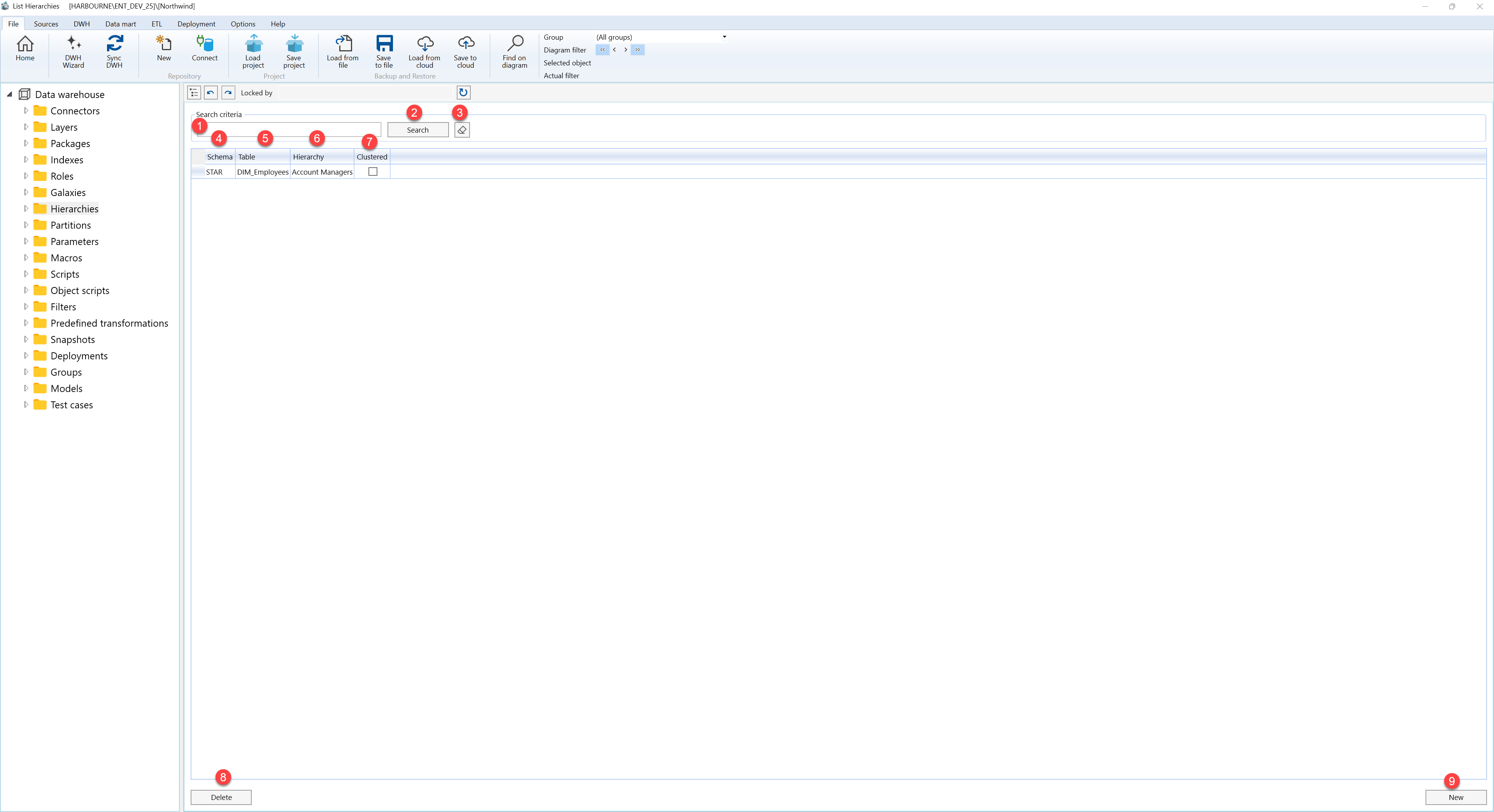
| ID | Property | Description |
|---|---|---|
| 1 | Search criteria | Filter area at the top of the page. |
| 2 | Search field | Text field used to filter hierarchy records by hierarchy name, schema, or table. |
| 3 | Search | Runs the filter and refreshes the hierarchies grid. |
| 4 | Clear filter | Clears the search field and reloads the full hierarchies list. |
| 5 | Schema | Grid column that shows the schema for the hierarchy table. |
| 6 | Table | Grid column that shows the table connected to the hierarchy. |
| 7 | Hierarchy | Grid column that shows the hierarchy name. |
| 8 | Clustered | Grid column that shows the clustered hierarchy setting. |
| 9 | Hierarchies grid | Read-only result list. Double-click a row to open the selected hierarchy. |
| 10 | New | Opens the OLAP Hierarchy page for a new hierarchy. |
| 11 | Delete | Removes the selected hierarchy after confirmation. |
