
Encrypted strings
Overview
The Encrypted strings list maintains protected string values used by repository configuration and connection settings.
Function
Use the search area to filter encrypted strings and the grid to maintain names, protected values, and protection state.
Decrypt exposes a selected value for review when the user has the required rights, while Save and Cancel control the edit session.
Access
Open encrypted string management from the Options toolbar tab.
How to access
Navigation tree
Not opened from the navigation tree.
Toolbar
Options -> Encrypted strings.
Diagram
Not opened directly from the diagram.
Visual element
Encrypted strings list
Screen overview
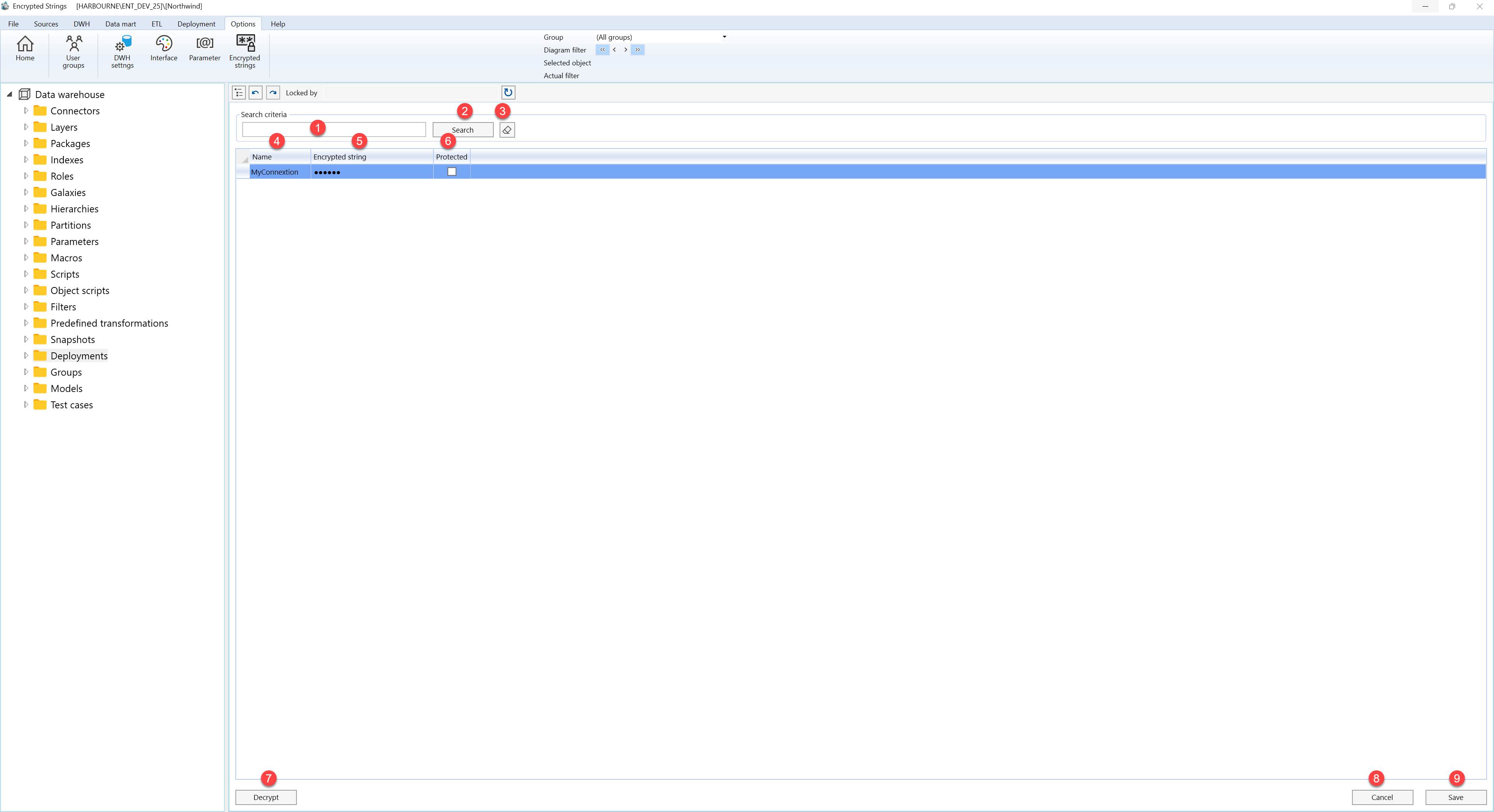
| ID | Property | Description |
|---|---|---|
| 1 | Search criteria | Area used to filter encrypted string rows. |
| 2 | Search | Applies the current search criteria. |
| 3 | Name | Business name shown in lists and navigation. |
| 4 | Encrypted string | Protected value stored for the named entry. |
| 5 | Protected | Shows whether the value is protected. |
| 6 | Decrypt | Decrypts the selected value for authorized review. |
| 7 | Save | Saves the current definition, refreshes the relevant navigation or list, and keeps the page consistent with the saved state. |
| 8 | Cancel | Leaves the page without continuing the current edit. |
