
Synchronize DWH
Overview
Synchronize DWH updates the data warehouse structure and refreshes the diagram metadata that AnalyticsCreator uses to show warehouse objects. Use it after model changes, source changes, repository maintenance, or when the diagram needs to reflect newly created objects.
Function
The Synchronize and refresh dialog lets users choose the synchronization scope, the diagram refresh scope, and optional maintenance tasks. The templates at the top apply common combinations for a full run, a selected group, new objects only, all standard additional tasks, or no additional tasks.
Choose OK to save the selected options and start the operation. While synchronization is running, the toolbar command changes to Stop sync, which requests cancellation. When the run finishes, AnalyticsCreator refreshes the diagram and reports any returned errors in a log prompt.
Access
Open Synchronize DWH from the File toolbar, from the data warehouse context menu, or from the architecture diagram context menu.
How to access
Navigation tree
DWH -> Synchronize DWH
Toolbar
File -> Sync DWH
Diagram
Architecture diagram -> Synchronize DWH
Visual element
Synchronize and refresh dialog
Screen overview
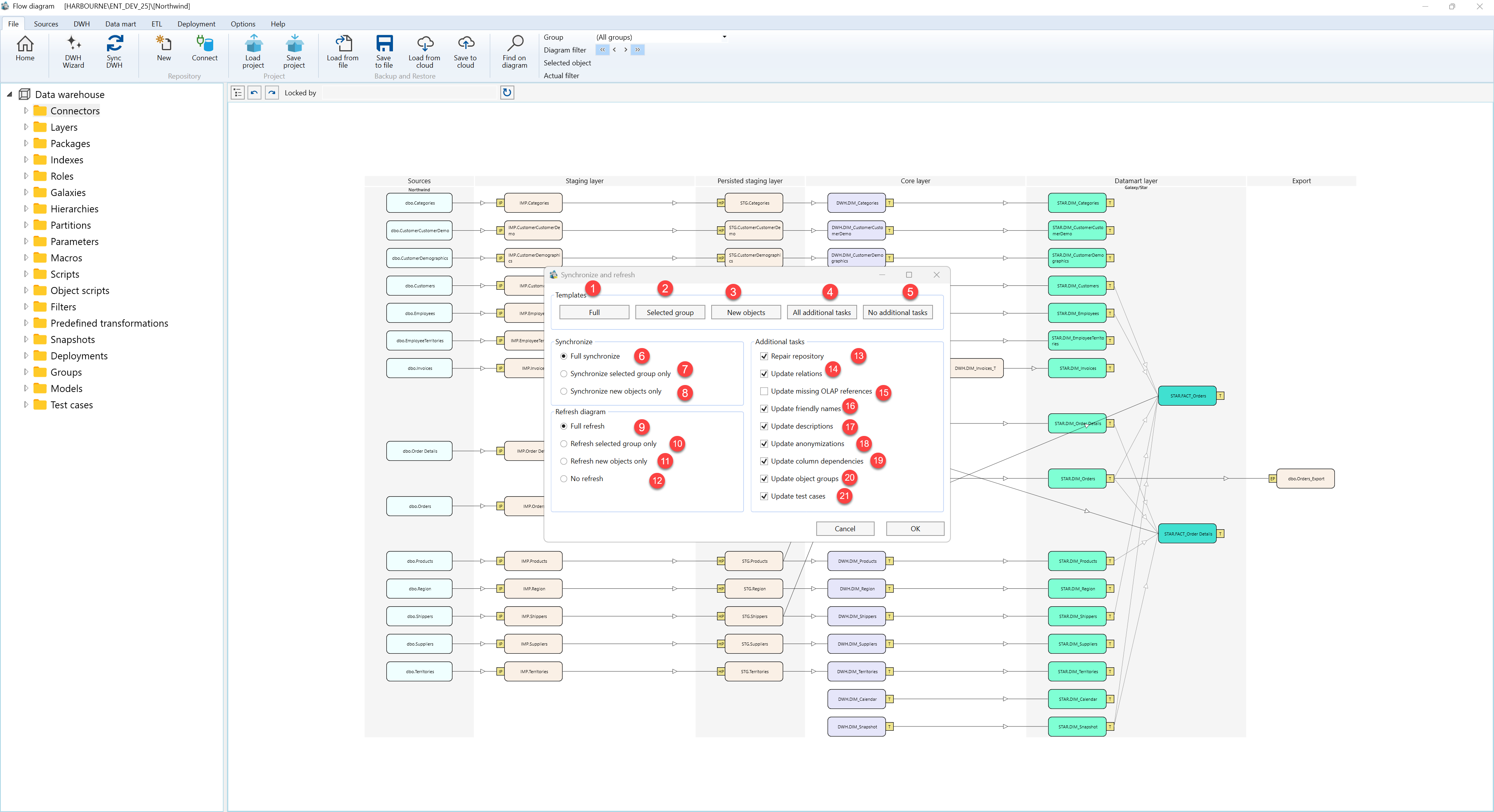
| ID | Property | Description |
|---|---|---|
| 1 | Templates | Preset buttons for common synchronization and refresh combinations. |
| 2 | Full | Selects a full synchronization, a full diagram refresh, and the standard additional maintenance tasks. |
| 3 | Selected group | Limits synchronization and diagram refresh to the active object group and clears the standard additional task selections. |
| 4 | New objects | Synchronizes and refreshes only objects that are new to the repository metadata. |
| 5 | All additional tasks | Turns on the standard maintenance tasks used with a full synchronization run. |
| 6 | No additional tasks | Clears the standard maintenance task selections so only synchronization and refresh choices are used. |
| 7 | Synchronize | Defines how much data warehouse metadata is synchronized. |
| 8 | Full synchronize | Synchronizes the complete data warehouse metadata set. |
| 9 | Synchronize selected group only | Synchronizes only the active object group. |
| 10 | Synchronize new objects only | Synchronizes only newly detected objects. |
| 11 | Refresh diagram | Controls how much of the architecture diagram metadata is refreshed after synchronization. |
| 12 | Full refresh | Refreshes the full diagram metadata set. |
| 13 | Refresh selected group only | Refreshes diagram metadata for the active object group. |
| 14 | Refresh new objects only | Refreshes diagram metadata only for newly detected objects. |
| 15 | No refresh | Runs synchronization without refreshing the architecture diagram metadata afterward. |
| 16 | Additional tasks | Optional maintenance actions that can run after the selected synchronization scope. |
| 17 | Repair repository | Runs repository repair and related package checks as part of the synchronization workflow. |
| 18 | Update relations | Refreshes object relationships after the synchronized metadata is available. |
| 19 | Update missing OLAP references | Adds missing analytical references when relation updates are included. |
| 20 | Update friendly names | Refreshes readable names used in the repository and diagram. |
| 21 | Update descriptions | Refreshes stored descriptions for synchronized objects. |
| 22 | Update anonymizations | Refreshes anonymization metadata for objects that use it. |
| 23 | Update column dependencies | Refreshes column-level dependency information. |
| 24 | Update object groups | Refreshes object group membership metadata. |
| 25 | Update test cases | Refreshes test case metadata used for validation workflows. |
| 26 | OK | Saves the selected options and starts the synchronization workflow. |
| 27 | Cancel | Closes the dialog without starting synchronization. |
| 28 | Stop sync | Appears on the File toolbar while synchronization is running and requests cancellation when selected. |
