
Refresh source metadata
Overview
Refresh source metadata updates AnalyticsCreator source definitions from the connected source system. Use it after source tables, columns, descriptions, primary keys, or source references have changed outside AnalyticsCreator.
Function
The dialog can refresh all sources for a connector, only the connector sources that are already used, or a single selected source. It can compare metadata without saving changes, update source descriptions and columns, remove missing metadata, refresh primary keys, and refresh source references.
When you choose OK, AnalyticsCreator runs the selected refresh options and shows a log when messages or errors are available. Some connector types require a valid connection before metadata can be refreshed; file-based CSV connections are not refreshed through this dialog.
Access
Open Refresh source metadata from connector and source context menus in the navigation tree, or from a source object on the architecture diagram.
How to access
Navigation tree
Connector -> Refresh used sources or Refresh all sources. Source -> Refresh structure.
Toolbar
Not direct. Use the connector or source context menu.
Diagram
Architecture source object -> Refresh source
Visual element
Refresh sources dialog
Screen overview
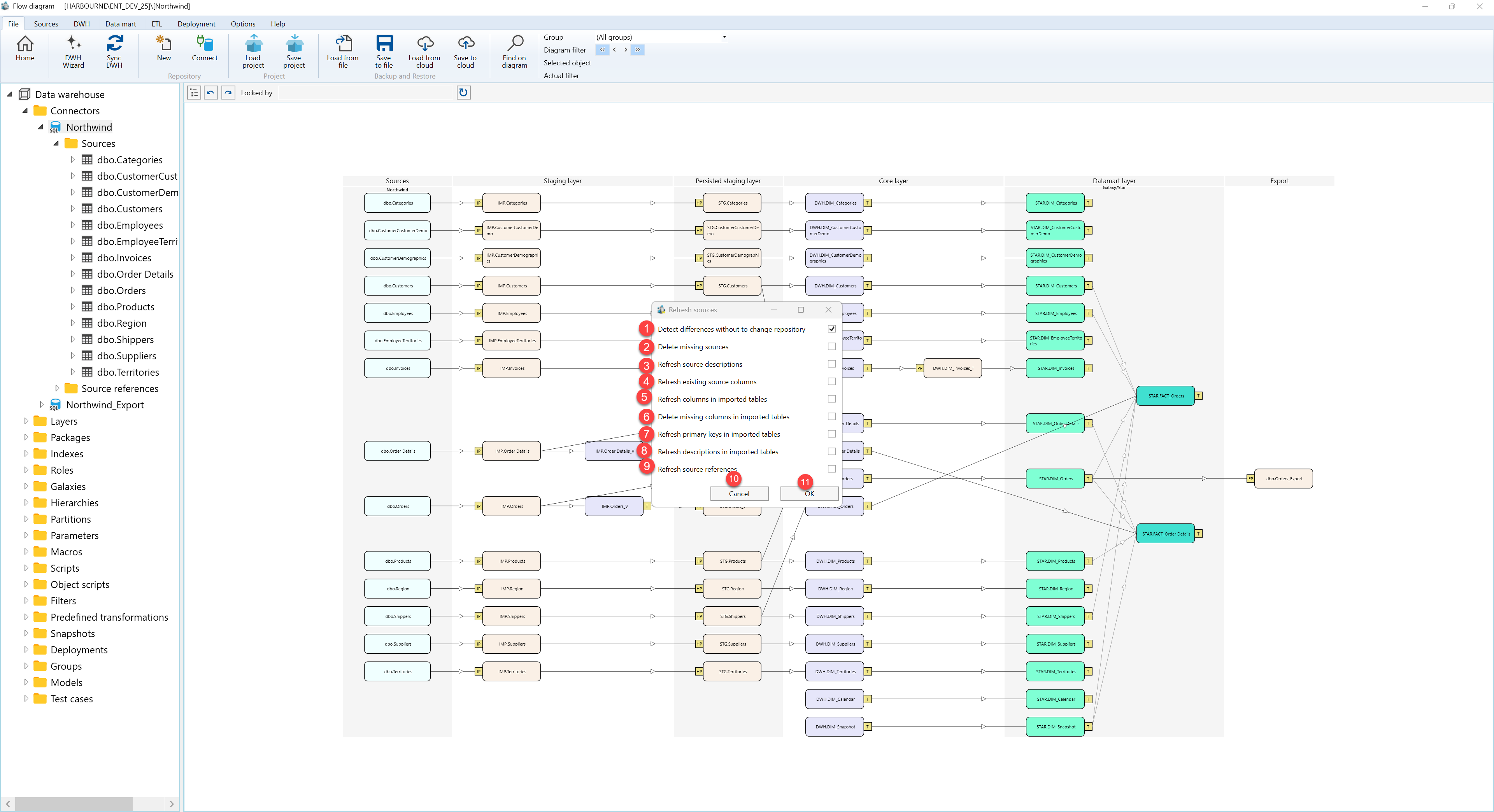
| ID | Property | Description |
|---|---|---|
| 1 | Detect differences without changing the repository | Runs the refresh as a comparison so differences can be reviewed without saving metadata changes. |
| 2 | Delete missing sources | Removes source definitions that no longer exist in the connected source system when changes are applied. |
| 3 | Refresh source descriptions | Updates source-level descriptions from the connected source metadata. |
| 4 | Refresh existing source columns | Updates metadata for columns that already exist in the AnalyticsCreator source definition. |
| 5 | Refresh columns in imported tables | Updates imported table columns that depend on the refreshed source metadata. |
| 6 | Delete missing columns in imported tables | Removes imported table columns that are no longer present in the source metadata when changes are applied. |
| 7 | Refresh primary keys in imported tables | Updates imported table primary key metadata from the refreshed source definition. |
| 8 | Refresh descriptions in imported tables | Updates imported table and column descriptions that come from source metadata. |
| 9 | Refresh source references | Refreshes relationships between source objects after the metadata refresh. |
| 10 | Progress bar | Shows progress while connector sources are being refreshed. |
| 11 | OK | Runs the refresh with the selected options and stores the option choices for future refreshes. |
| 12 | Cancel | Closes the dialog without running the refresh. |
