
Calendar transformation wizard
The Calendar transformation wizard creates a calendar dimension with the required date range and naming settings.
Use this overview when a warehouse or datamart needs a calendar dimension. Follow the guide for the creation procedure and saved-definition checks.
Create a calendar dimension
Create a calendar dimension
Set the calendar name, date range, and related settings, then create and verify the calendar dimension.
Overview and configuration
To create a calendar transformation, select "Add → Calendar Dimension" from the diagram context menu.
As shown in the image below:
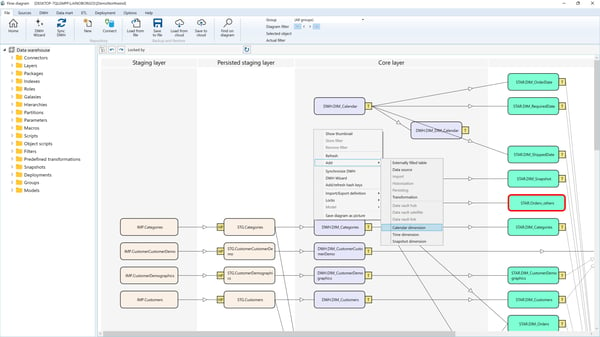
The Calendar Transformation Wizard will open. Typically, only one calendar transformation is required in the data warehouse.
As shown in the image below:
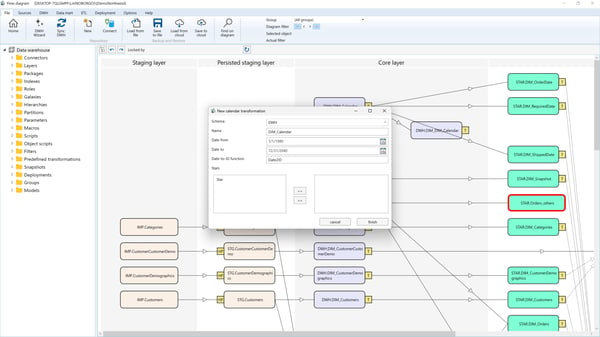
Parameters
- Schema: The schema of the calendar transformation.
- Name: The name of the calendar transformation.
- Date From: The start date for the calendar.
- Date To: The end date for the calendar.
- Date-to-ID Function: The macro name that transforms a
DateTimevalue into the key value for the calendar dimension. This macro is typically used in fact transformations to mapdatetimefields to calendar dimension members. - Stars: The data mart stars where the calendar transformation will be included.
