
Desktop Interface
Learn how the AnalyticsCreator Desktop interface presents warehouse objects and their relationships. Use the overview below to locate the editing, navigation, and project-management features.
When to use this section
Use this overview when orienting yourself in the desktop application before following a task guide.
Explore the desktop workspace
Interface
Find objects and control which objects are visible in the dataflow diagram. The guides cover diagram search and stored filters.
Interface Appearance
Adjust the appearance and colors of the AnalyticsCreator interface. The guide covers the relevant settings and checking their effect.
Save and Load
Save a Data Warehouse project folder and load a saved project for continued work. The guide explains the file workflow and how to check the loaded project.
Working in this area
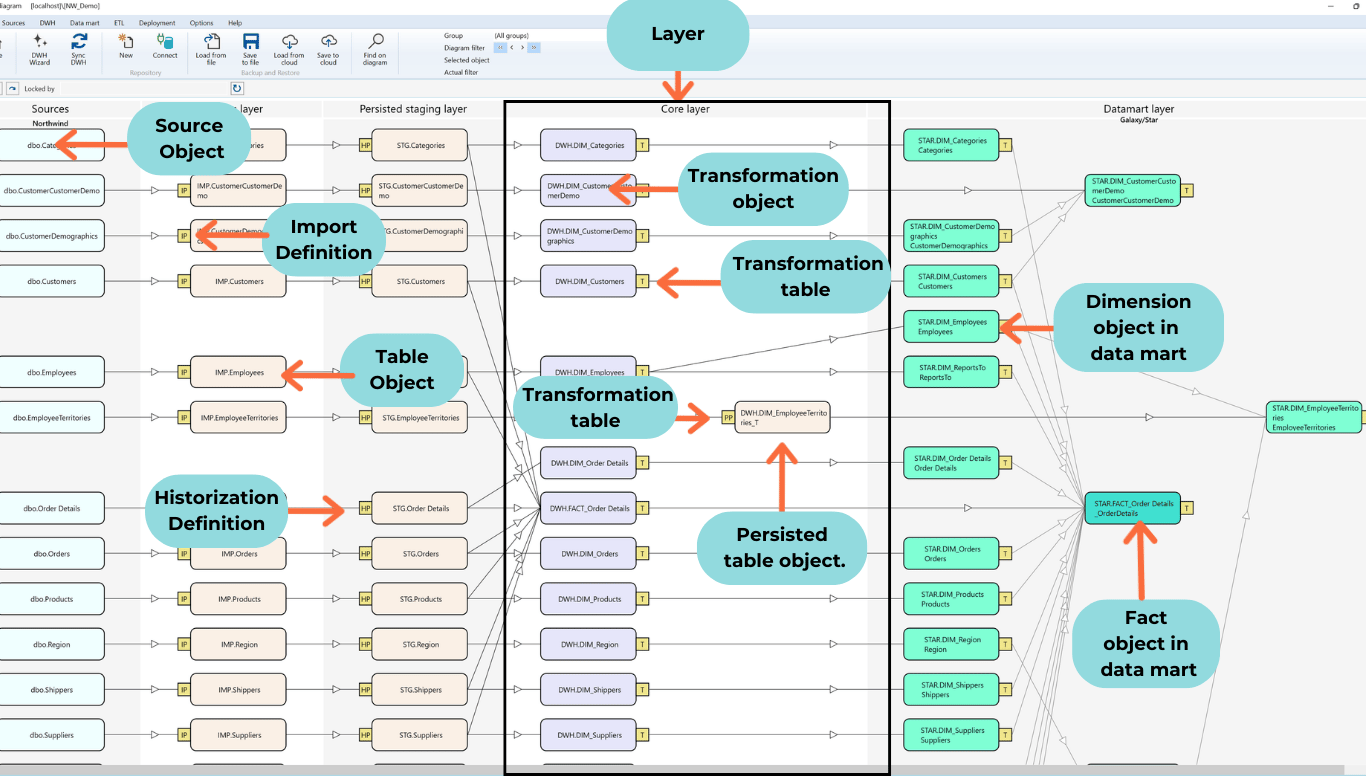
With AnalyticsCreator Desktop users can:
- Data Warehouse Creation
Automatically generate and structure your data warehouse, including fact tables and dimensions. - Connectors
Add connections to various data sources and import metadata seamlessly. - Layer Management
Define and manage layers such as staging, persisted staging, core, and datamart layers. - Package Generation
Generate integration packages for SSIS (SQL Server Integration Services) and ADF (Azure Data Factory). - Indexes and Partitions
Automatically configure indexes and partitions for optimized performance. - Roles and Security
Manage roles and permissions to ensure secure access to your data. - Galaxies and Hierarchies
Organize data across galaxies and define hierarchies for better data representation. - Customizations
Configure parameters, macros, scripts, and object-specific scripts for tailored solutions. - Filters and Predefined Transformations
Apply advanced filters and transformations for data preparation and enrichment. - Snapshots and Versioning
Create snapshots to track and manage changes in your data warehouse. - Deployments
Deploy your projects with flexible configurations, supporting on-premises and cloud solutions. - Groups and Models
Organize objects into groups and manage models for streamlined workflows. - Data Historization
Automate the process of creating historical data models for auditing and analysis.
