Back to all Blogs
Mixed Modelling & Hashing with Data Vault 2.0 + Kimball in AnalyticsCreator
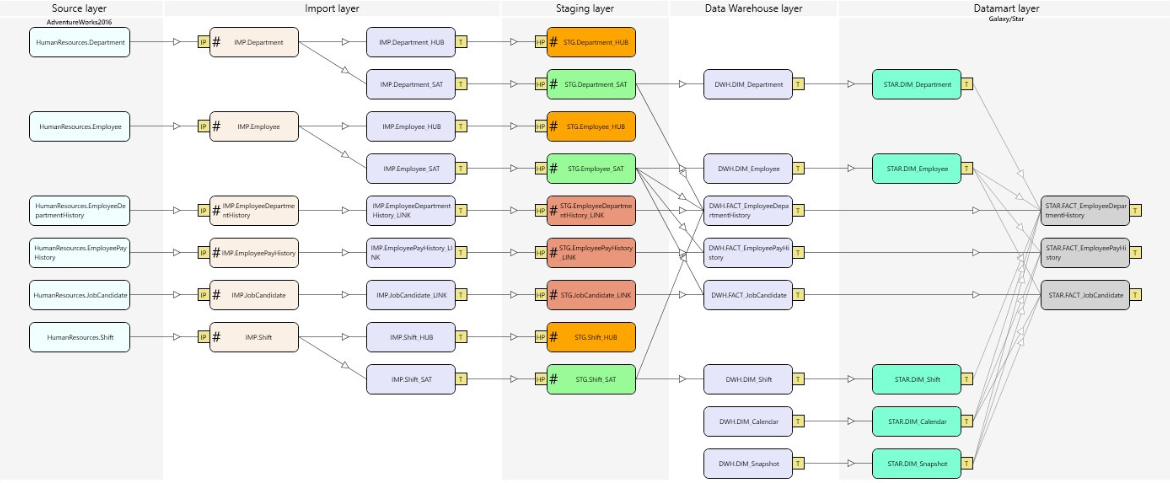


AnalyticsCreator supports an upgraded modelling technique combining Data Vault 2.0, Kimball dimensional modelling, and hashing — giving you flexible, scalable modelling and the ability to work with both business and hash keys in the same data model.
AnalyticsCreator supports an upgraded modelling technique that combines Data Vault 2.0, Kimball dimensional modelling, and hashing. You can use either Data Vault 2.0 as a base layer with a mixed approach on top — or use the mixed approach alone. This flexibility gives you scalable, adaptable data models that support both subject primary keys and hash‑key architectures.
Upgraded modelling options in AnalyticsCreator
In this post, we introduce the upgraded modelling options available to AnalyticsCreator customers. Two configurations are supported:
- Use Data Vault 2.0 as base layer, with mixed modelling on top.
- Use only the mixed modelling approach, without a base Data Vault 2.0 layer.
We believe that AnalyticsCreator’s Data Vault 2.0 mixed approach is a powerful feature for all developers.
Mixed modelling and data hashing together form a robust architecture that improves model flexibility, scalability, and analytics readiness.
What is mixed modelling?
Mixed modelling combines the strengths of two popular data‑modelling methodologies: Data Vault 2.0 and Kimball dimensional modelling. This hybrid approach delivers the agility and business‑process orientation of Kimball, along with the scalability, auditability, and integration capabilities of Data Vault 2.0.
One of the key benefits is the ability to support both transactional data ingestion and dimensional data marts in the same architecture — enabling a unified view of business operations and analytics.
What is data hashing?
Hashing converts variable‑length data into fixed‑length hash values (hash keys), creating unique identifiers for records or business entities. This allows efficient joins, change detection, and integrity checks — especially useful in large or distributed data environments.
Combining mixed modelling and hashing in AnalyticsCreator
When mixed modelling is paired with hashing, you get a powerful data‑warehouse architecture capable of handling complex, large-scale, and evolving datasets. AnalyticsCreator enables this by generating models that support both business keys (as in Kimball) and hash keys (as in Data Vault), giving you the flexibility to choose which key type suits each use case — or even support both side-by-side.
This design helps maintain data integrity, scalability, and performance — without complicating the conceptual model unnecessarily.
Why you should explore mixed modelling and hashing
If you aim to elevate your data warehousing and analytics capabilities, mixed modelling with hashing offers a balanced, future-ready solution. It ensures flexibility, scalability, and robustness — enabling you to rapidly respond to business changes while maintaining a clean, performant, and auditable data layer.
Frequently Asked Questions
What is “mixed modelling” in AnalyticsCreator?
Mixed modelling is a hybrid approach combining Data Vault 2.0 with Kimball dimensional modelling, which enables both robust ingestion and business‑ready data marts from the same architecture.
What is data hashing and why use it?
Hashing converts data into fixed-length unique identifiers (hash keys). It supports efficient joins, change detection, and consistency , particularly in large or distributed datasets.
Can I use both business keys and hash keys in the same model?
Yes. AnalyticsCreator allows both key types side-by-side, giving flexibility to use the one best suited to your use case.
Why use mixed modelling + hashing instead of pure Data Vault or pure Kimball?
Mixed modelling + hashing combines the strengths of both methods: auditability, scalability, and flexibility from Data Vault + business‑centric analytics convenience from Kimball with hashing adding performance and integrity.
Is this approach suitable for large enterprise datasets?
Yes. The combination scales well even with large, complex, and evolving datasets, offering both performance and maintainability.
Does AnalyticsCreator generate this architecture automatically?
Yes. AnalyticsCreator supports this hybrid architecture and generates the required schema and transformations automatically.