Back to all Blogs
SQL Server 2025 Adds Native Regex: What It Means for AnalyticsCreator Users


SQL Server 2025 introduces REGEXP_LIKE, REGEXP_REPLACE, and REGEXP_SUBSTR to T-SQL. These work out-of-the-box with AnalyticsCreator, enabling regex-based cleansing, validation, and parsing in your transformations—no manual integration required.
What’s New in SQL Server 2025
REGEXP_LIKE: Tests if a pattern matches (boolean)REGEXP_REPLACE: Replaces pattern matches in stringsREGEXP_SUBSTR: Extracts matched substrings
Supported flags include: i (ignore case), m (multi-line), s (dot matches newline), and c (case-sensitive by default).
Why This Matters for AnalyticsCreator Users
Regex is now natively available in SQL Server 2025 and Azure SQL. AnalyticsCreator users can define regex logic in calculated columns or transformation steps—AnalyticsCreator compiles it to native T-SQL, no special configuration required.
Common Use Cases
- Cleanse product numbers or codes
- Validate email or pattern formats
- Extract values from unstructured strings
Working Example (AdventureWorksLT)
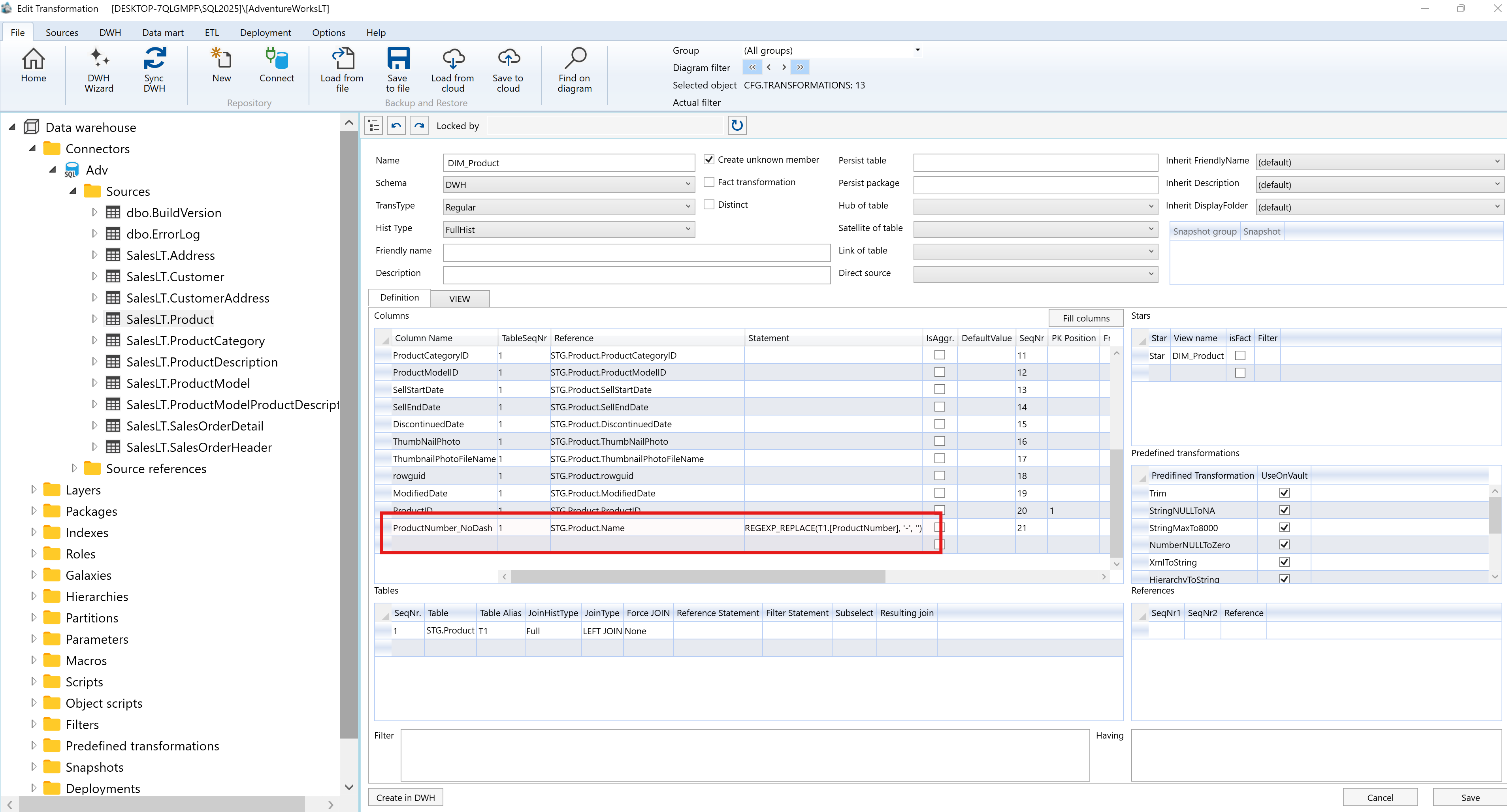
REGEXP_REPLACE([T1].[ProductNumber], '-', '')This removes dashes from product numbers in a transformation view. Simply enter this in the Statement field of a calculated column in AnalyticsCreator.
Additional Regex Test Scenarios
- Email validation
- Extracting numeric tokens
- Normalizing whitespace
- Case-sensitive vs case-insensitive pattern matching
- Targeted replacements by match occurrence
- Capture group extraction
Environment Requirements
- SQL Server 2025 (preview) or Azure SQL with regex support
- Patterns follow PCRE-style syntax
Performance Tips
- Use regex for complex patterns, not simple
LIKEalternatives - Persist results for large datasets
- Index cleaned columns used in joins or filters
Suggested AnalyticsCreator Test Plan
- Test regex on SQL Server 2019, 2022, and 2025
- Create transformation steps using each REGEXP function
- Validate data integrity and output
- Benchmark regex performance at scale
- Combine with historization patterns for robust pipelines
Conclusion
Native regex support in SQL Server 2025 empowers AnalyticsCreator users to enrich data quality, enforce patterns, and simplify cleansing—directly in the transformation layer. No external tools or scripts needed. Just metadata-driven modeling, compiled for performance.
Frequently Asked Questions
What are the new regex functions in SQL Server 2025?
SQL Server 2025 introduces REGEXP_LIKE, REGEXP_REPLACE, and REGEXP_SUBSTR—functions that support pattern matching, substitution, and extraction in T-SQL.
Do these regex functions work automatically in AnalyticsCreator?
Yes. AnalyticsCreator compiles transformations to native T-SQL, so these regex functions work without additional setup.
What can I use regex for in data pipelines?
Use cases include cleansing identifiers, validating email patterns, extracting codes or segments, and standardizing inputs.
Are case-insensitive matches supported?
Yes. Use the flag 'i' to perform case-insensitive pattern matching.
Can I use regex in calculated columns in AnalyticsCreator?
Absolutely. Just enter the expression (e.g., using REGEXP_REPLACE) in a calculated column, and it will be compiled into the target SQL view.
Will this work on Azure SQL too?
Yes. The same regex functions are supported in compatible Azure SQL previews.
Is regex slower than LIKE or PATINDEX?
For simple patterns, LIKE may be faster. For complex logic, regex provides flexibility but may benefit from persisted outputs and indexing.
What’s the easiest way to start testing regex in AnalyticsCreator?
Add a regex expression to a transformation, compile to SQL Server 2025, and run sample queries. Use test scenarios like email validation or token extraction.