English
Build Fabric and Power BI solutions on a governed model.
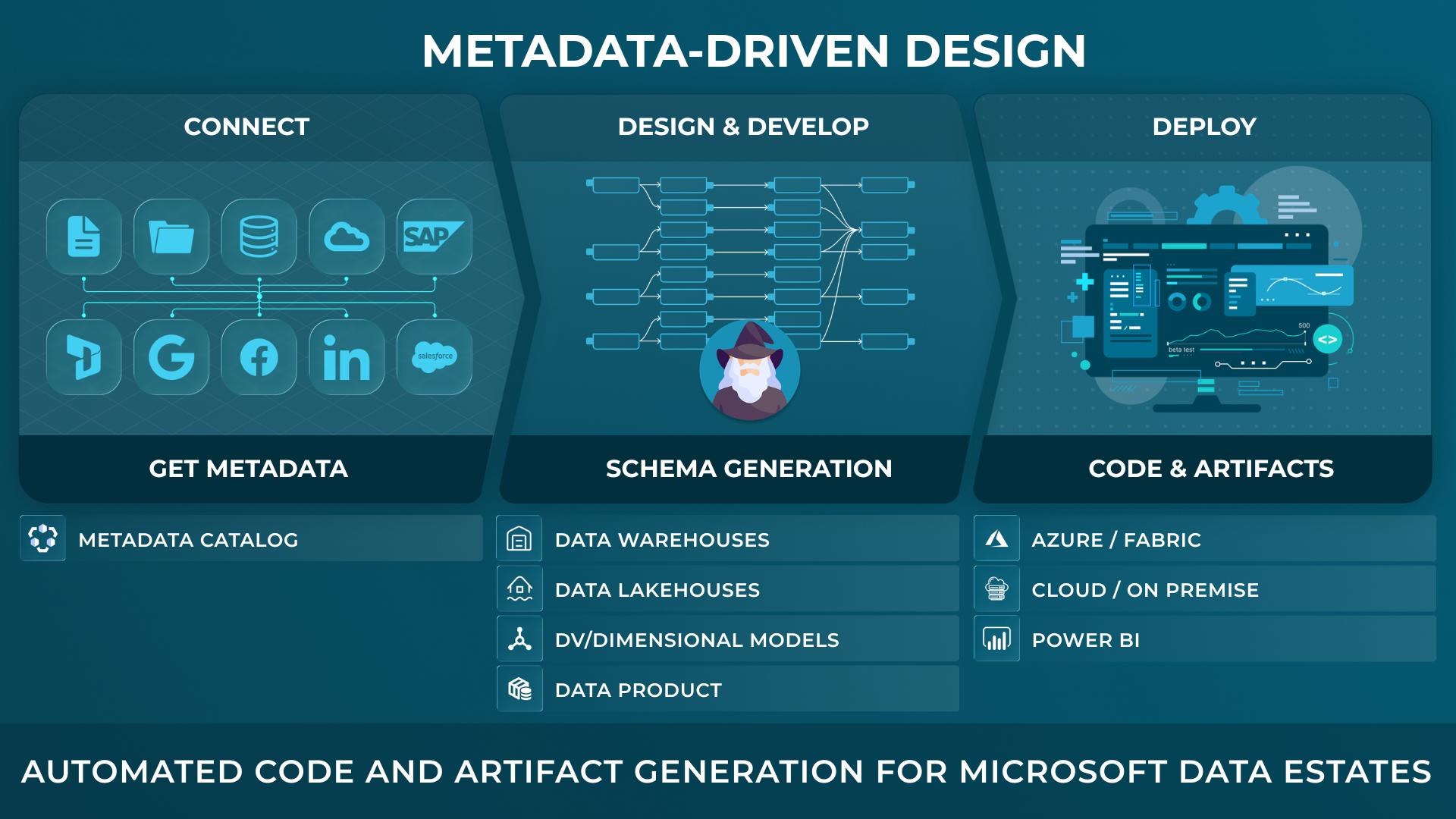
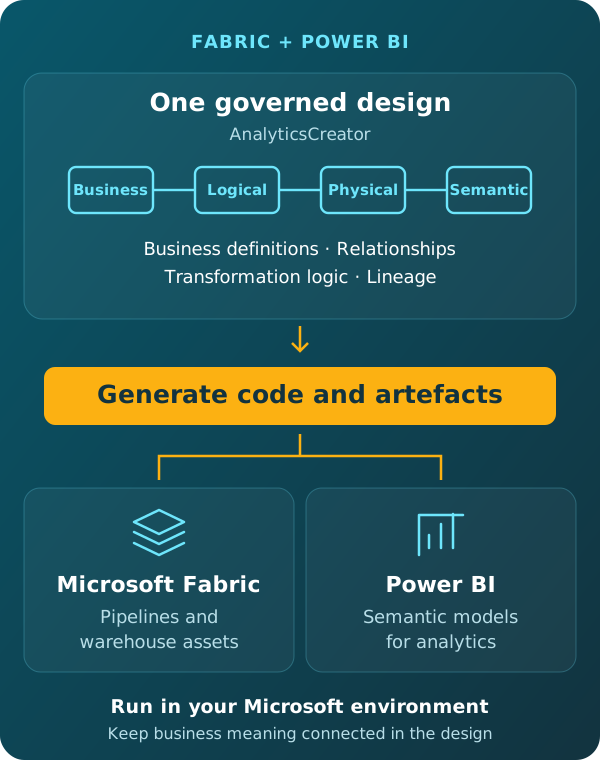
Develop the business, logical, physical and semantic models of your data analytics solution in AnalyticsCreator. Intelligent wizards connect definitions, relationships and transformation logic, with the corresponding code visible as the model evolves. From this governed project, generate native implementation artefacts for supported Microsoft Fabric and Power BI targets.
Run the generated assets in your Microsoft environment. Keep the design connected in AnalyticsCreator.
Design with intent. Generate owned artefacts. Deploy with control.
AnalyticsCreator gives data teams a metadata-driven design application to define and import metadata, model target structures, generate implementation artifacts, and see lineage and change impact before deployment across SQL Server, Azure, Microsoft Fabric and Power BI.
Built for technical buyers who need faster delivery, visible lineage, and controlled change across the Microsoft data estate.
Fabric brings services together. Teams still need shared design standards.
Fabric can simplify the Microsoft analytics experience, but it does not remove the need for agreed business definitions, data analytics modelling decisions, semantic consistency and visible dependencies. Teams may also have different levels of experience across pipelines, warehousing and Power BI.
Develop the business, logical, physical and semantic models of your data analytics solution in AnalyticsCreator. Intelligent wizards connect definitions, relationships and transformation logic, with the corresponding code visible as the model evolves. From this governed project, generate native implementation artefacts for supported Microsoft Fabric and Power BI targets.
CEO:
“How to create a modern data analytics platform”
Peter Smoly, CEO of Analytics Creator explains how to build a modern data warehouse new and changing requirements from business and IT result in a dificiency of your data architecture.
Generate code and artefacts from the governed project model.
- Microsoft Fabric pipelines and warehouse assets.
- Azure Data Factory pipelines and related Azure artefacts.
- SQL Server structures and database code, including for on-premises SQL Server.
- Power BI semantic models and Tabular models.
- Lineage, documentation and deployment packages for review and handover.
Preserve business meaning from source to Power BI.
Measures, relationships, hierarchies and business definitions remain connected to the underlying data structures and transformations within the governed model, ensuring consistent meaning across the entire analytics solution.
This gives data engineering and BI teams a shared basis for reviewing semantic change.
See the affected design before regenerating.
When source metadata is refreshed in AnalyticsCreator, affected places are automatically shown in the connected lineage. Teams can follow the dependencies to identify the structures, transformations and semantic models that need attention.
Teams update the relevant models and transformation logic through the design tools, then regenerate the selected code and implementation artefacts. Business-rule and semantic changes follow the same model-driven process.
Develop in AnalyticsCreator. Run in your Microsoft environment.
AnalyticsCreator connects business, logical, physical and semantic models with transformation logic, relationships and implementation code. The code evolves with the model during development.
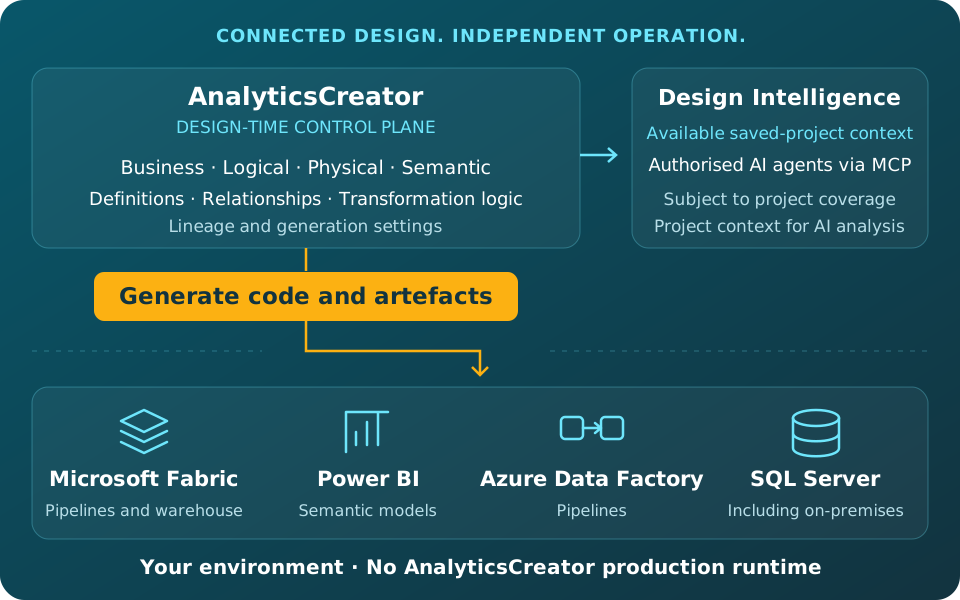
From this governed project, teams generate native implementation artefacts for supported Microsoft targets. The resulting solution runs without an AnalyticsCreator production runtime.
Project context for AI analysis
Design Intelligence makes available saved-project context accessible to authorised AI agents through MCP. Agents can combine this context with live business data accessed through separately authorised connections. Coverage depends on the project information available, and agents must be configured to consult it.
Common questions about AnalyticsCreator, Fabric and Power BI
What does AnalyticsCreator add to Microsoft Fabric and Power BI?
AnalyticsCreator provides a connected development environment for business, logical, physical and semantic models. The corresponding implementation code evolves with the model and remains visible during development. Native artefacts are generated from this governed project for supported targets, while Fabric and Power BI remain the environments in which those assets run.
What can AnalyticsCreator generate for Fabric and Power BI?
AnalyticsCreator generates supported Microsoft Fabric pipelines and warehouse assets, Power BI semantic models and Tabular models. It also supports Azure Data Factory pipelines, SQL Server structures and database code, documentation and deployment packages. The outputs depend on the selected target and project configuration.
How does AnalyticsCreator preserve semantic consistency?
Measures, relationships, hierarchies and business definitions remain connected to the underlying data structures and transformation logic in the governed project. This gives engineering and BI teams a shared design foundation for implementing and reviewing changes.
What happens when a source structure changes?
After source metadata is refreshed, AnalyticsCreator automatically shows affected places in the connected lineage. Teams can inspect those dependencies, update the relevant models and transformation logic, and regenerate the selected implementation artefacts
Do generated Fabric and Power BI assets require an AnalyticsCreator runtime?
No. Generated assets run in the customer’s Microsoft environment under its security and operational controls. AnalyticsCreator remains the design-time application used to maintain the project and generate further changes.
Can AI agents use Design Intelligence when analysing live data?
Yes. An authorised MCP-compatible agent can consult Design Intelligence for available project context and query live business data through a separate authorised connection. This allows it to use business definitions, relationships and transformation logic when interpreting results. The agent must be configured to consult DI; DI itself does not provide the live-data connection.
Explore the next step
Free Trial
REGISTER NOW AND ACTIVATE YOUR FREE TRIAL