

English
Understand the change. Keep the evidence connected.
AnalyticsCreator connects business definitions, model structures, transformations and lineage so teams can understand the effects of change. Project versions, generated documentation and logged results from configured tests provide evidence for review, release decisions and handover.
See the dependencies. Review the changes. Retain the evidence.
Design with intent. Generate owned artefacts. Deploy with control.
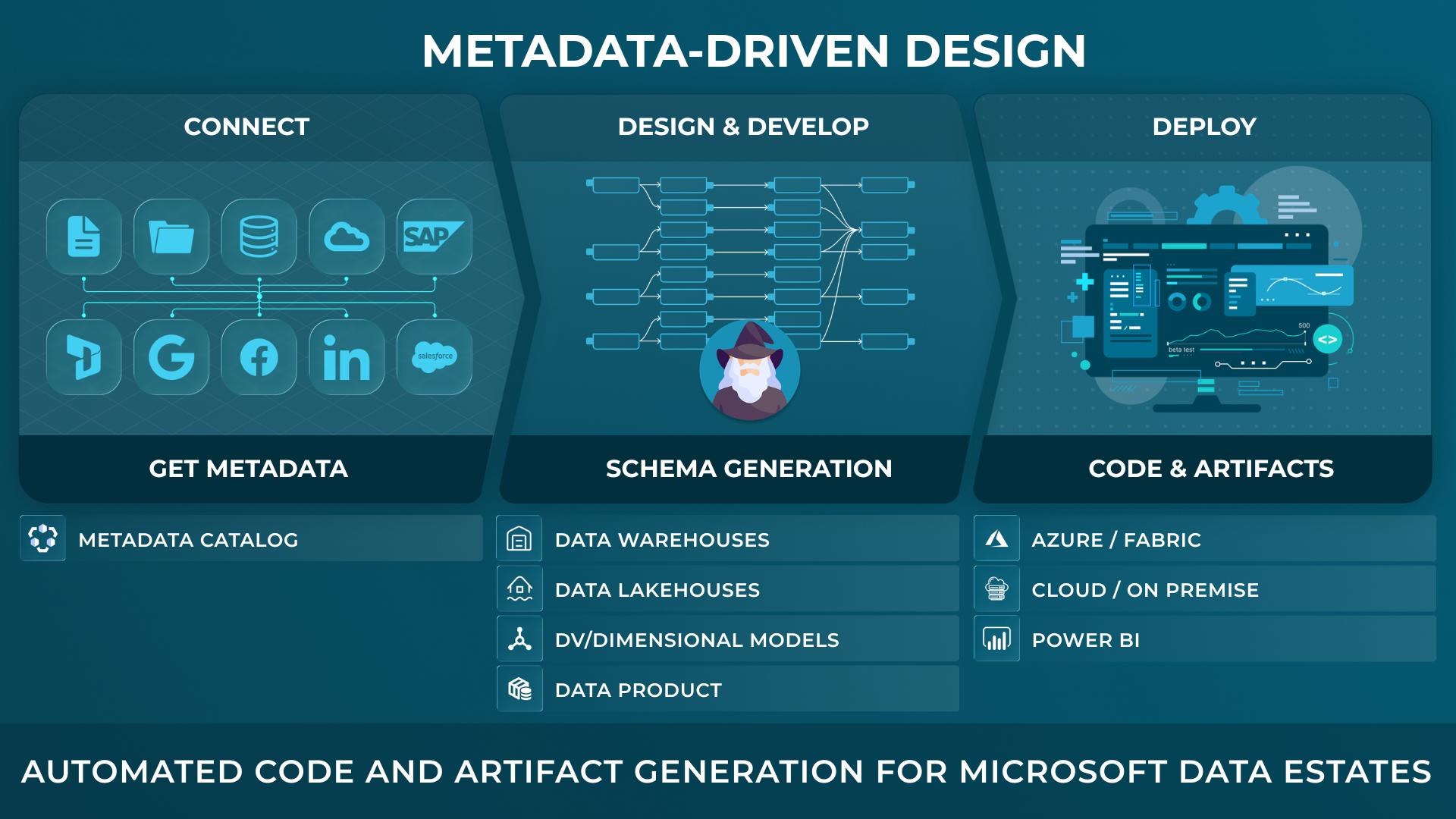
AnalyticsCreator gives data teams a metadata-driven design application to define and import metadata, model target structures, generate implementation artifacts, and see lineage and change impact before deployment across SQL Server, Azure, Microsoft Fabric and Power BI.
Built for technical buyers who need faster delivery, visible lineage, and controlled change across the Microsoft data estate.
Complexity becomes risky when the evidence is fragmented.
As sources, business areas, teams and Microsoft services increase, a single requirement can affect structures, transformations, semantic assets, documentation and release packages.
When that context is spread across code, tickets, diagrams and individual memory, every change begins with investigation. Traceability keeps the recorded design decisions, dependencies, resulting implementation and review evidence connected throughout the data analytics lifecycle.
Follow the design from business definition to implementation.
AnalyticsCreator maintains connected context across the layers used to design and implement a data analytics solution.
- Business meaning
- Business concepts, definitions and rules.
- Connected models
- Logical, physical and semantic structures and their relationships.
- Implementation
- Transformation logic and code connected to native structures, pipelines and semantic assets.
- Project knowledge
- Documentation and lineage for understanding the design and reviewing changes.

CEO:
“How to create a modern data analytics platform”
Peter Smoly, CEO of Analytics Creator explains how to build a modern data warehouse new and changing requirements from business and IT result in a dificiency of your data architecture.

Understand the origin. Follow the logic.
AnalyticsCreator connects business definitions, source structures, transformations and analytical models through project lineage.
Business context and technical detail remain connected. The same project provides a view of where data comes from and the relationships, calculations and processing logic behind an analytical output.
See where a source change affects the solution.
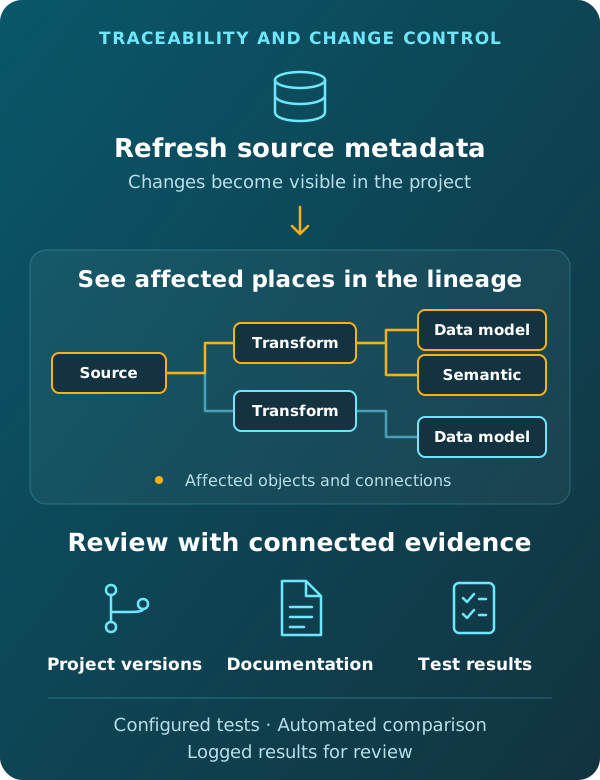
When source metadata is refreshed in AnalyticsCreator, new or changed source fields are reflected in the project, and affected places are automatically shown in the lineage.
Connected dependencies provide the context for assessing which structures, transformations and analytical models need attention. Changes to business requirements are developed in the project model, with the corresponding code visible as the design evolves.
Validate changes and identify unintended effects.
AnalyticsCreator's integrated data analytics testing feature executes validations, compares results with expected outcomes and records differences in test reports.
Regression testing helps identify unintended effects after model or transformation changes. Automated execution and comparison reduce testing effort, while recorded results provide evidence of the validation performed.
Keep project history, documentation and validation connected.
Project versions
AnalyticsCreator's integrated versioning preserves defined project states, including connected models, transformation logic, implementation code and settings.
Optional Git integration allows structured project files and generated artefacts to be incorporated into existing comparison and review processes.
Documentation
Documentation and lineage are generated from the project, retaining a reference for its structures, relationships and processing logic.
Recorded design decisions provide further context where the reasoning behind an implementation matters.
Validation evidence
Test reports record validation results and differences between actual and expected outcomes.
Together with project versions and documentation, these results support review and release decisions under the organisation's agreed controls.
Keep changes traceable as Microsoft targets evolve.
The governed model remains a reference for relating business definitions, dependencies and generated assets as implementation targets change. This supports review and handover during migration and modernisation.
Traceability and change control: common questions
What happens when source metadata changes?
When source metadata is refreshed, AnalyticsCreator automatically shows affected places in the lineage for new or changed source fields. Connected dependencies help identify the structures, transformations and analytical models that may need attention. Business-requirement changes are developed in the project model; they are not detected through source metadata refresh.
How does lineage differ from project versioning?
Lineage shows relationships and dependencies within the solution, helping teams understand data origins and change impact. Project versioning preserves defined states of the AnalyticsCreator project. Optional Git integration supports comparison and review of project files and generated code.
How does AnalyticsCreator support regression testing?
AnalyticsCreator’s integrated testing feature executes validations, compares results with expected outcomes and records differences in test reports. Regression testing helps identify unintended effects after model or transformation changes, reducing testing effort and providing evidence for release decisions.
Can AI agents help review project dependencies?
Authorised AI agents can use Design Intelligence to query available project lineage, dependencies and change context. The analysis identifies coverage limitations where information is partial or unknown. Review and approval remain with the responsible team.
Explore the next step
Free Trial
REGISTER NOW AND ACTIVATE YOUR FREE TRIAL
