

English
Your Microsoft environment. Your assets. Your operating model.
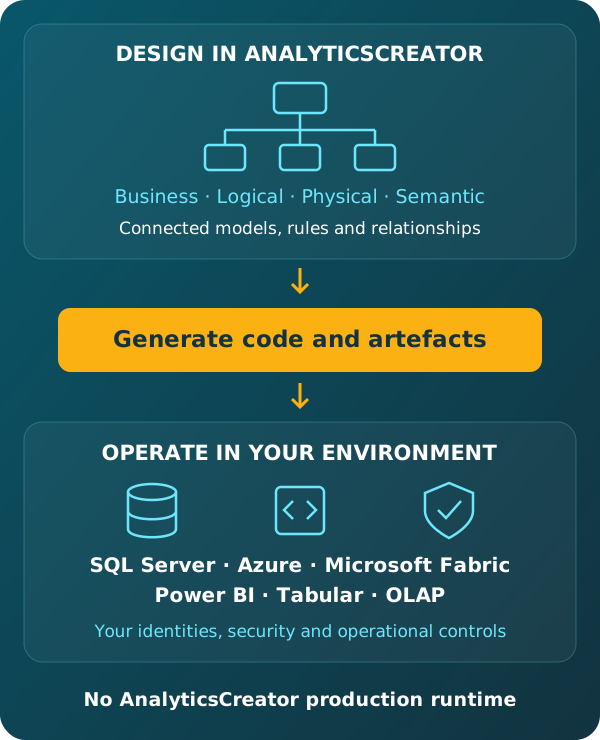
Develop your data analytics solution in AnalyticsCreator, with connected models and implementation code. Generate native assets for supported SQL Server, Azure, Microsoft Fabric and Power BI environments. The resulting solution runs without an AnalyticsCreator production runtime, under customer, partner or shared operation.
Design with AnalyticsCreator. Operate independently in your environment.
Design with intent. Generate owned artefacts. Deploy with control.
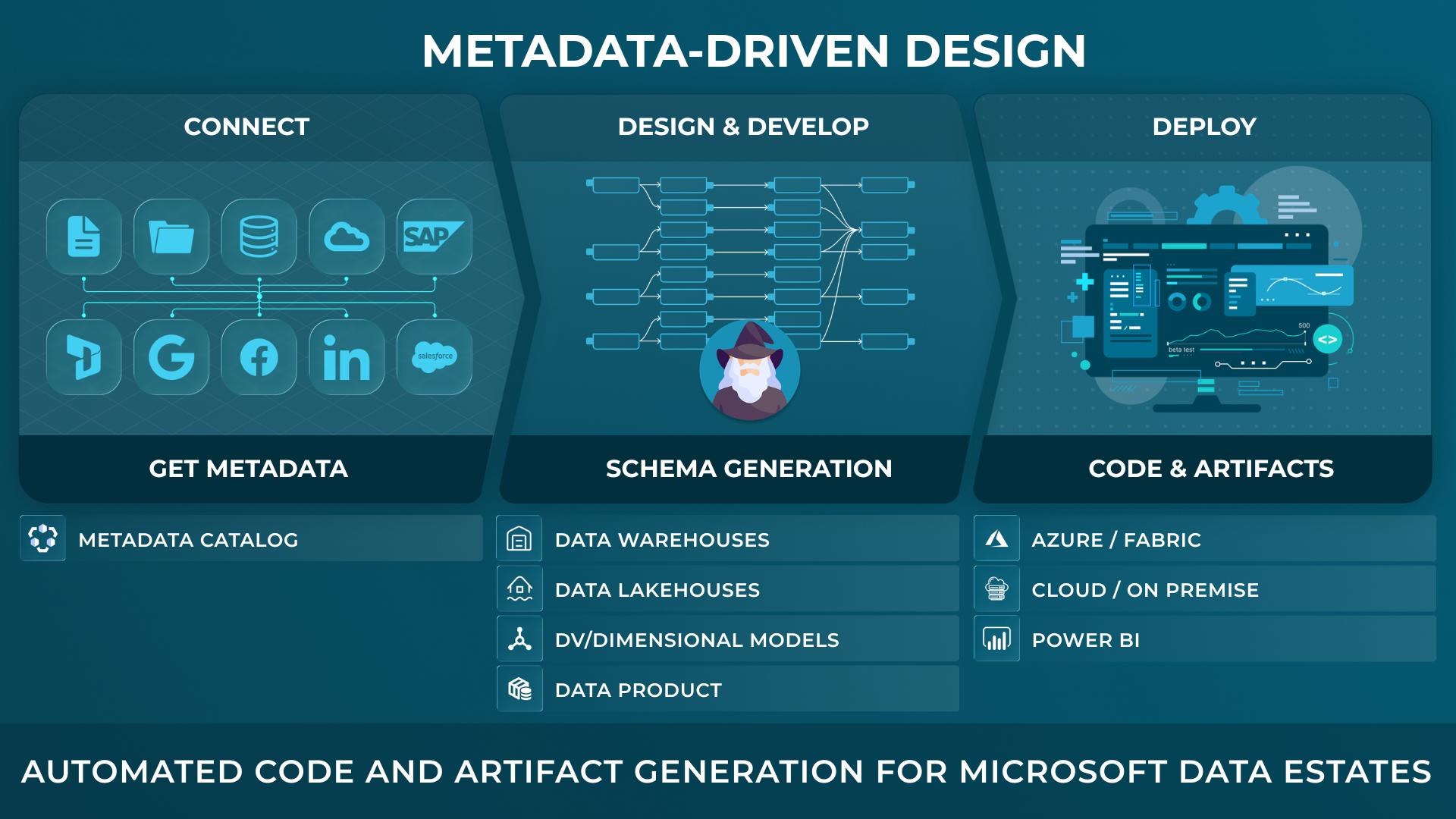
AnalyticsCreator gives data teams a metadata-driven design application to define and import metadata, model target structures, generate implementation artifacts, and see lineage and change impact before deployment across SQL Server, Azure, Microsoft Fabric and Power BI.
Built for technical buyers who need faster delivery, visible lineage, and controlled change across the Microsoft data estate.
Develop in AnalyticsCreator. Run independently in Microsoft.
Connected development
AnalyticsCreator maintains the business, logical, physical and semantic models together with transformation logic, implementation code and target settings. The code evolves with the model during development.
Independent operation
Generated native assets run in the selected Microsoft environment without an AnalyticsCreator production runtime. Security, monitoring and operational responsibilities follow the arrangements agreed by the customer and its service providers.
Design Intelligence provides available saved-project context to authorised AI agents. An agent can also access live business data through a separate authorised connection; Design Intelligence itself does not provide that live-data connection.

CEO:
“How to create a modern data analytics platform”
Peter Smoly, CEO of Analytics Creator explains how to build a modern data warehouse new and changing requirements from business and IT result in a dificiency of your data architecture.

Preserve the design knowledge while implementation technology evolves.
The governed AnalyticsCreator project keeps business definitions, model relationships and transformation logic connected. This design knowledge remains available when the target technology or implementation settings change.
Business, logical, physical and semantic models develop together with relationships, transformation logic and implementation code. Target settings determine the supported native assets and deployment packages prepared from that connected project.
Teams can adapt target-specific structures and generation settings while retaining the established business definitions, relationships and transformation intent. Changes can then be implemented for the supported target environment.
Some customers have used AnalyticsCreator for more than 15 years, carrying their design knowledge forward across successive generations of Microsoft data technology rather than reconstructing its meaning from old implementation code.
Change the technology. Keep the knowledge.
Keep the implementation in your selected environment.
Supported assets are generated for the project's selected Microsoft technologies and configuration.
- SQL Server
- Database structures and code, including on-premises SQL Server.
- Azure Data Factory
- Pipelines and related Azure assets.
- Microsoft Fabric
- Supported pipelines and warehouse assets.
- Power BI and Tabular
- Semantic models for analytical use.
- Project artefacts
- Documentation, lineage and deployment packages.
Keep the code available throughout development.
Implementation code is visible as the model develops. Native outputs remain available for inspection and use in the selected environment.
The connected project preserves the models, transformation logic and code for continued development. Generating deployment assets does not separate the implementation from its design context.
Keep releases within your agreed controls.
AnalyticsCreator includes project versioning, testing, native asset generation, packaging and deployment capabilities.
Git and external CI/CD tools are optional. Project files and generated assets can be incorporated into existing comparison, review and release processes, with responsibilities determined by the organisation's operating model.
Share the project. Agree the responsibilities.
AnalyticsCreator supports concurrent work on a shared project. Object locking helps prevent conflicting edits, while project versioning preserves defined states of the solution.
Development and operation can remain with a partner, transfer to the customer or be shared. The generated solution runs under the identities, access controls and governance policies of its target environment.
Common questions about ownership and runtime independence
Does the generated solution need AnalyticsCreator to keep running?
No. Generated native assets run in the selected environment without an AnalyticsCreator production runtime. AnalyticsCreator is used for continued development of the connected models and code, and for preparing updated native assets.
Does AnalyticsCreator support more than physical data modelling?
Yes. AnalyticsCreator supports business, logical, physical and semantic modelling. Business definitions, relationships and transformation logic remain connected in the project, together with generation settings for the supported target environment.
Can generated assets run on-premises?
Yes. AnalyticsCreator generates SQL Server structures and database code for on-premises SQL Server as well as supported Microsoft cloud environments. The generated assets operate under the controls of the environment in which they are deployed.
Are Git and external CI/CD tools required?
No. AnalyticsCreator provides its own project versioning, generation, testing, packaging and deployment capabilities. Organisations that use Git and CI/CD can incorporate the project and generated assets into their existing processes.
What remains reusable when the target technology changes?
The project retains business definitions, model relationships and transformation intent. Teams can adapt target-specific structures and generation settings for supported technologies while preserving that design context. Technology changes can still require adjustments and validation.
Can a service partner operate the generated solution?
Yes. Operation can be managed by the customer, a service partner or a shared team. AnalyticsCreator does not prescribe how those responsibilities are divided. The generated assets run without an AnalyticsCreator production runtime.
Explore the next step
Free Trial
REGISTER NOW AND ACTIVATE YOUR FREE TRIAL
