Back to all Blogs
Automate SCD Type 2 Historization in Microsoft Fabric and SQL Server


SCD Type 2 is essential for historical reporting, but it can be complex to implement manually. AnalyticsCreator supports metadata-driven historization by helping teams define SCD rules and generate the structures, logic, and deployment artifacts needed for SQL Server and Microsoft-oriented data warehouse environments, including relevant Microsoft Fabric scenarios.
Managing Change in Dimensional Models
Tracking changes from ERP, CRM, and other operational systems is central to accurate analytics. Businesses often need to understand not just the current state of an entity, but how that state evolved over time. This is where Slowly Changing Dimensions, especially SCD Type 2, become important.
Why SCD Type 2 Historization Matters
Historization allows BI and data teams to answer questions such as:
- What was the customer's status last quarter?
- How did the product price change over time?
- Who managed this customer before the last territory update?
Without SCD Type 2, reports may only show the current record. That can produce misleading analysis when historical context matters for reporting, auditability, or business decision-making.
Challenges with Manual SCD Type 2 Implementation
Manual SCD Type 2 implementation usually requires custom SQL, change detection logic, timestamp management, surrogate key handling, validity-period logic, and careful orchestration. This can be slow, error-prone, and difficult to scale consistently across many dimensions.
For teams that need a broader introduction before going deeper into Fabric-specific implementation, our overview of Slowly Changing Dimensions, SCD types, benefits, and challenges explains the core modelling concepts.
How AnalyticsCreator Simplifies Historization
AnalyticsCreator uses a metadata-driven approach to make SCD Type 2 historization more repeatable. Instead of writing each historization pattern from scratch, teams configure the relevant metadata, business keys, historized attributes, and SCD behavior. AnalyticsCreator can then generate the corresponding structures and logic for the selected target environment.
Depending on the configured scenario, generated outputs can include:
- Schema changes such as valid-from / valid-to fields and surrogate keys
- Change detection logic for historized attributes
- Insert and update logic for current and previous record versions
- Generated pipeline or orchestration artifacts for supported Microsoft data environments
For a practical walkthrough of the configuration process, see how the AnalyticsCreator Historization Wizard supports SCD historization.
Architecture Overview
A typical SCD Type 2 historization architecture spans ingestion, modelling, deployment, and warehouse storage. The exact architecture depends on the selected Microsoft environment and project requirements, but the workflow usually includes:
- Source ingestion: Data is loaded from ERP, CRM, or other operational systems into the target data environment.
- Metadata modelling: AnalyticsCreator is used to model dimensions, facts, keys, and historized attributes.
- Artifact generation: AnalyticsCreator generates the relevant structures, logic, and deployment artifacts from the configured metadata.
- Target execution: Generated assets are deployed and executed in the selected target environment, such as SQL Server or relevant Microsoft Fabric contexts.
- Analytical consumption: BI and analytics tools can query historized records to analyse how values changed over time.
Step-by-Step: How SCD Type 2 Historization Works in AnalyticsCreator
1. Define SCD Settings in Metadata
Select a dimension, such as a customer, product, or order-related dimension, and enable SCD Type 2 for the attributes that require history. AnalyticsCreator can apply required historization columns such as:
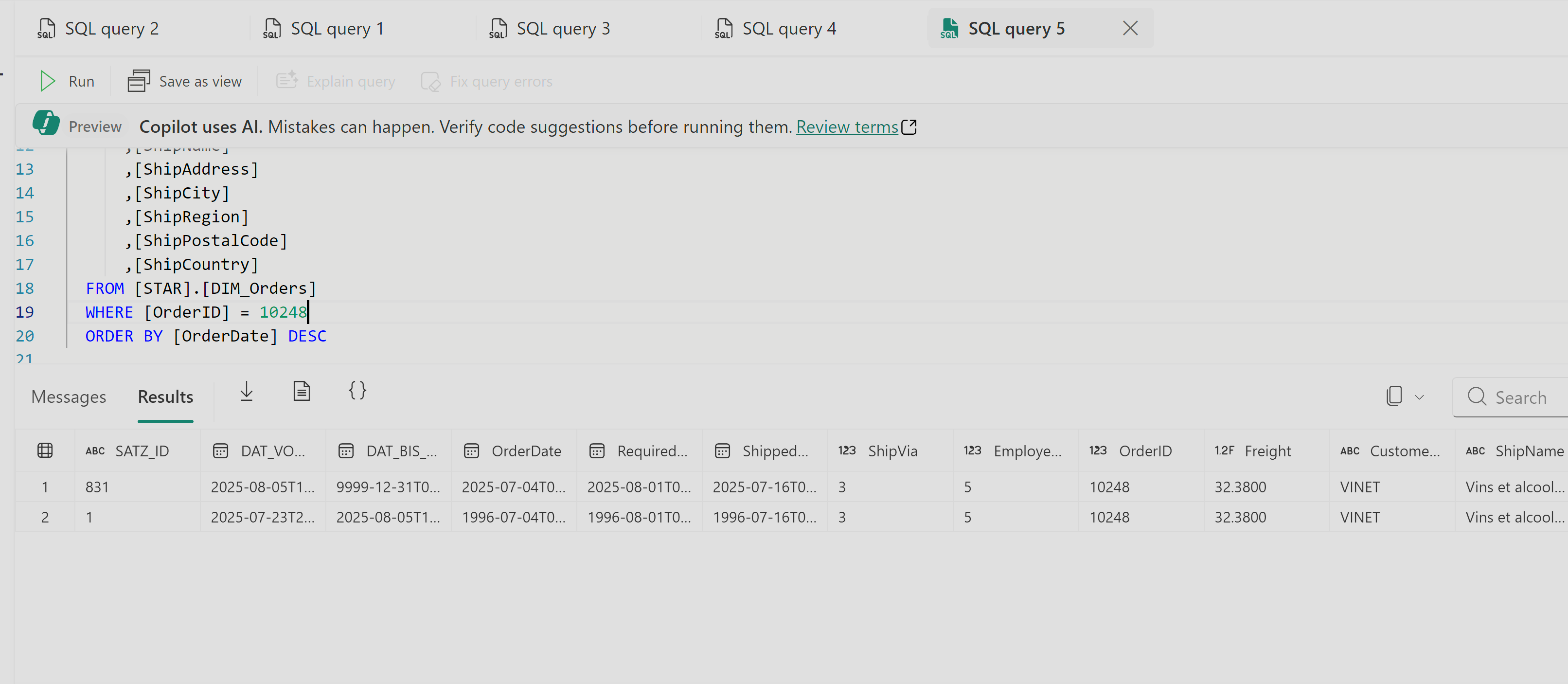
DAT_VON- Valid-from timestampDAT_BIS- Valid-to timestampSATZ_ID- Surrogate key
2. Generate SCD Logic
AnalyticsCreator uses the configured metadata to generate SCD logic for comparing incoming and stored values. When a relevant change is detected:
- The existing version is closed with an end date.
- A new version is inserted with the updated values.
- The validity period makes it possible to query what was true at a specific point in time.
3. Deploy, Execute, and Validate
After deployment to the selected target environment, the generated logic can be executed as part of the data warehouse workflow. Querying the historized table should show multiple versions of a record where relevant changes occurred, supporting time-aware reporting and analysis.
Manual SCD Type 2 vs Metadata-Driven Historization
| Capability | Manual Approach | AnalyticsCreator Approach |
|---|---|---|
| Change detection | Custom SQL or ETL logic per table | Generated from configured metadata |
| Tracking columns | Manually designed and added | Generated based on the SCD configuration |
| Surrogate key logic | Implemented manually | Generated as part of the model logic |
| Deployment artifacts | Prepared and maintained manually | Generated for the selected supported environment |
| Pipeline or orchestration logic | Custom development per workflow | Generated where supported by the configured target scenario |
| Governance and traceability | Depends on documentation and manual discipline | Supported through metadata, lineage, and repeatable model configuration |
Use Case: Northwind Orders
Using a synthetic dataset such as Northwind, SCD Type 2 can be enabled on an order-related or customer-related dimension. After source records are modified and the workflow is reloaded, AnalyticsCreator can detect configured attribute changes and generate new historical record versions without requiring custom SQL for each individual SCD pattern.
Where This Fits in Microsoft Fabric Projects
Microsoft Fabric introduces several ways for teams to build, move, and analyse data. For dimensional historization, the key question is not only how data is ingested, but how historical business context is modelled, governed, generated, and maintained over time.
AnalyticsCreator is useful when teams need a metadata-driven design application for modelling SCD Type 2 behavior, generating repeatable warehouse artifacts, and maintaining traceability across dimensional models. This is especially relevant when Fabric is part of a broader Microsoft-oriented data warehouse architecture that also includes SQL Server, Azure Data Factory, Power BI, Azure DevOps, or GitHub.
Final Takeaway
SCD Type 2 historization is essential when reports need to preserve historical context. AnalyticsCreator helps teams configure SCD behavior through metadata and generate repeatable historization logic and artifacts for supported SQL Server and Microsoft-oriented data warehouse scenarios. This gives data teams a more consistent way to manage historical tracking while reducing repetitive manual implementation work.
Frequently Asked Questions
Why is SCD Type 2 historization important?
It preserves historical changes to attributes, enabling accurate reporting, compliance, and trend analysis.
How does AnalyticsCreator automate SCD Type 2?
By defining historization rules in metadata and auto‑generating the required schema, ETL logic, and pipelines.
Does AnalyticsCreator support SCD on Microsoft Fabric?
Yes. It generates all logic directly for Microsoft Fabric SQL and integrates with Fabric’s consumption layers.
Can this automation be used on SQL Server as well?
Absolutely. AnalyticsCreator supports SQL Server 2012–2025 and Azure SQL in addition to Fabric.
What columns does AnalyticsCreator generate for historization?
Columns like valid-from, valid-to, surrogate keys, and versioning metadata.
Do I need to write any SQL for historization?
No. AnalyticsCreator handles delta queries, inserts, and updates automatically.