

English
Design the model. Generate the implementation.
Develop data models, semantic models and transformation logic using AnalyticsCreator's intelligent wizards and design tools. The corresponding code is immediately visible alongside the model and evolves as you work. From this governed project, generate native implementation assets for SQL Server, Azure, Microsoft Fabric and Power BI.
Model and code together. Native assets for your target environment.
.svg)
Design with intent. Generate owned artefacts. Deploy with control.
AnalyticsCreator gives data teams a metadata-driven design application to define and import metadata, model target structures, generate implementation artifacts, and see lineage and change impact before deployment across SQL Server, Azure, Microsoft Fabric and Power BI.
Built for technical buyers who need faster delivery, visible lineage, and controlled change across the Microsoft data estate.
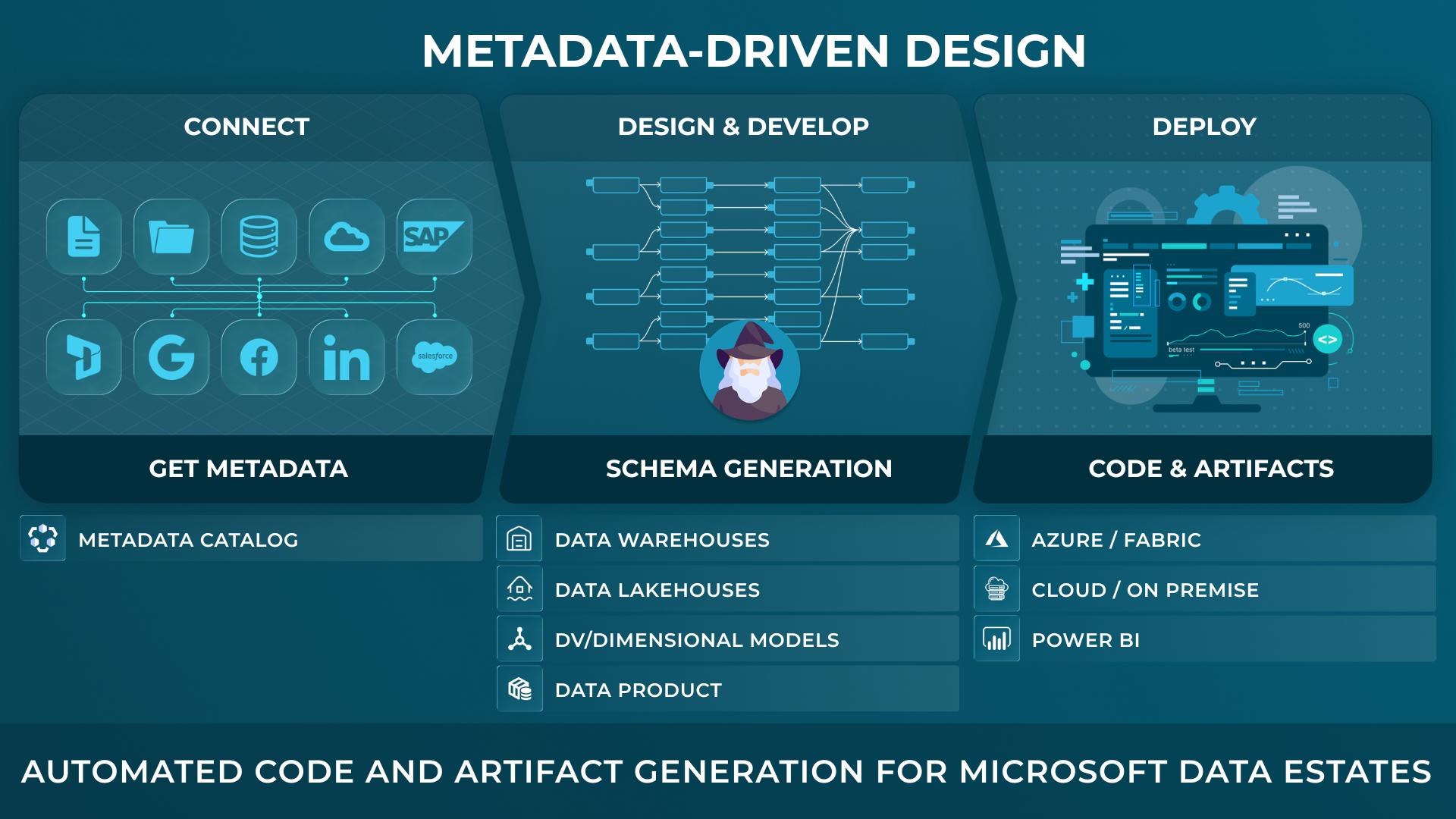
Develop the model and implementation together.
Engineers use AnalyticsCreator's intelligent wizards and design tools to develop data models, semantic models, relationships and transformation logic from source metadata. The corresponding code is immediately visible alongside the model and evolves as the design changes.
Define how data is imported, transformed and historised, configure relationships and calculations, and inspect the resulting code as you work. Business definitions, models and implementation code remain connected in the governed project.
The wizards work from source metadata and your development choices to create a project-specific model. Teams can also reuse customer-created templates or selected parts where these fit the requirements.
From this developed project, generate supported native assets and deployment packages for the selected target environment.
Generate code and artefacts for your Microsoft environment.
- SQL Server structures and database code, including for on-premises SQL Server.
- SSIS packages and Azure Data Factory pipelines.
- Microsoft Fabric pipelines and warehouse assets.
- Power BI semantic models, Tabular models and multidimensional OLAP models.
- Test procedures and validation reports.
- Documentation, lineage and deployment packages, including DACPAC.
The generated outputs depend on the selected target and project configuration.

CEO:
“How to create a modern data analytics platform”
Peter Smoly, CEO of Analytics Creator explains how to build a modern data warehouse new and changing requirements from business and IT result in a dificiency of your data architecture.

Evolve the model and its implementation together.
When source metadata is refreshed, AnalyticsCreator automatically shows affected places in the connected lineage. Engineers can follow the dependencies to identify the structures, transformations and semantic models that need attention.
Update the relevant design using the wizards and development tools. The corresponding code remains visible as the model evolves. Generate the selected supported assets and deployment packages when the revised implementation is ready.
Develop a working example while requirements take shape.
Start with source metadata and use intelligent wizards to develop a representative part of the solution. Work on the model and inspect its corresponding code together, then prepare the native assets for a development environment.
Use test data to validate the relevant processing and discuss the results with the people defining the requirements. Incorporate their feedback into the project and extend the design as understanding develops.
Keep project versions and deployment decisions under control.
AnalyticsCreator's integrated project versioning lets teams save and restore defined project states. Deployment packaging lets engineers select the assets and configured test procedures to include for the target environment.
Where teams use Git, Azure DevOps or GitHub, structured project files and generated artefacts can be incorporated into their existing comparison, review and release workflows. Git and external CI/CD tooling are optional.
Validate processing and identify regressions.
AnalyticsCreator's integrated data analytics testing feature executes validations, compares results with expected outcomes and records differences in test reports.
Regression testing helps teams identify unintended effects after changes to the model or transformation logic. This reduces testing effort and supports reliable releases as the solution evolves.
Run native assets under your agreed operating model.
The resulting solution runs as native Microsoft assets without an AnalyticsCreator production runtime. The customer, a service partner or a shared team can operate and maintain it according to the agreed responsibilities.
AnalyticsCreator remains the development environment for maintaining the connected model and code, and preparing further implementation changes.
Review implementation decisions as you develop.
As you design relationships, transformations and historisation behaviour in AnalyticsCreator, the corresponding code is immediately visible alongside the model. Inspect how each decision affects the implementation while you work.
Use this connected view when discussing an approach with colleagues, investigating processing logic or introducing another engineer to the project.
Common questions about model-driven data engineering
How do modelling and development work together in AnalyticsCreator?
Engineers use intelligent wizards and design tools to develop data models, semantic models, relationships and transformation logic from source metadata. The corresponding code is immediately visible alongside the model and evolves with it. The governed project contains both the models and implementation code, from which supported native assets and deployment packages can be generated.
Can engineers see the generated code?
Yes. The corresponding code is immediately visible alongside the model in AnalyticsCreator and evolves as engineers develop structures, relationships and transformation logic. Engineers can inspect and review the implementation throughout development, before generating native assets and deployment packages for the selected environment.
Is AnalyticsCreator template-based?
AnalyticsCreator’s wizards work from source metadata and the choices made during development to create a project-specific model. Teams can also create and reuse templates or selected parts of them where these suit the requirements. Using a complete template is not a prerequisite.
How are source changes handled?
After source metadata is refreshed, AnalyticsCreator automatically shows affected places in the connected lineage. Engineers can review the dependencies and update the relevant design, with the corresponding code visible during development. Selected native assets can then be regenerated.
How does AnalyticsCreator support testing after changes?
The integrated testing feature executes validations, compares results with expected outcomes and records differences in test reports. Regression testing helps identify unintended effects after changes to models or transformation logic.
Does the resulting solution require an AnalyticsCreator runtime?
No. Native assets run in the selected environment without an AnalyticsCreator production runtime. The customer, service partner or a shared team can operate the solution according to the agreed responsibilities.
Are Git and external CI/CD tools required?
No. AnalyticsCreator provides integrated project versioning, testing, native asset generation, deployment packaging and deployment capabilities. Teams can also incorporate project files and implementation artefacts into existing Git and CI/CD workflows.
Explore the next step
Free Trial
REGISTER NOW AND ACTIVATE YOUR FREE TRIAL
